COVER SHEET 181
COVER SHEET
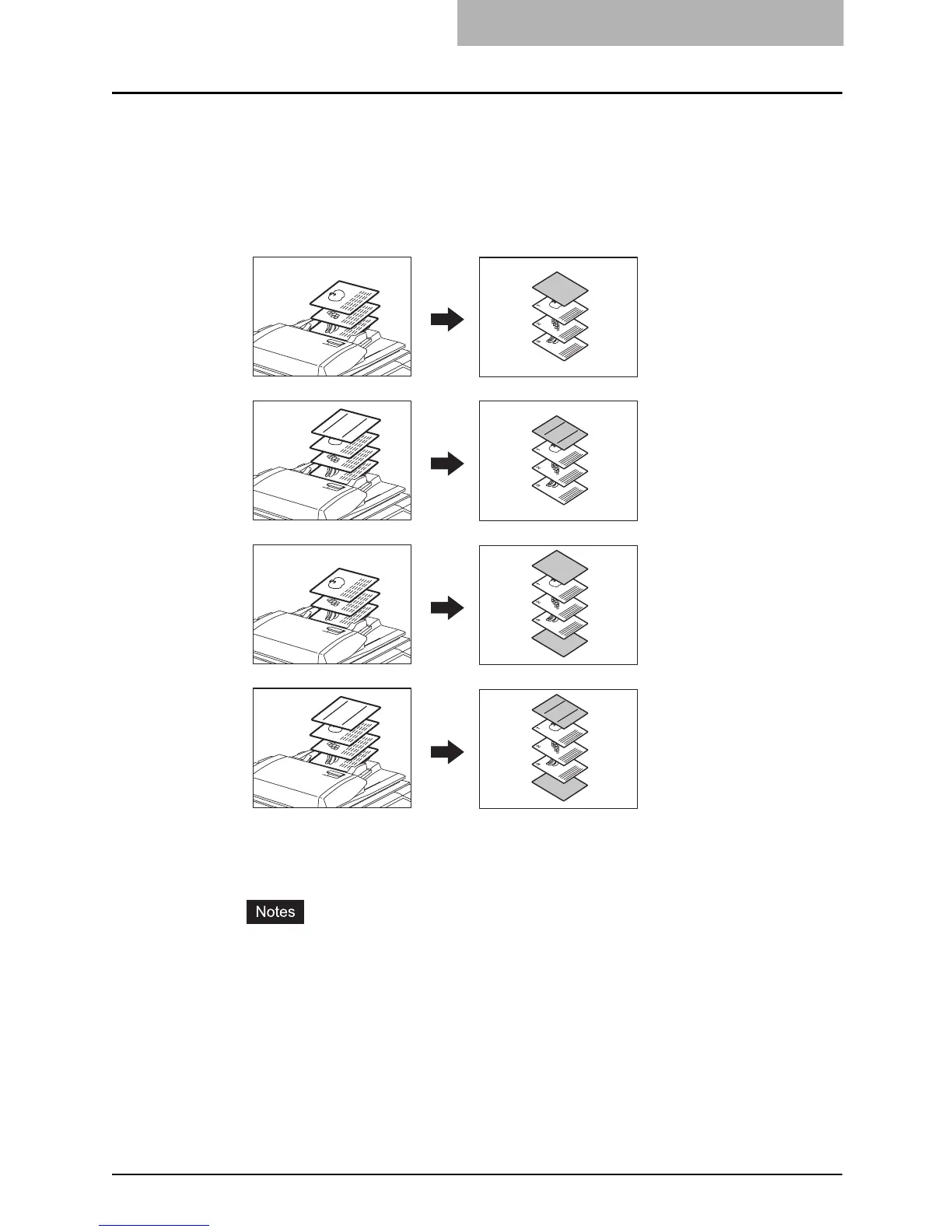
This function allows you to insert special sheets of paper (such as color paper) into a set of cop-
ies as cover sheets. A copied front cover sheet can be inserted. The back cover sheet is
inserted blank. There are 4 types of cover sheet modes:
1. Adding a blank front cover sheet ([TOP BLANK])
2. Adding a copied front cover sheet ([TOP COPIED])
3. Adding a blank front and blank back cover sheets ([BOTH BLANK])
4. Adding a copied front and blank back cover sheets ([TOP COPIED BACK BLANK])
1
Place the cover sheet.
y Place the cover sheet in the drawer selected for cover sheets or on the bypass tray.
y When it is placed in the drawer for the cover sheets, you must set the paper type
(cover sheet), size and thickness. ( P.59 “Drawer for special uses”)
y When it is placed on the bypass tray, you must set the paper size and thickness. (
P.81 “Bypass Copying”)
y Make sure the cover sheet and the sheets other than the cover sheet are placed in
the same direction and of the same size.
2
Place paper (other than cover paper) in the drawer(s).
3
2
1
3
2
1
REPORT
2003
3
2
1
3
2
1
REPORT
2003
REPORT
2003
REPORT
2003
1
2
3
4



 To Next Page
 Loading...



