Motion Coordinator Technical Reference Manual
Daughter Boards 4-5
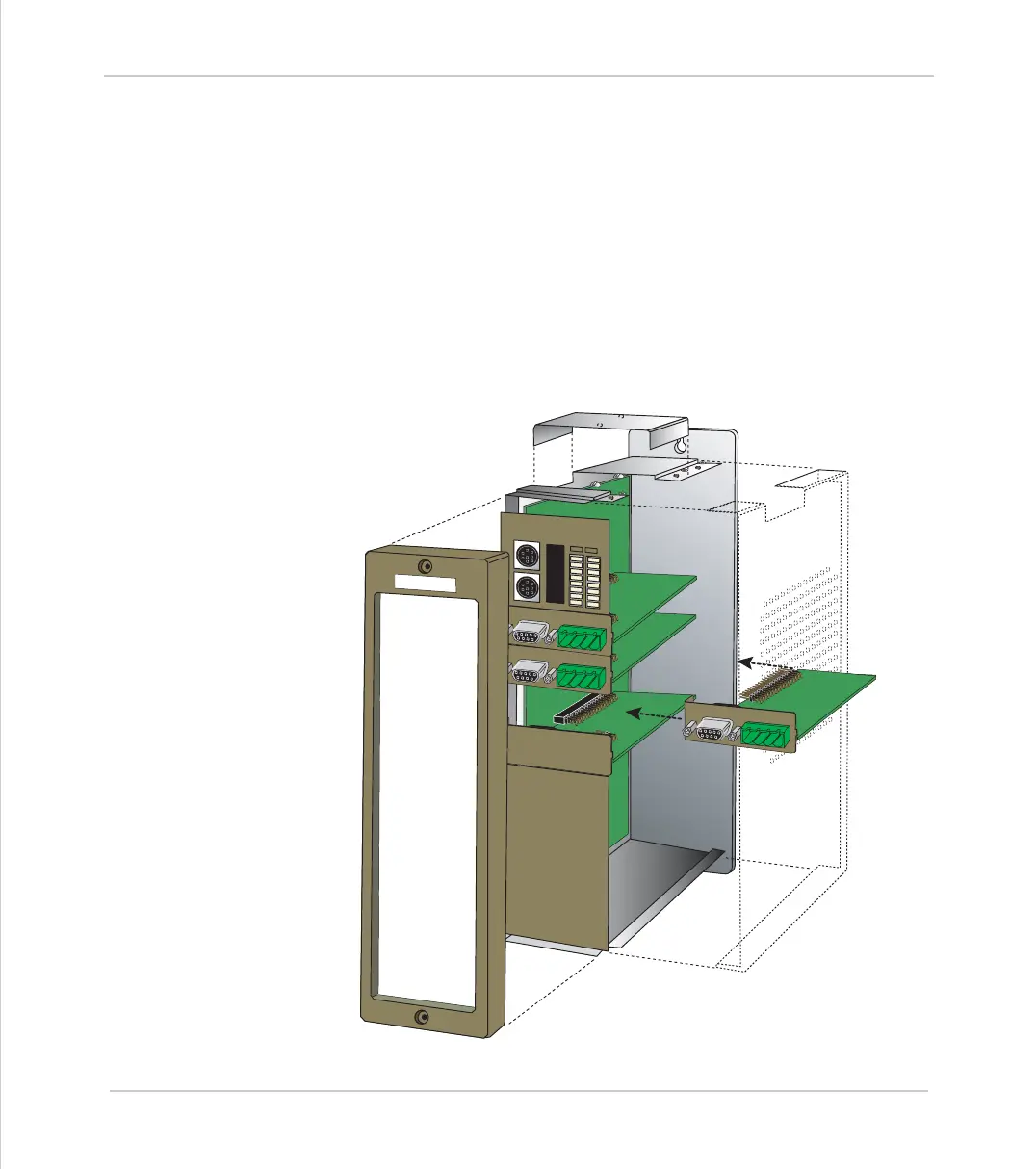
Fitting and Handling Daughter Boards
Fitting Daughter Boards to the MC216 / Axis Expander
• Check there is no power on the module
• Unscrew the 2 Allen screws which secure the front moulding cover and remove
the cover
• Unscrew the top ribbon cable bus cover. If the ribbon cable is connected,
remove this by pushing the retaining levers outwards.
• Unscrew the 8 screws which secure the right hand side cover of the module
• Unscrew the single screw which secures the axis daughter board to the left
hand side of the module. This is located by the left hand end of the axis
daughter front panel
• The sequence is reversed after inserting any new modules.
E
N
C
O
D
E
R
V
+
V
-
R
O
v
E
N
C
O
D
E
R
V
+
V
-
R
O
v
E
N
C
O
D
E
R
V
+
V
-
R
O
v
E
N
C
O
D
E
R
T
ri
o



 To Next Page