STARTUP
Carl Zeiss Mounting the Standard Components Axio Scope.A1
30 M60-2-0007 e 05/08
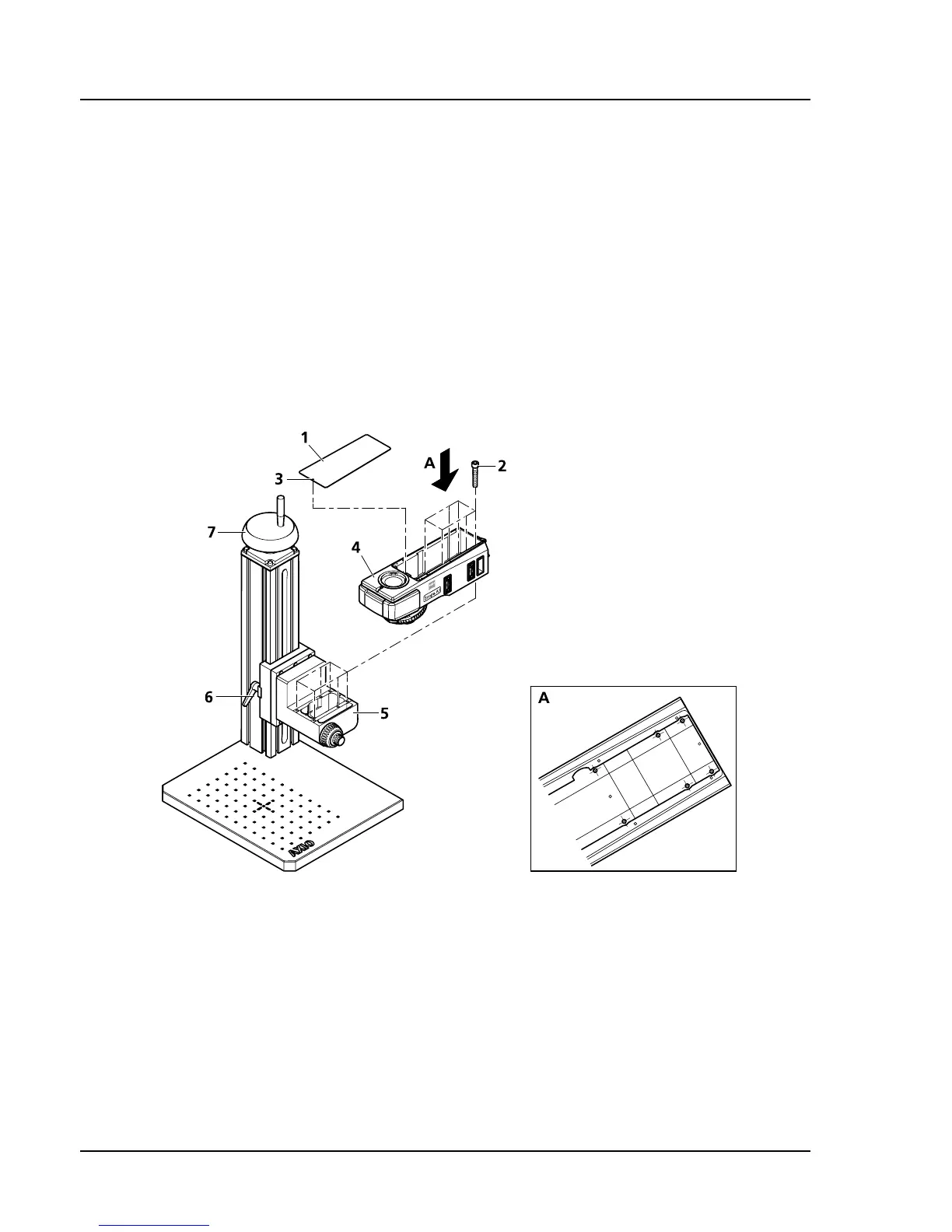
3.1.2 Mounting the Upper Stand Part on the Stand Column
If you are going to use a microscope stand consisting of an upper stand part and a stand column, please
begin by assembling the upper stand part.
• Remove the magnetically mounted cover (
287H287HFig. 3-2/1) of the upper stand part by inserting a ball head
screwdriver into the assembly opening in front (
288H288HFig. 3-2/3). Lift the cover.
• Using the six hexagon socket screws (
289H289HFig. 3-2/2) included in the package, screw the upper stand part
(
290H290HFig. 3-2/4) onto the gear box (291H291HFig. 3-2/5) of the stand column.
• Replace the cover.
• In order to adjust the microscope vertically, loosen both release tractors (
292H292HFig. 3-2/6) on the stand
column and adjust the height (according to the size of the specimen) with the hand wheel (
293H293HFig. 3-2/7).
Then tighten the release tractors again.
Fig. 3-2 Mounting the upper stand part on the stand column









 To Next Page