STARTUP
Carl Zeiss Mounting Optional Components Axio Scope.A1
64 M60-2-0007 e 05/08
3.4.10 Inserting a Modulator Disk in the
Condenser 0.9/1.25 H
• Remove the condenser (
580H580HFig. 3-50/1) from the
condenser carrier (see chapter
581H581H3.1.12).
If the condenser cannot be lowered sufficiently,
e.g. with mounted overview fixture, then it
might become necessary to remove it with the
stage carrier, then lower it to the stop and
remove the condenser.
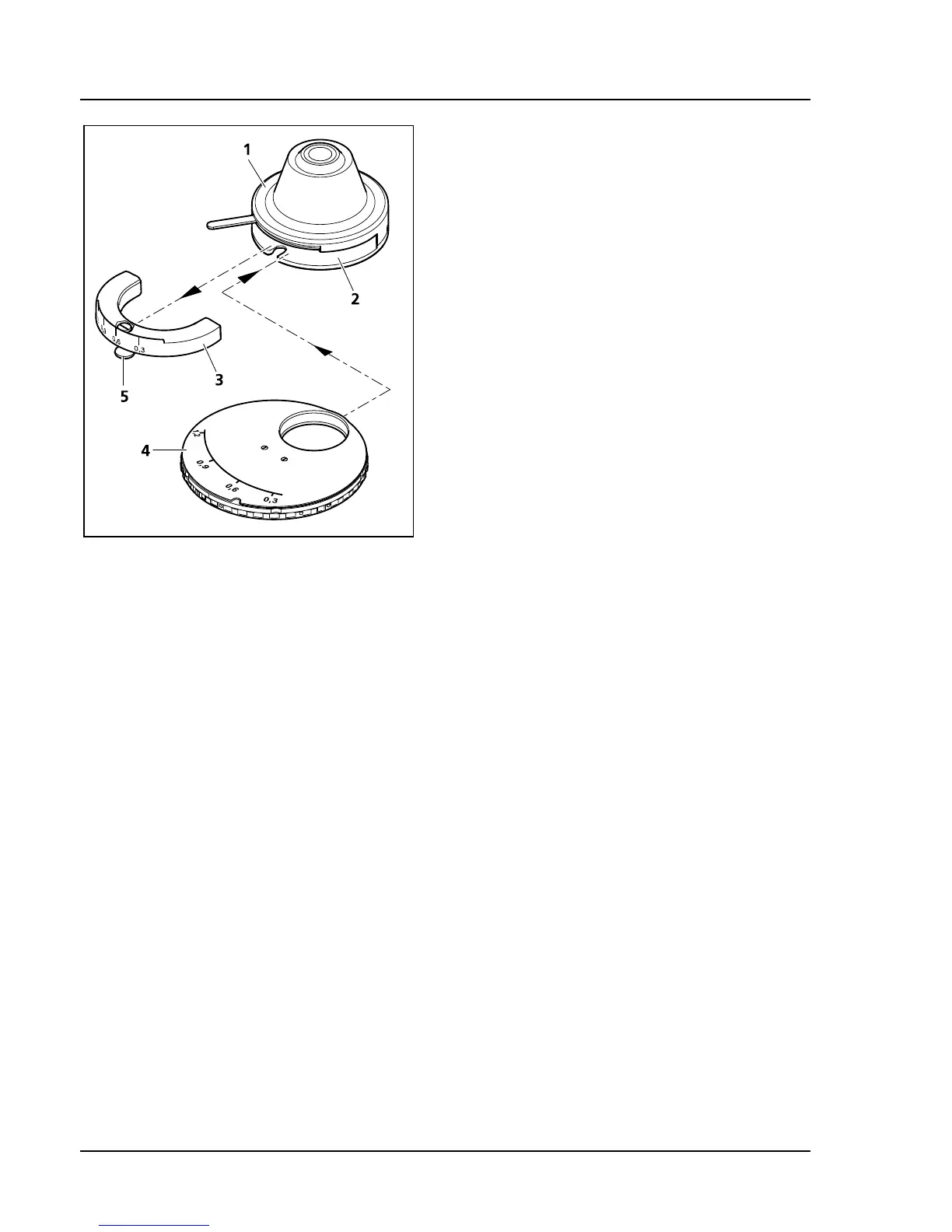
• Loosen the clamping screw (
582H582HFig. 3-50/5) of the
condenser’s dial segment (
583H583HFig. 3-50/3) with the
screwdriver (SW 3) and pull out the dial
segment.
• Slide the modulator disk (
584H584HFig. 3-50/4) with its
two-pronged forked opening pointing forward
into the condenser. Make sure that the disk
engages in the guide on both inner sides of the
condenser. The guide serves as a stop for the
modulator disk. The pin of the disk’s clamping
screw must slide into the orientation groove of
the condenser.
• Tighten the disk’s clamping screw with the
screwdriver (SW 3).
• Replace the condenser into its carrier (see
chapter
585H585H3.1.12).
Fig. 3-50 Modulator disk in condenser
0.9/1.25 H









 To Next Page