STARTUP
Axio Scope.A1 Mounting the Standard Components Carl Zeiss
M60-2-0007 e 05/08 31
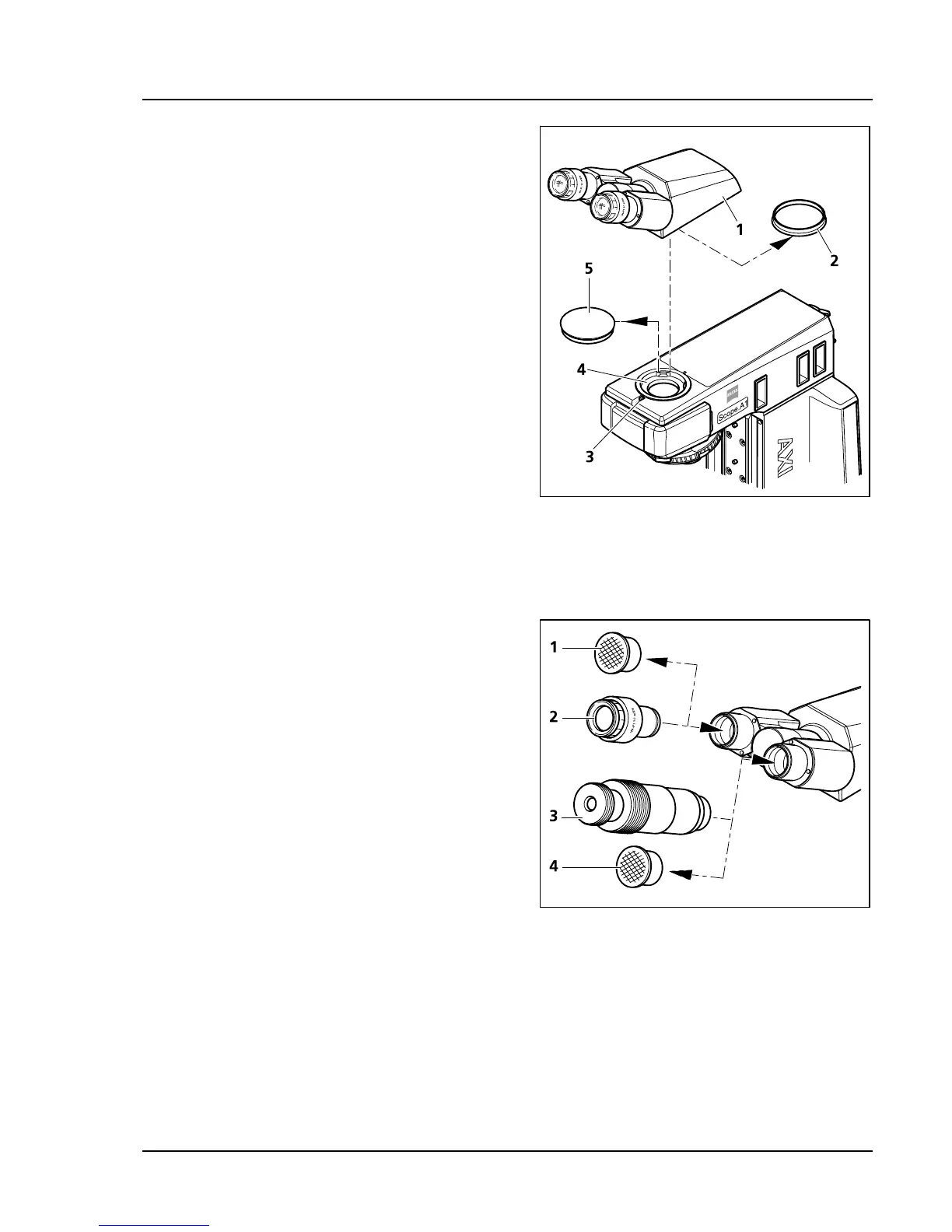
3.1.3 Mounting the Binocular Tube /
Photo Tube
All binocular tubes listed in the systems overview
(chapter
294H294H2.2) can be mounted on the microscope
stand.
• Loosen the hexagon socket screws (
295H295HFig. 3-3/3)
with the ball head screwdriver SW 3. Remove
the dust cover caps (
296H296HFig. 3-3/2 and 5) from the
bottom of the tube and the dovetail ring socket
on the stand.
• Hold the binocular tube (
297H297HFig. 3-3/1) or the
binocular photo tube at an angle and insert it
into the stand socket with the dovetail ring
(
298H298HFig. 3-3/4). Then push it into a horizontal
position. Turn the binocular tube into the
desired examination position and tighten the
hexagon socket screws with the ball head screw
driver.
3.1.4 Inserting Eyepieces or an Auxiliary
Microscope
• Remove both dust cover caps (
299H299HFig. 3-4/1 and 4)
from the binocular tube.
• Remove both eyepieces (
300H300HFig. 3-4/2) from the
box and insert them into the binocular tube to
the stop.
• Instead of an eyepiece you may insert an
auxiliary microscope (
301H301HFig. 3-4/3) into one of the
binocular nozzles in order to examine aperture,
phase and dark field diaphragms and to center
phase and dark field diaphragms. These
diaphragms can be focused with the adjustable
crystalline lens.
Fig. 3-3 Mounting the binocular tube
Fig. 3-4 Inserting eyepieces









 To Next Page