STARTUP
Carl Zeiss Mounting Optional Components Axio Scope.A1
62 M60-2-0007 e 05/08
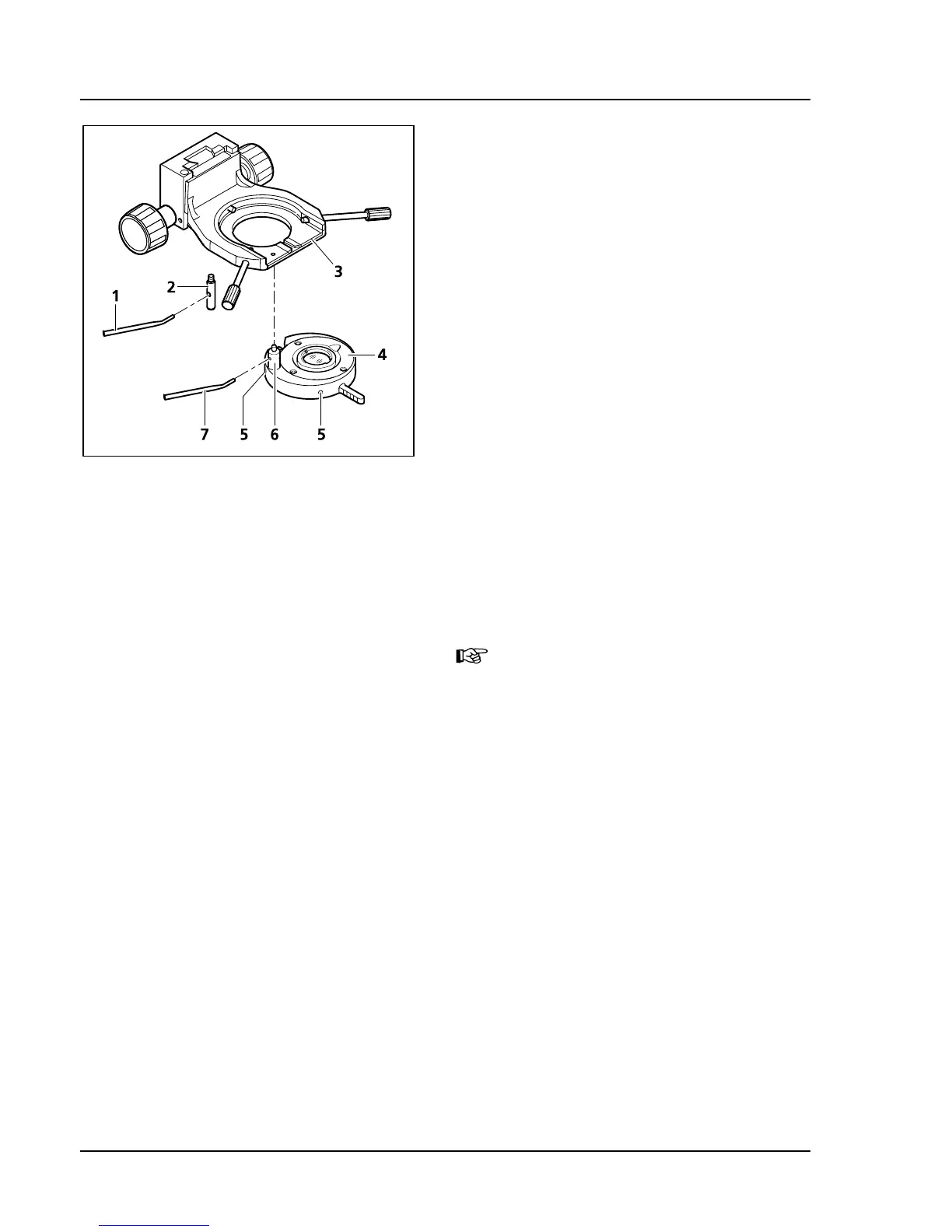
3.4.8 Mounting and Centering the
Overview Fixture
• If necessary, remove polarizer or filter holder
from the condenser carrier.
• Hold the overview fixture (
567H567HFig. 3-48/4) parallel
to the bottom of the condenser carrier
(
568H568HFig. 3-48/3) and screw the bracket bolt
(
569H569HFig. 3-48/6) of the overview fixture with the
angled adjustment lever (
570H570HFig. 3-48/7) into the
front threaded opening to the left below the
condenser carrier (
571H571HFig. 3-48/3) until it stops.
• With the adjustment lever (
572H572HFig. 3-48/1) screw
the stop bolt (
573H573HFig. 3-48/2) into the back
threaded opening of the condenser barrier
(
574H574HFig. 3-48/3) to the stop.
• Retract the overview fixture into the beam path.
Make sure that the fixture is securely engaged.
• Open aperture diaphragm and field diaphragm
completely.
• Adjust both adjustment screws (
575H575HFig. 3-48/5)
with the aid of two hexagon socket
screwdrivers (SW 1.5) until the field of vision is
well lit.
It only makes sense to mount the
overview fixture on the condenser
0.9/1.25.
Fig. 3-48 Mounting the overview fixture









 To Next Page