STARTUP
Carl Zeiss Connection of the Power Supply Axio Scope.A1
54 M60-2-0007 e 05/08
3.2 Connection of the Power Supply
3.2.1 Lower Stand Part for LED and
HAL 50 Illumination
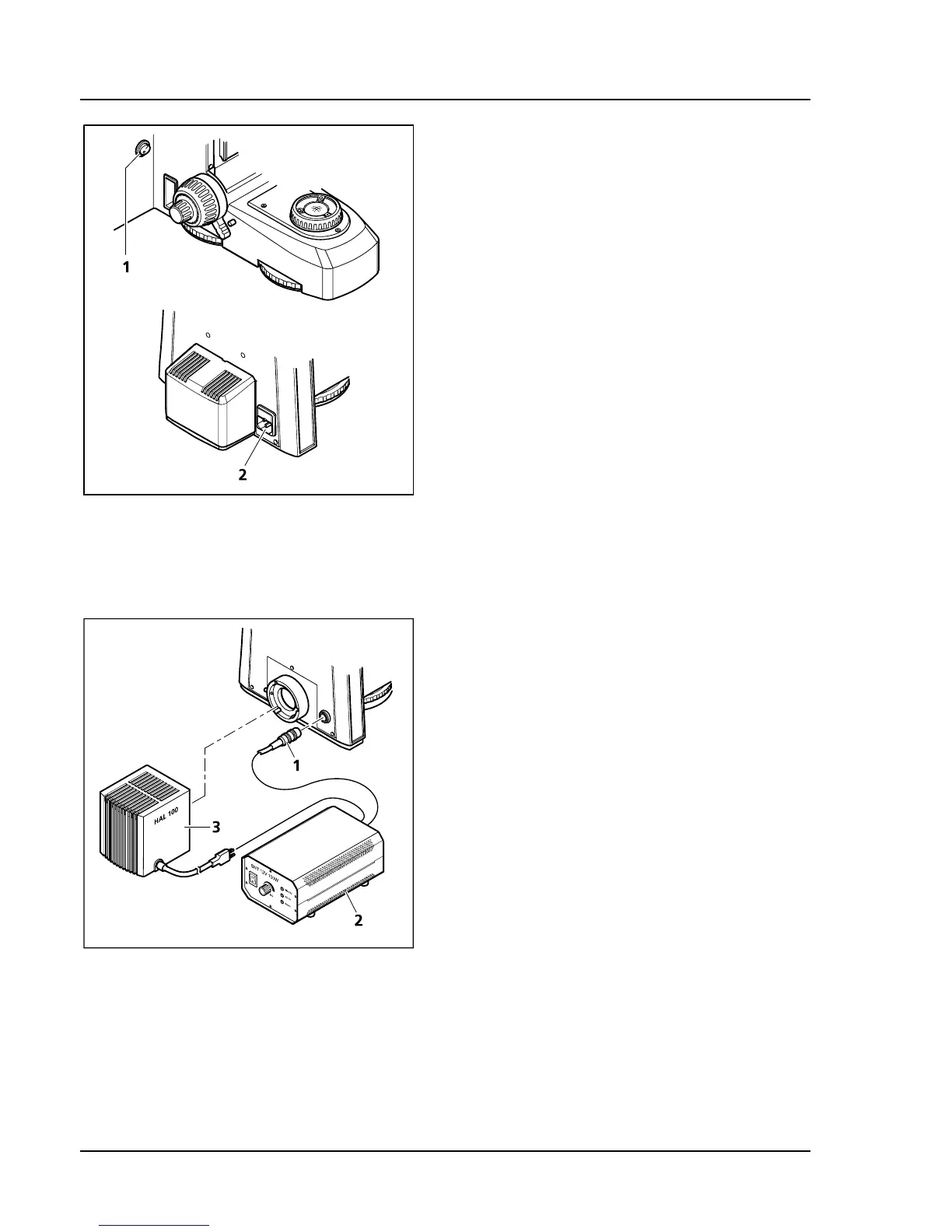
• Connect the microscope’s power supply
(
486H486HFig. 3-35/2) with its power cord to an electrical
outlet. The microscope can adjust to a power
and voltage range of 100 to 240 VAC, 50 ...
60 Hz. The power supply unit adjusts auto-
matically to the available voltage.
3.2.2 Lower Stand Part for HAL 100
Illumination
• Mount halogen lamp HAL 100 (
487H487HFig. 3-36/3) to
the stand (see also chapter
488H488H3.1.15.1).
• Connect the 3-pin HAL 100 plug to the
separate auxiliary power supply unit
(
489H489HFig. 3-36/2).
• Connect the cable for light intensity control
(
490H490HFig. 3-36/1) with the appropriate connecting
socket on the back of the stand or on the
auxiliary power supply unit (
491H491HFig. 3-36/2).
Fig. 3-35 Lower stand part for HAL 50
illumination (proceed analogically
for LED illumination)
Fig. 3-36 Lower stand part for HAL 100
illumination









 To Next Page