STARTUP
Axio Scope.A1 Mounting the Standard Components Carl Zeiss
M60-2-0007 e 05/08 53
3.1.18.3 Adjusting the HBO 100
illuminator
The HBO 100 illuminator is available in two
variants (manual and automatic adjustment).
The self-adjusting HBO 100 (423011-9901-000)
adjusts automatically when the transformer is
turned on.
Here is how to adjust the HBO 100 illuminator with
manual adjustment (423010-0000-000).
If the FL attenuator is in the reflected
light beam path, make sure that it is
adjusted to 100 % transmission.
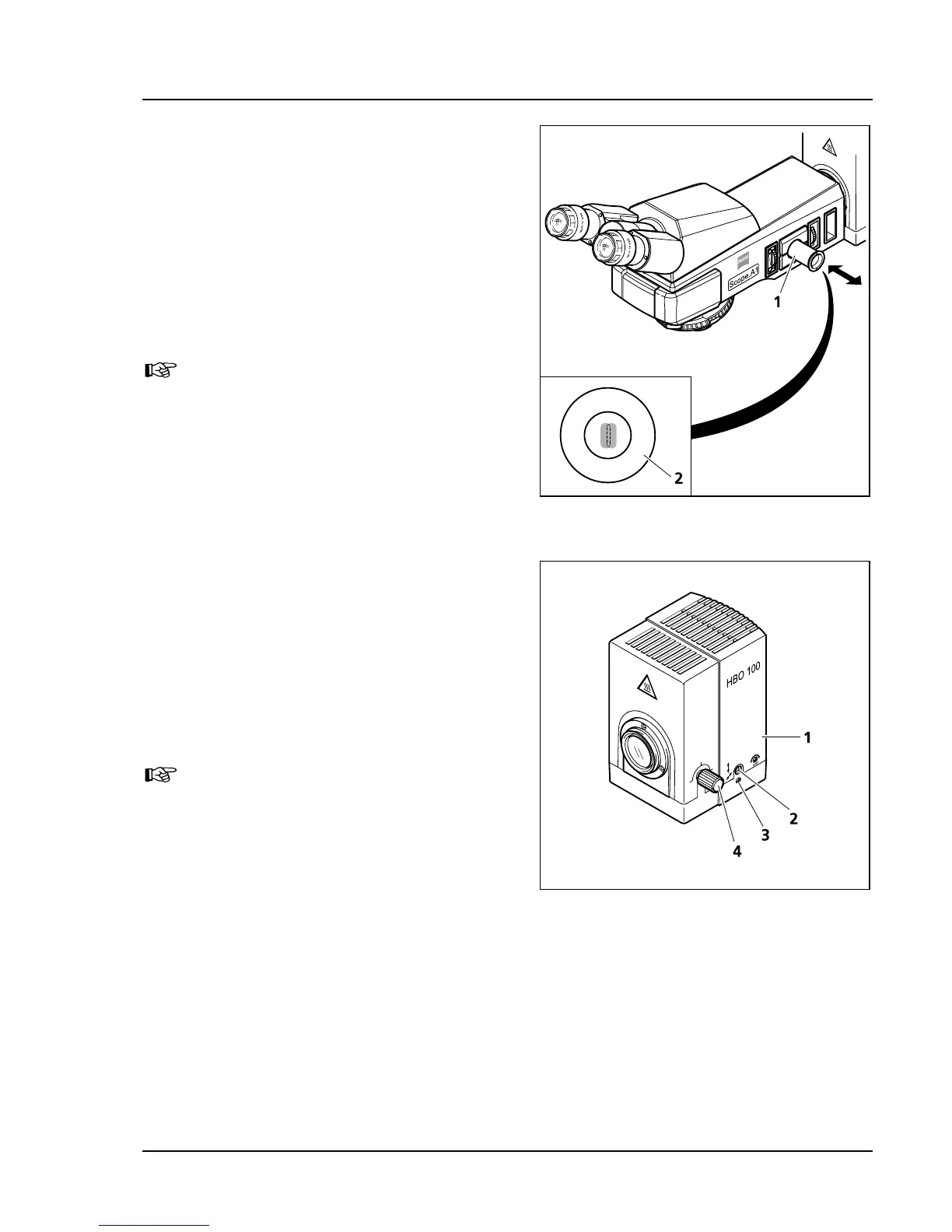
• Turn on HBO 100 illuminator (
480H480HFig. 3-34/1) on
the transformer HBO 100 W (
481H481HFig. 3-38/1) and
wait until it reaches its operational temperature.
• Pull adjustment aid (
482H482HFig. 3-33/1) out of the
microscope stand. The lighter colored focal
point of the lamp HBO 103 W/2 and its slightly
darker reflection become visible in the black
glass window of the adjustment aid.
• Use the knurled button (
483H483HFig. 3-34/4) for
collector adjustment in order to focus the
lighter focal point.
• Use the adjustment screws (
484H484HFig. 3-34/2 and 3)
to focus the darker focal point (reflection) in
analogy to the focal point image (
485H485HFig. 3-33/2) in
the inscribing adjustment circle.
Both focal points of the HBO 103 W/2
lamp should be close to each other in
the adjustment circle of the
adjustment aid!
• Replace the adjustment aid in its original
position.
3.1.19 Illumination System Colibri and External Illumination Fixture HXP 120
Please refer to the separate operation manual of Colibri and HXP 120 for installing and operating these
systems.
Fig. 3-33 Adjustment aid
Fig. 3-34 Adjusting the HBO 100









 To Next Page