STARTUP
Axio Scope.A1 Mounting Optional Components Carl Zeiss
M60-2-0007 e 05/08 63
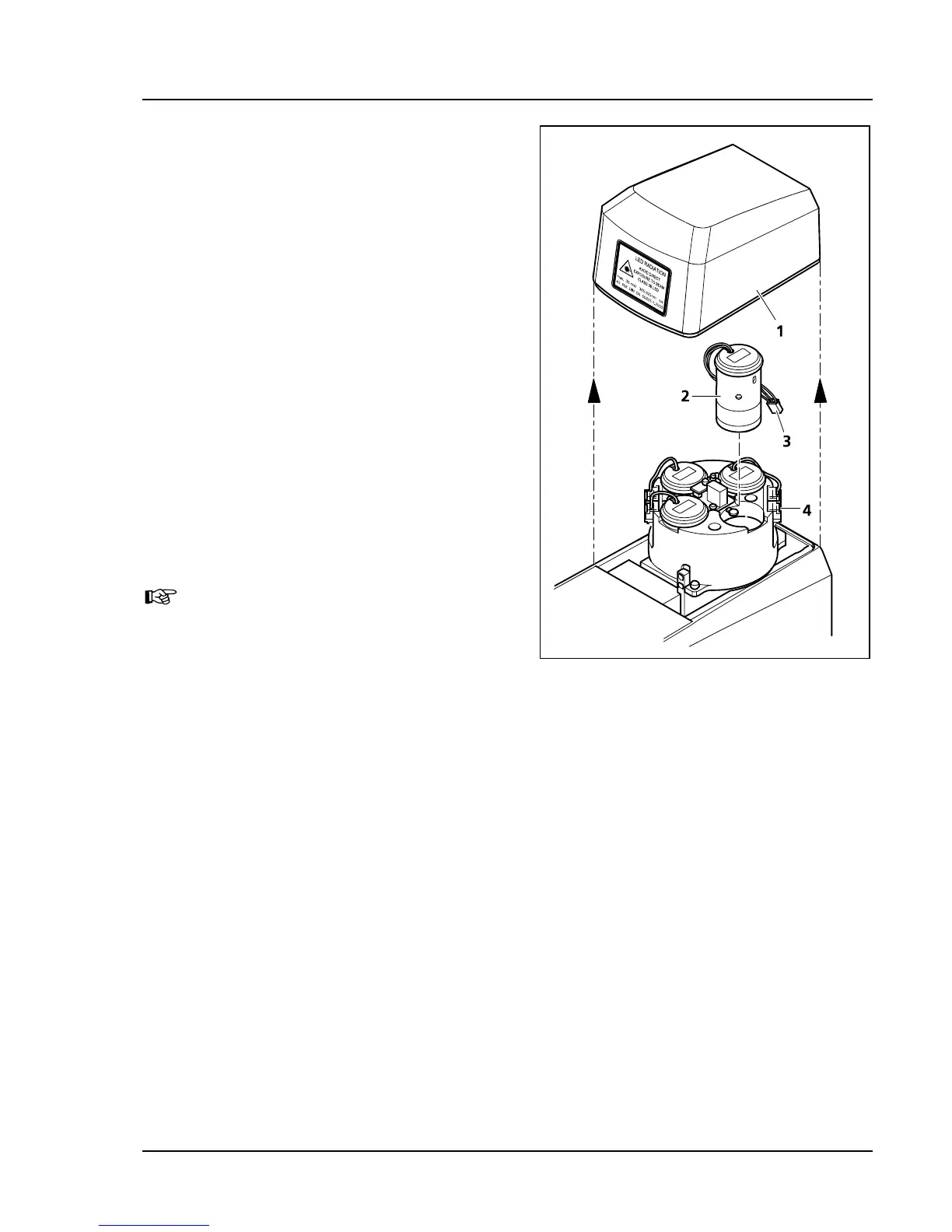
3.4.9 Changing the LED Module in the
Upper Stand Part FL-LED
• Lift the covering caps (
576H576HFig. 3-49/1) off the upper
stand part.
• Remove the connecting plug (
577H577HFig. 3-49/3) of the
LED module to be changed (
578H578HFig. 3-49/2) from
the corresponding slot (
579H579HFig. 3-49/4) and pull the
LED module out of its socket.
• Put the new LED module into the socket and
plug the cable into the corresponding slot. No
adjustment is necessary.
• As the LED circuit is coupled to the reflector
turret, it is necessary to make sure that LED
module and fluorescence filters on the
corresponding reflector turret position are
compatible.
For better orientation, the positions of the LED
module and those in the reflector turret are
numbered.
• Replace the covers.
When you insert LED modules or
fluorescence filters, make sure that they
match spectrally. This guarantees that
the correct LED is switched on when the
reflector turret is rotated.
Fig. 3-49 Changing the LED module









 To Next Page