STARTUP
Carl Zeiss Mounting the Standard Components Axio Scope.A1
34 M60-2-0007 e 05/08
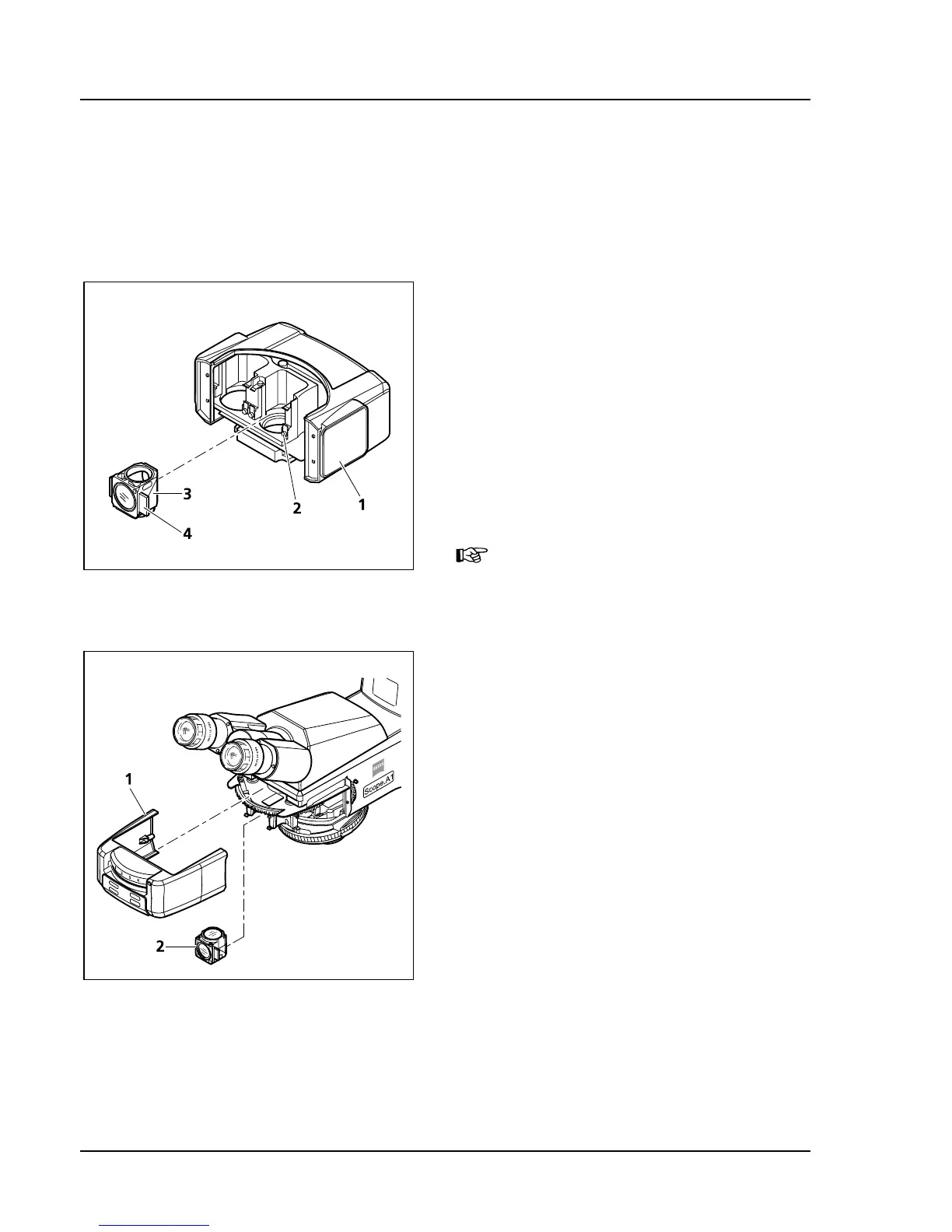
3.1.6 Installing and Uninstalling "Push&Click" Modules in the Reflector Insert
To install or uninstall the modules, the reflector insert (reflector turret 4- or 6-fold, reflector slider 2-fold)
must be removed from the upper stand part.
The reflector turret in the upper stand part FL-LED cannot be removed. Install or uninstall the modules
from the front after removing the cover cap.
How to install a module:
• Remove the reflector insert (
315H315HFig. 3-7/1) from the
upper stand part (chapter
316H316H3.1.7) and put it aside
with the upper side facing down.
• Insert the module (
317H317HFig. 3-7/3) (with the upper
side facing down) with the aid of its mounting
elements on its left and right (
318H318HFig. 3-7/4) at a
slant from the top into the lower spring clips
(
319H319HFig. 3-7/2) on the reflector socket.
• Press the module against the upper spring clips
of the reflector turret until it engages firmly.
When installing the module into the
upper stand part FL-LED, remove the
cover cap (
320H320HFig. 3-8/1) by pulling it
forward, then turn the module (
321H321HFig.
3-8/2) by 180° and insert it into the
upper spring elements. Engage it firmly
by pressing it down.
How to uninstall a module:
• Disengage the module from the upper spring
elements by tilting it forward, then lift it off the
lower spring elements and remove the module.
• After installing or uninstalling the reflector
module, don’t forget to replace the reflector
insert or the cover cap.
Fig. 3-7 Changing the reflector module in
the reflector insert
Fig. 3-8 Changing the reflector module in
the upper stand part FL-LED









 To Next Page