STARTUP
Axio Scope.A1 Mounting Optional Components Carl Zeiss
M60-2-0007 e 05/08 65
3.4.11 Changing the Diaphragm PlasDIC
How to mount the slit-diaphragm (426715-9000-
000):
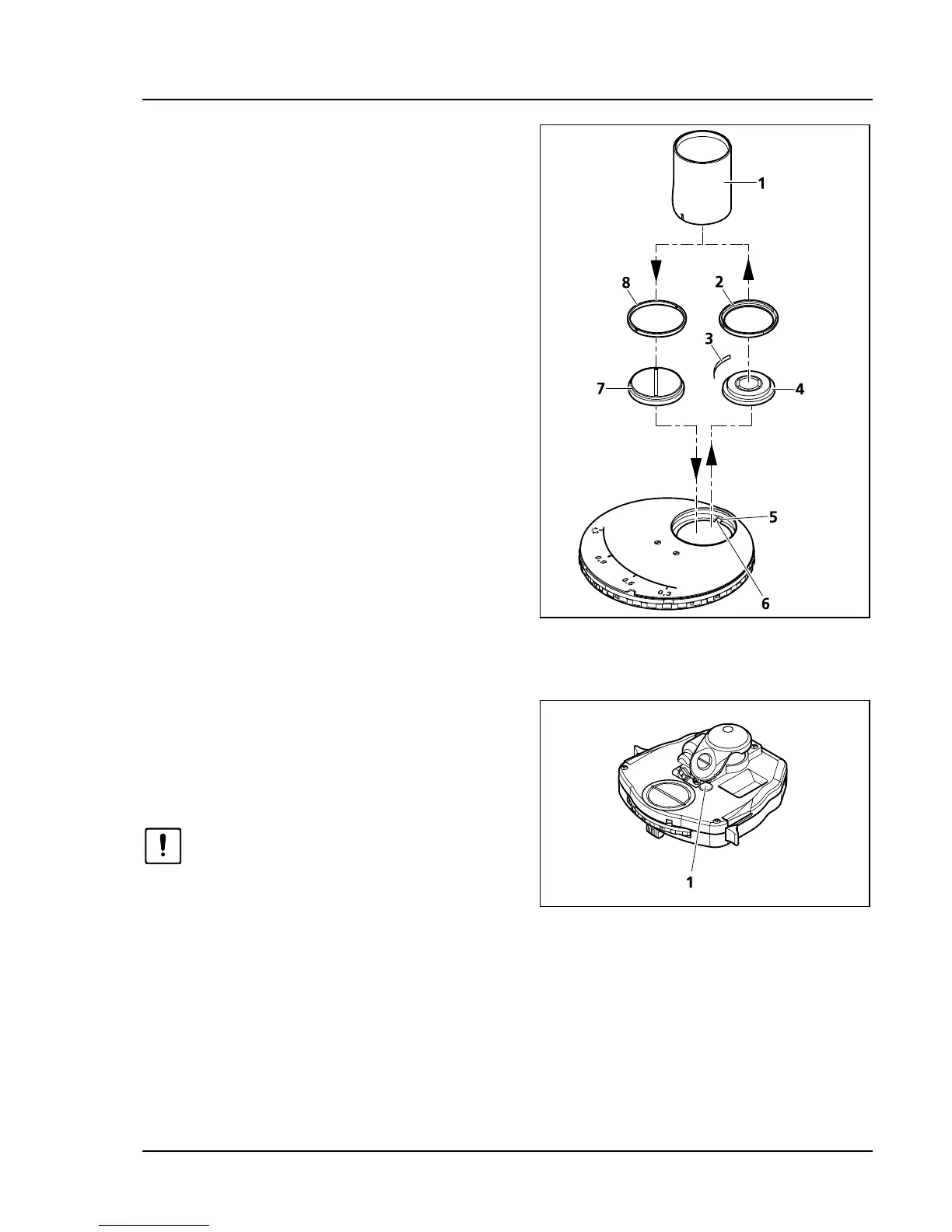
• Turn the Ph-diaphragm which needs to be
changed into the free aperture of the
modulator disk.
• Screw the modulator disk’s centering screws
(
586H586HFig. 3-51/5) with the aid of a hexagonal socket
screwdriver back until they stop.
• Unscrew the adapter ring (
587H587HFig. 3-51/2) of the
Ph-diaphragm with the included tool
(
588H588HFig. 3-51/1).
• Remove Ph-diaphragm (
589H589HFig. 3-51/4) and spring
(
590H590HFig. 3-51/3).
• With the aid of the tool (
591H591HFig. 3-51/1), insert the
slit-diaphragm (
592H592HFig. 3-51/7) with the cams into
the orientation grooves (
593H593HFig. 3-51/6).
• Screw in the adapter ring (
594H594HFig. 3-51/8) included
with the slit-diaphragm with the aid of the
appropriate tool (
595H595HFig. 3-51/1).
3.4.12 Changing the Diaphragm Ph-DIC on
the Achromatic-Aplanatic
Condenser 0.9 H D Ph DIC
The diaphragm is changed according to the
directions given in chapter
596H596H3.4.10.
After inserting the DIC module, do
not tighten the condenser’s centering
screw again.
How to deactivate the pre-set diaphragm
mechanism which automatically opens the
diaphragm when phase contrast occurs:
• Remove the cover (
597H597HFig. 3-52/1). Turn the screw (598H598HFig. 3-51/5) with the hexagon socket screwdriver 1.5
mm counter-clockwise to the stop. You can now close the aperture diaphragm for contrasting
procedures in DIC.
Fig. 3-51 Mounting the slit-diaphragm
Fig. 3-52 Changing the diaphragm Ph-DIC









 To Next Page