PREVENTIVE AND CORRECTIVE MAINTENANCE
PRODUCT
ACS6000
DOCUMENT KIND
User manual
DOCUMENT ID.
3BHS212794 E01
REV.
N
LANG.
en
PAGE
247/266
10.4.15.2. Replacing auxiliary fan units
1. Switch off the miniature circuit breaker of the fan unit that you want to
replace.
To identify the miniature circuit breaker, see “Appendix D - Wiring diagrams”.
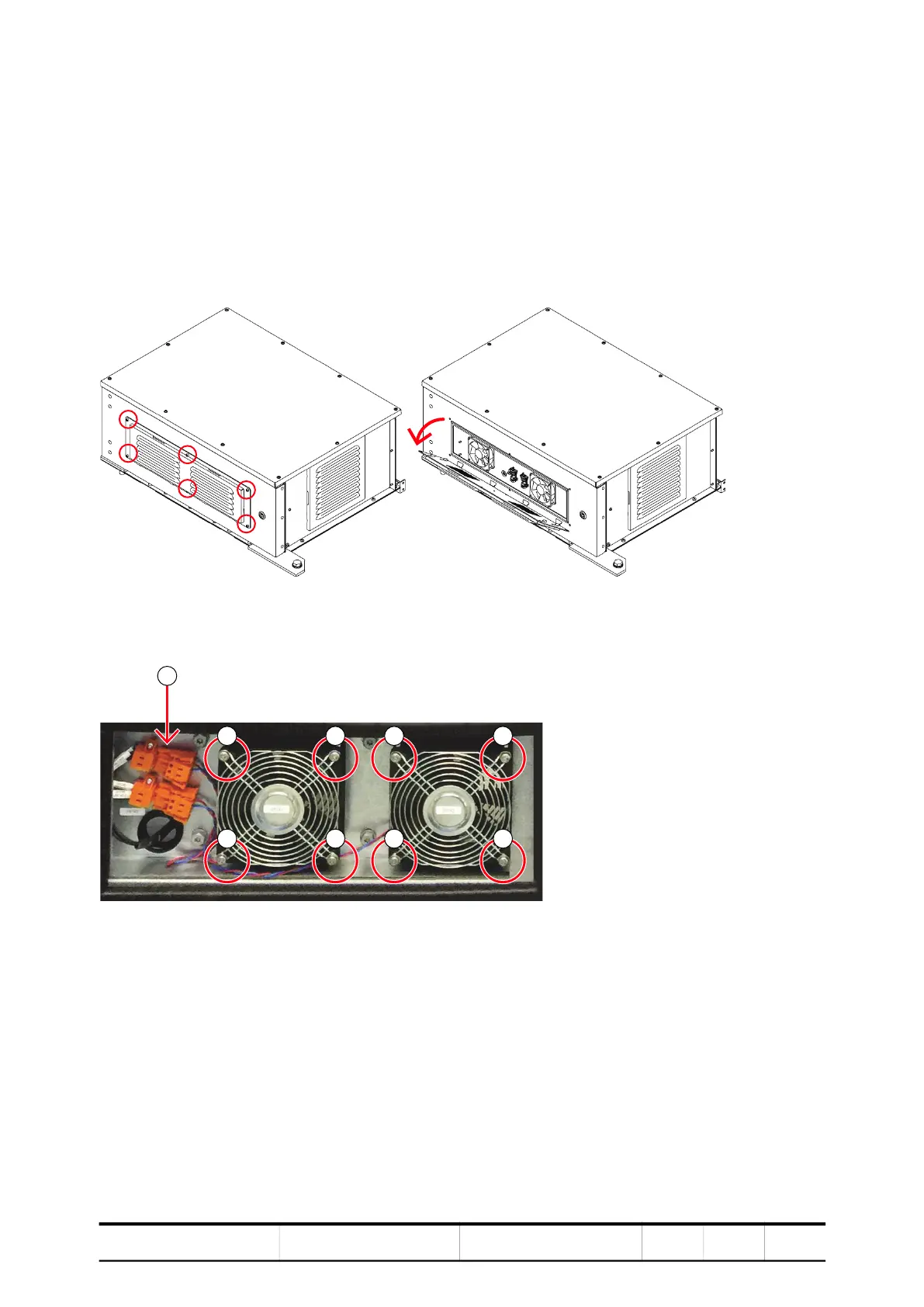
2. (Only for fan units of the optional REB) Unscrew the ventilation grid (circles)
and flip the grid downward (arrow).
IMPORTANT! The ventilation grid is hinged. You DO NOT need to remove it.
Figure 10-25 Accessing the fan units in the WCU roof box
3. Disconnect the wires (1) and unscrew (2) the fan units.
4. Remove the fan unit.
5. Reinstall the new one in reverse order of removal.
2
2
2
2



 To Next Page