Radio Test Instruments
Subject to Export Control, see Cover Page for details.
7-28
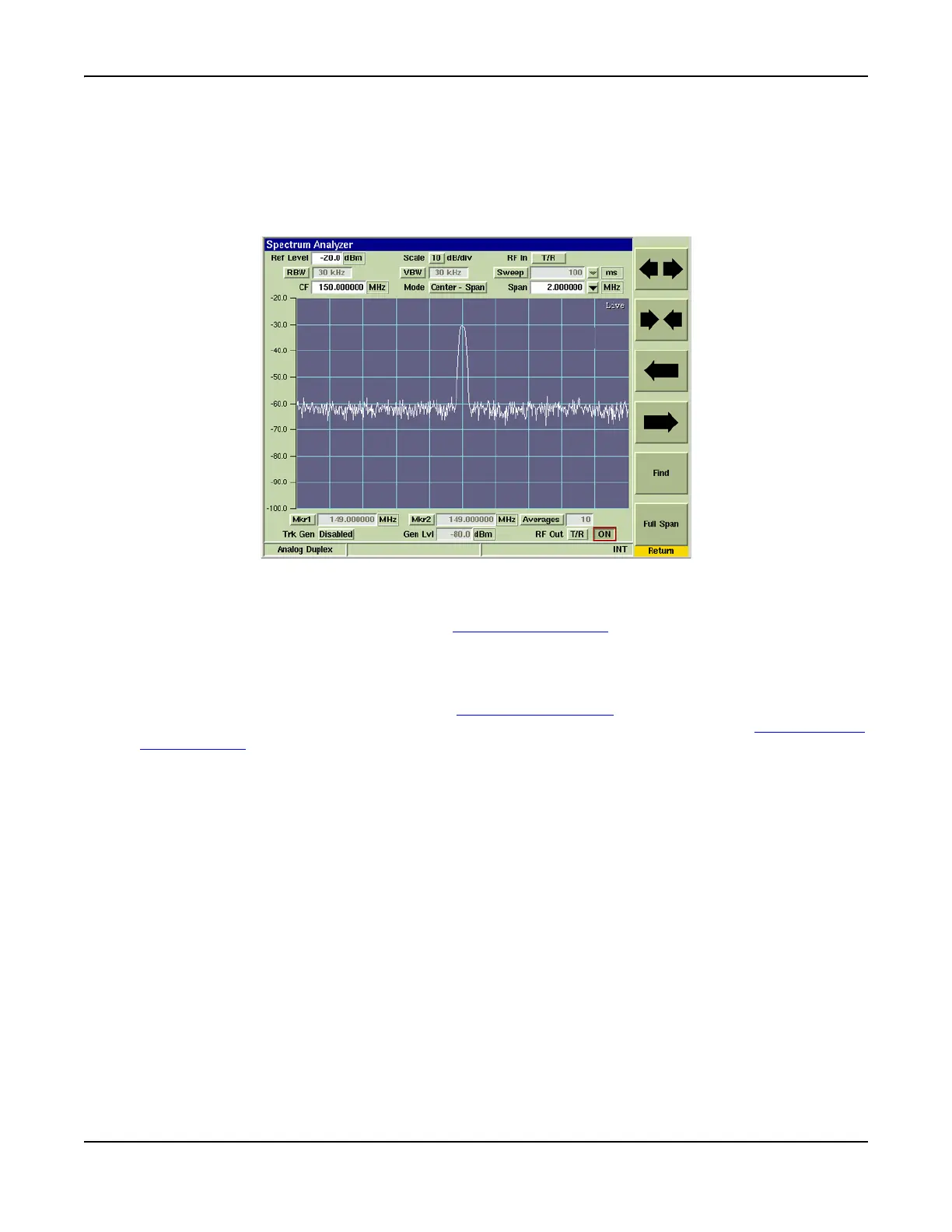
[Horizontal] Soft Key
The [Horizontal] Soft Key accesses a group of soft keys that adjust the horizontal scaling and
position of the signal trace. The left/right arrow keys move the trace right or left on the display
field, which simultaneously adjusts the Center and/or Start Frequency, depending on the span
mode selected. The [Expand / Contract] Soft Keys adjust the span of the trace, which can also
be adjusted by changing the Span setting.
Fig. 7-32 Spectrum Analyzer Horizontal Soft Keys
[Find] Soft Key
This soft key is accessed by pressing the [Horizontal] Soft Key. Pressing [Find] sweeps the Test
Set’s available frequency range and sets Center Frequency to highest signal peak along
frequency range.
[Full Span] Soft Key
This soft key is accessed by pressing the [Horizontal] Soft Key. Pressing [Full Span] sets the
Start - Stop signal span to the Test Set’s frequency range. Refer to Appendix B, 3900 Platform
Specifications for the Spectrum Analyzer’s operating parameters.













 To Next Page