Chapter 4: AC Drive Parameters
Page 4–81
DURApulse GS4 AC Drive User Manual – 1st Ed, Rev A - 10/20/2017
Type Hex Addr Dec Addr
P3.32 Desired Frequency 1
♦R/W 0320 40801
Range/Units (Format: 16-bit unsigned) Default
0�00~600�00 Hz
60�00
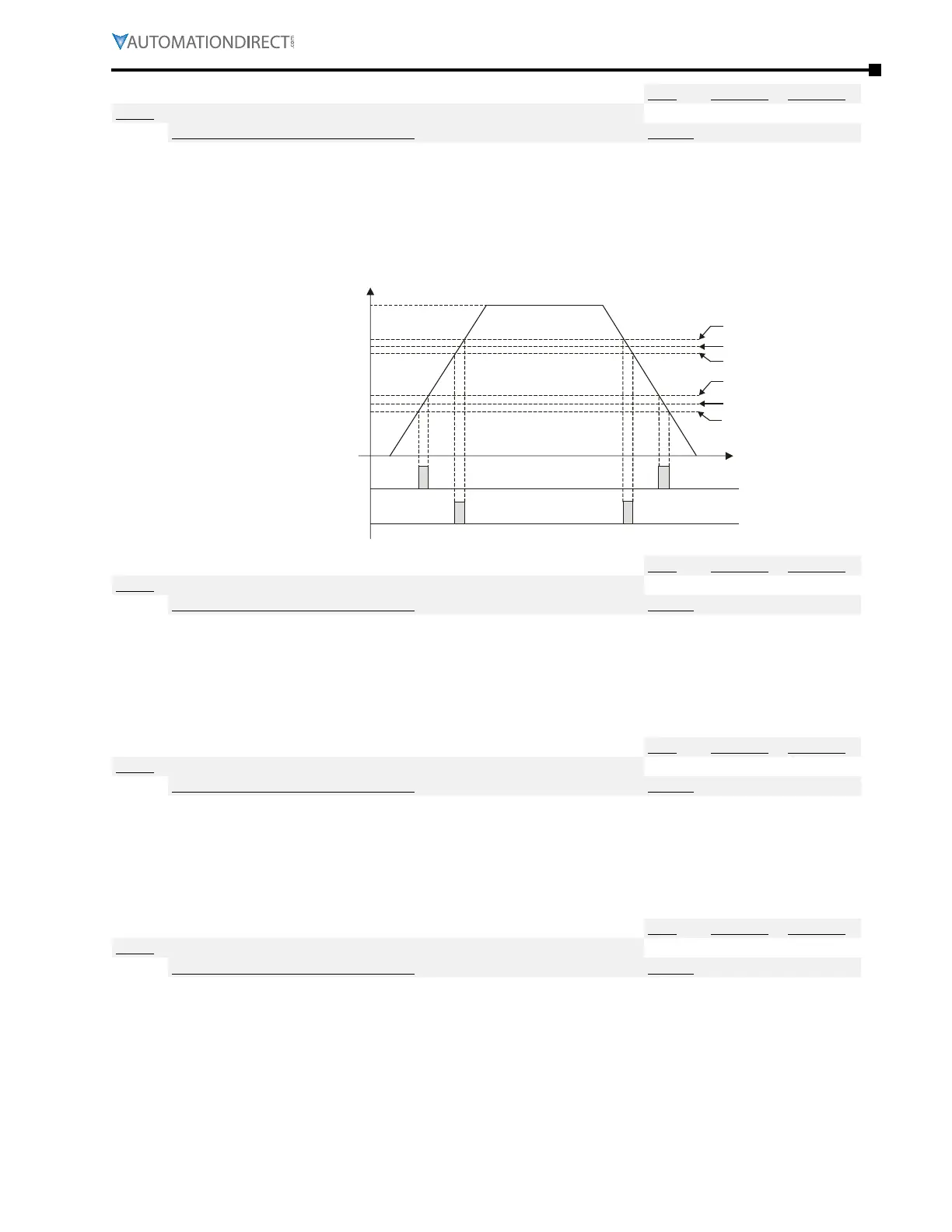
If a Multi-Function Output terminal is set to function “At Speed” (P3.17~P3.31 = 03 or 04), then the
output will be activated when the programmed frequency is attained and within the window set in
P3.33.
•
Once output frequency reaches desired frequency (± width) and the corresponding multi-function
output terminal is set to 3 or 4 (P3�17~P3�31), this multi-function output terminal will be ON�
42Hz
40Hz
38Hz
12Hz
10Hz
8Hz
P3.34=40Hz
P3.35=2Hz
P3.32=10Hz
P3.33=2Hz
P3.17-P3.31=3
P3.17-P3.31=4
Fcmd=60Hz
T
Type Hex Addr Dec Addr
P3.33 Desired Frequency 1 Width
♦R/W 0321 40802
Range/Units (Format: 16-bit unsigned) Default
0�00~600�00 Hz
2�00
Sets the window of when the “Desired Frequency 1” (P3.32) will be activated. The value set here
represents a plus and minus range surrounding the P3.32 setting. The overall window width will
be twice the value set here.
•
Refer to timing chart at P�3�32�
Type Hex Addr Dec Addr
P3.34 Desired Frequency 2
♦R/W 0322 40803
Range/Units (Format: 16-bit unsigned) Default
0�00~600�00 Hz
60�00
If a Multi-Function Output terminal is set to function “At Speed” (P3.17~P3.31 = 03 or 04), then the
output will be activated when the programmed frequency is attained and within the window set in
P3.35.
•
Refer to timing chart at P�3�32�
Type Hex Addr Dec Addr
P3.35 Desired Frequency 2 Width
♦R/W 0323 40804
Range/Units (Format: 16-bit unsigned) Default
0�00~600�00 Hz
2�00
Sets the window of when the “Desired Frequency 2” (P3.34) will be activated. The value set here
represents a plus and minus range surrounding the P3.34 setting. The overall window width will
be twice the value set here.
•
Refer to timing chart at P�3�32�


 To Next Page
 Loading...


