124
V2.6 | 8/30/2022 | 1120758
10. In the last step you have the option to inuence the image via tone mapping.
Notice
To use tone mapping, the HDRSplitView feature must be disabled.
With tone mapping, the HDR (High Dynamic Range) image is converted to an
LDR (Low Dynamic Range) image.
It does use a transfer function, which is approximated by up to 16 different
linear sections.
Three presets are available (selectable via HDRTonemappingCurvePresetSe-
lector).
see chapter „7.12.13 Category: HDRTonemappingCurveControl“ on page 131
11. Execute the HDRTone MappingCurveResetToPreset command to activate the
selected preset.
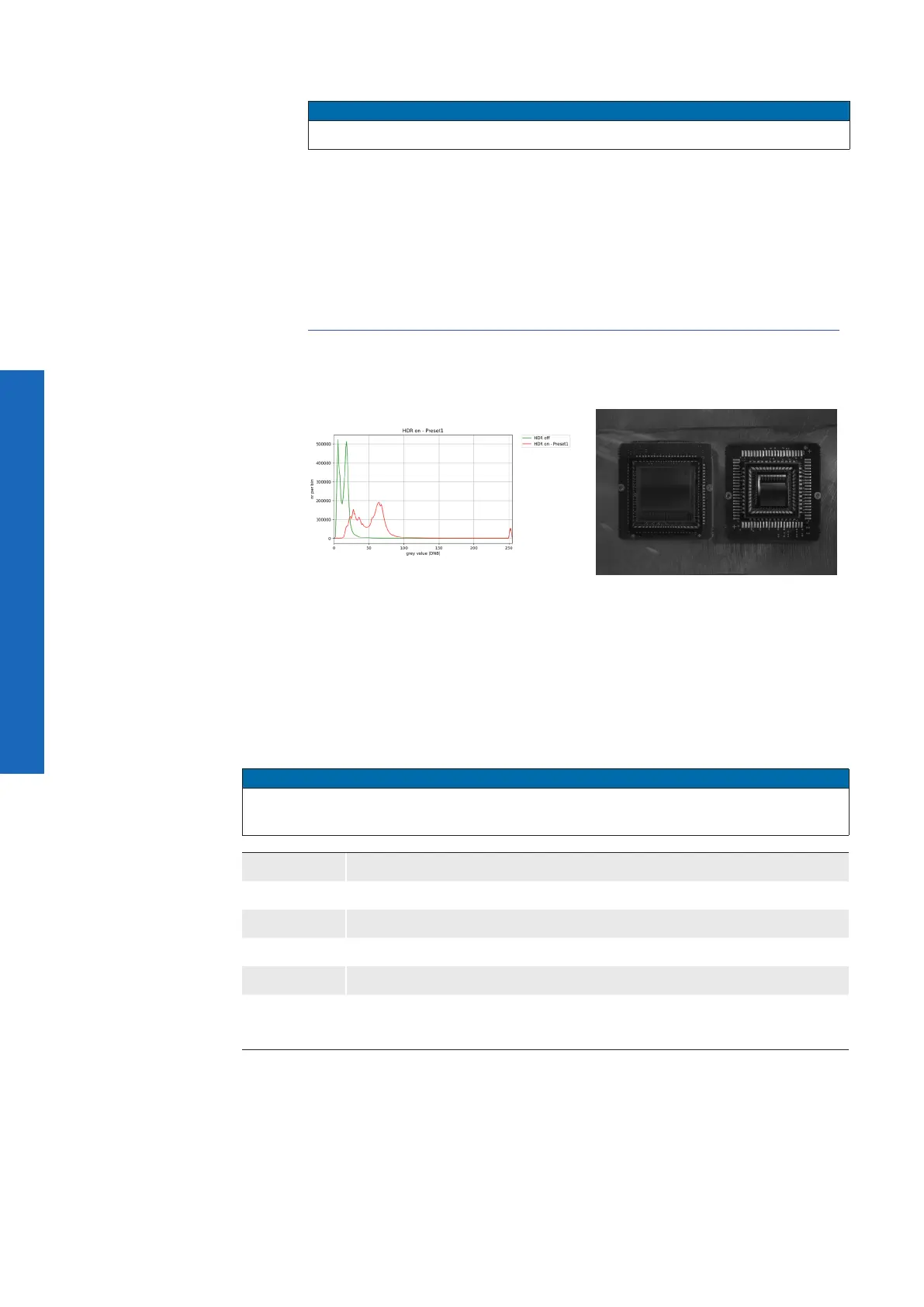
Histogram of the nal image → more
details in the dark areas
nal image with tone mapping
(HDRTonemappingCurvePreset-
Selector = Preset1)
7.12.1 HDREnable
Enables the High Dynamic Range mode of the camera.
Notice
The camera must be stopped before feature can be set. HDR can not be used together
with the Sequencer.
Name HDREnable
Category HDRControl
Interface IBoolean
Access Read / Write
Unit -
Values
true = 1 (On)
false = 0 (Off)



 To Next Page