12
New Features of PE-DESIGN NEXT
Transferring Designs to the
Embroidery Machine
The procedure for transferring an embroidery design to the machine differs depending on the embroidery
machine.
Check your machine’s specifications, and then select the appropriate transfer method.
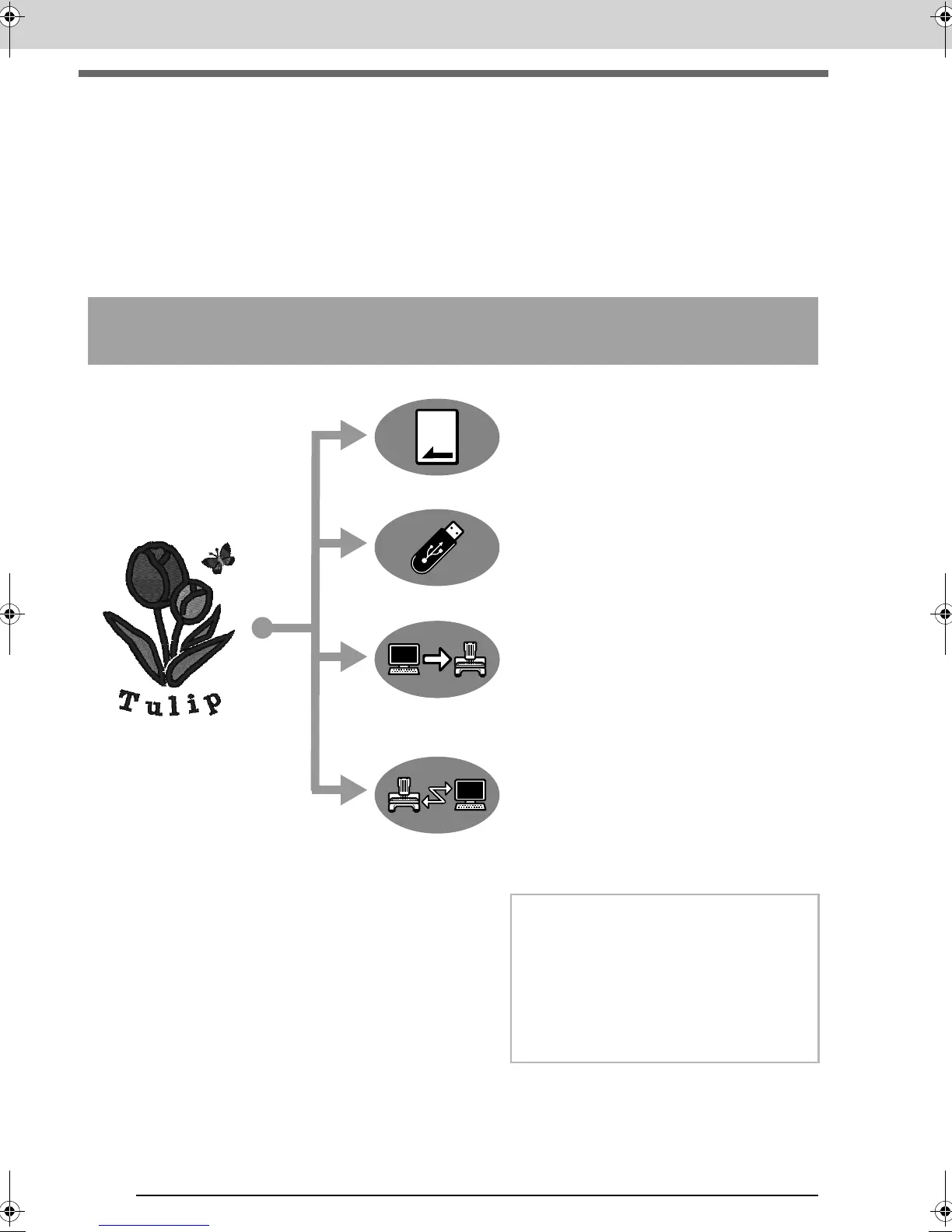
This software supports four different methods for
transferring data.
For embroidery machines compatible with
embroidery cards
Use an original card.
(☞ p. 174)
For embroidery machines compatible with USB
media
Use commercially available
USB media.
(☞ p. 175)
For embroidery machines that can be connected to
a computer using a USB cable
Transfer the embroidery design
with the USB cable.
(☞ p. 176)
For our embroidery machines compatible with the
Link function
Use the Link function to
transfer embroidery designs to
the embroidery machine that
was included with the machine.
(☞ p. 177)
b Memo:
• In order to use the Link function to transfer
embroidery designs to an embroidery
machine, a machine compatible with the
Link function must be running in Link mode.
• In order to save embroidery designs in the
memory of an embroidery machine, the
machine must be running in normal mode.
XE8656-001.book Page 12 Monday, May 24, 2010 5:44 PM



 To Next Page
 Loading...


