56
Applying Sewing Attributes to Lines and Regions
Applying Sewing Attributes to Lines and
Regions
Setting the thread color and
sew type
The Sew group in Attributes tab allows you to set
the embroidery attributes.
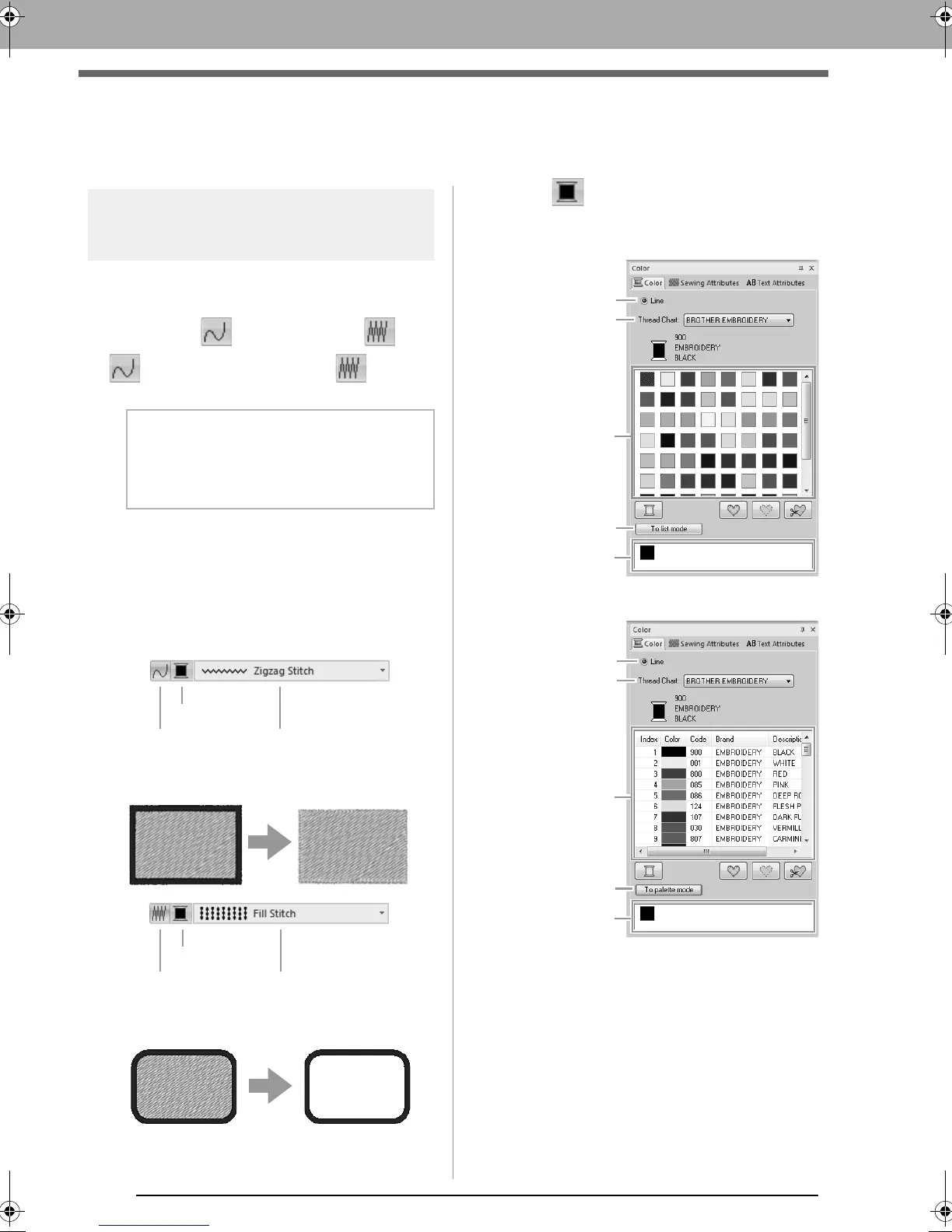
■ Line sew
/
Region sew
switches on/off line sewing, switches
on/off region sewing.
On: The Line color/Region color button and
the Line sew type/Region sew type
selector are displayed.
Off: The Line color/Region color button and
the Line sew type/Region sew type
selector are not displayed.
Line sewing on: Line sewing off:
Region sewing on: Region sewing off:
c
“Color” on page 56 and “Sew type” on
page 57
■ Color
Click the Color button.
• Palette mode
•List mode
(1) Select the type of stitching (Line,
Region1 or Region2) whose color is
being selected.
Line: Line color
Region1: Region color
Region2: Additional color for blending
b Memo:
When line sewing or region sewing is
switched off, it is not sewn (and the color or
sew type cannot be selected).
Line sew
Line color
Line sew type
Region sew
Region color
Region sew type
XE8656-001.book Page 56 Monday, May 24, 2010 5:44 PM



 To Next Page
 Loading...


