261
Checking the Created Font Patterns
Checking the Created Font Patterns
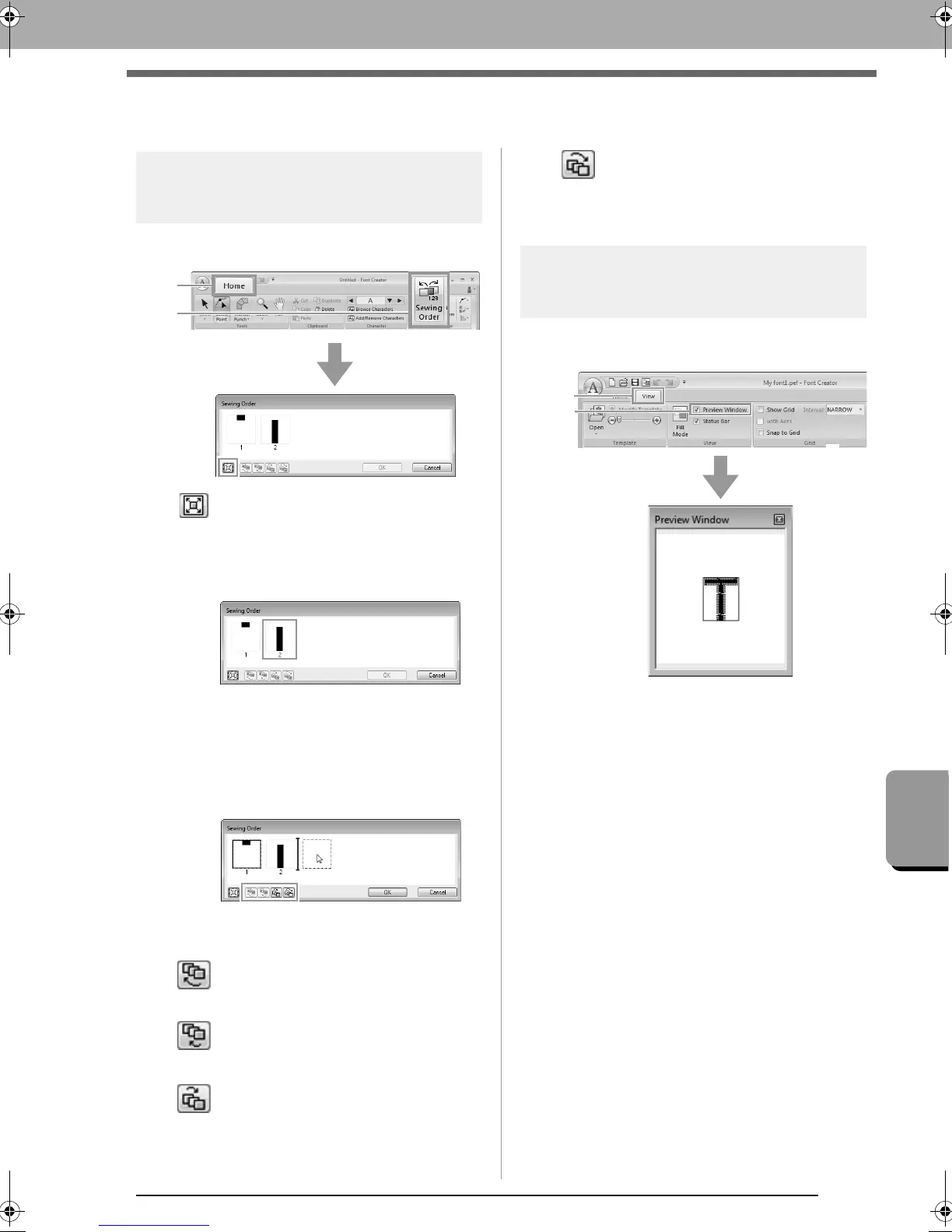
Checking and editing the
sewing order
1. Click 1, then 2.
: Click to enlarge each pattern to fill its
frame.
2. Select a pattern in the Sewing Order dialog
box.
3. The sewing order can be changed by
selecting the frame containing the pattern that
you want to move, then dragging the frame to
the new location. A vertical red line appears,
indicating the position where the frame is
being moved.
An alternative method for moving the frames is by
clicking the buttons at the bottom of the dialog box.
: To move to the beginning of the
sewing order.
: To move ahead one position in the
sewing order.
: To move back one position in the
sewing order.
: To move to the end of the sewing
order.
To change the sewing order, click OK.
Previewing the embroidery
pattern
To switch between displaying and hiding the
Preview Window, click 1, then 2.
XE8656-001.book Page 261 Monday, May 24, 2010 5:44 PM



 To Next Page
 Loading...


