73
Checking Embroidery Patterns
Basic Layout & Editing Operations
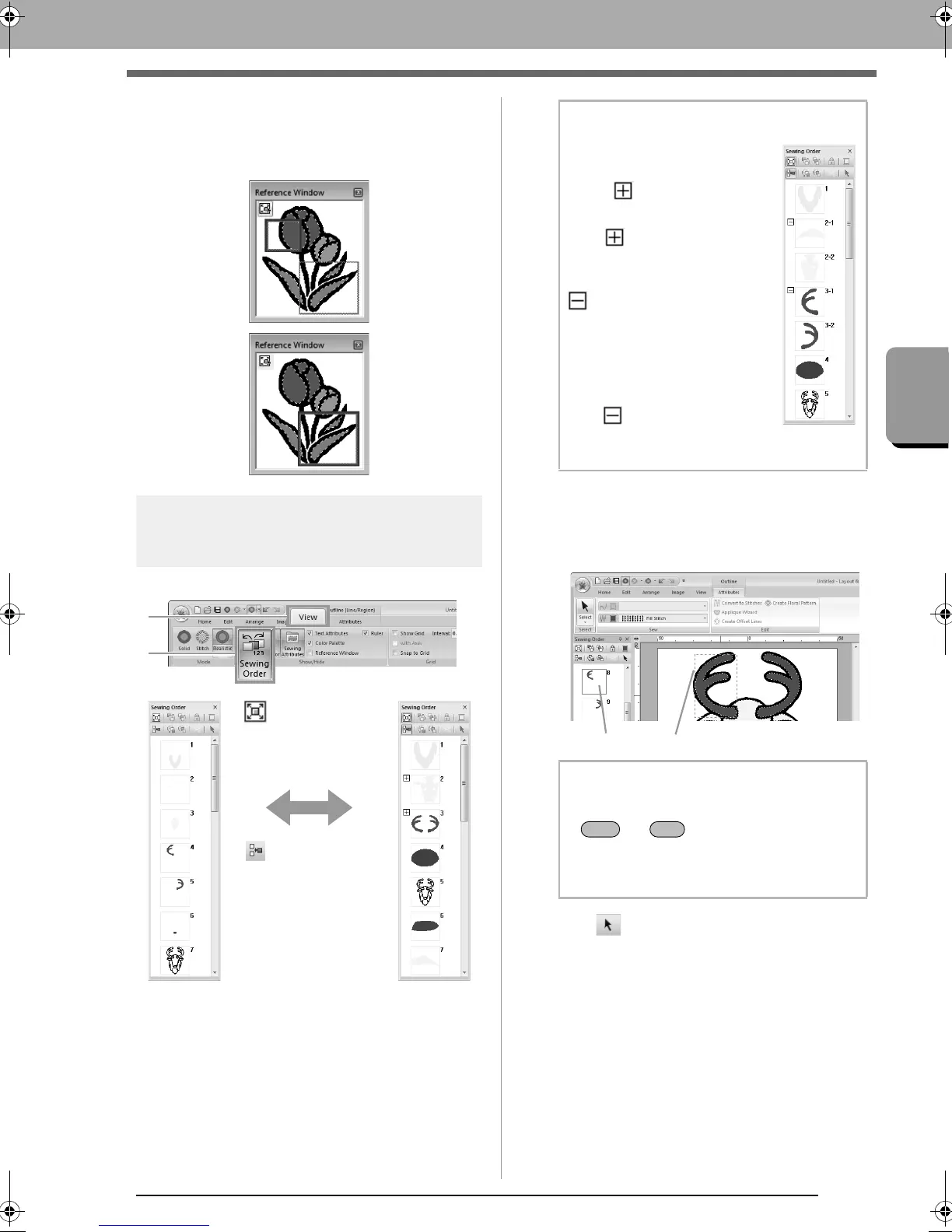
■ Redrawing the display area frame
Instead of moving the display area frame, the frame
can be redrawn to display the desired part of the
pattern in the Design Page.
Checking and Editing the
Sewing Order
Click 1, then 2.
■ Selecting a pattern
1. Click a frame containing the pattern in the
Sewing Order pane.
2. Click at the top of the Sewing Order pane
to select the pattern in the Design Page
corresponding to the frame selected in the
Sewing Order pane. The pattern can also be
selected by double-clicking its frame in the
Sewing Order pane.
:Click to
enlarge each
pattern to fill its
frame.
:Click to display
in one frame all
patterns of the
same color that will
be sewn together.
b Memo:
When multiple same color
patterns are combined into one
frame, appears to the left of
that frame.
Click to display the
combined same color patterns in
separate frames.
appears under the first
frame, and each frame is
displayed with a subnumber
following the first, to indicate its
sewing order within the patterns
of the same color.
Click to recombine all of the
same color patterns back into
one frame.
b Memo:
• To select multiple patterns, hold down the
or key while clicking the
frames for the desired patterns. In addition,
multiple frames can be selected by
dragging the pointer over them.
XE8656-001.book Page 73 Monday, May 24, 2010 5:44 PM



 To Next Page
 Loading...


