204
Sew Setting Stage
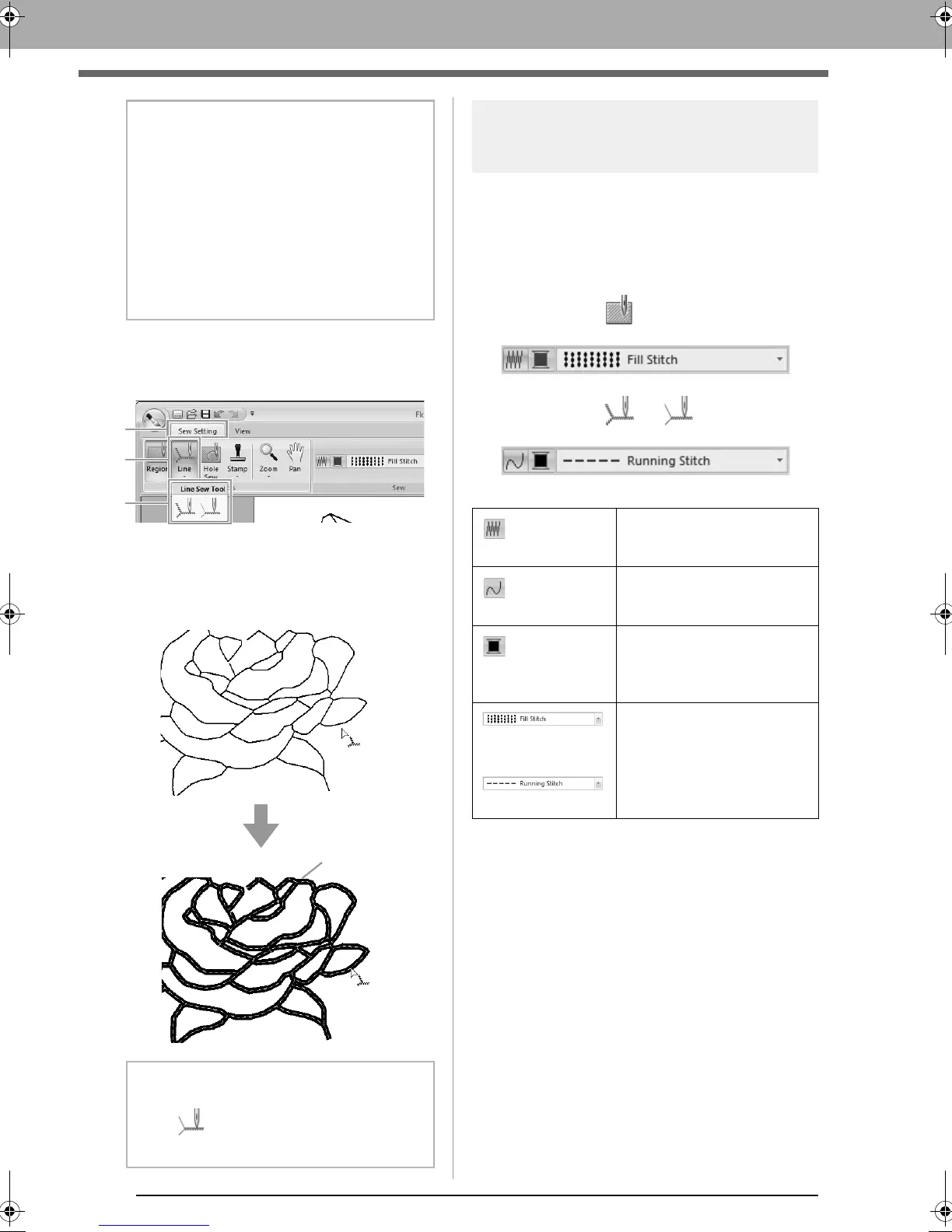
■ Line sewing
1. Click 1, then 2, click 3.
2. If necessary, change the color and sew type.
c
“Sewing attributes” on page 204.
3. Click the outline to apply the sewing attributes.
Sewing attributes
The Sew pane on the Sew setting tab, available in
the Sew Setting Stage, allows you to set the color
and sew type of region and outlines.
The sewing attributes that are available depend on
the tool selected.
Example 1: When is selected
Example 2: When or is selected
b Memo:
• Although a region may seem closed, if the
sewing attributes cannot be specified for the
region, the region may not actually be
closed.
• To find the opening in the region, use the
line drawing mode in the Figure Handle
Stage to divide the region into smaller
regions, and then check which region
sewing attributes cannot be applied to in the
Sew Setting Stage.
b Memo:
When is selected, settings are applied
only to a portion of the clicked outline.
Region sew
Switches on/off sewing for
the region.
Line sew
Switches on/off sewing for
the line.
Region color,
Line color
Click this button to set the
thread color for lines or
regions.
Region sew type
Line sew type
Use these selectors to set
the sew type for lines or
regions.
XE8656-001.book Page 204 Monday, May 24, 2010 5:44 PM



 To Next Page
 Loading...


