81
Saving and Printing
Basic Layout & Editing Operations
Saving and Printing
Saving
■ Overwriting
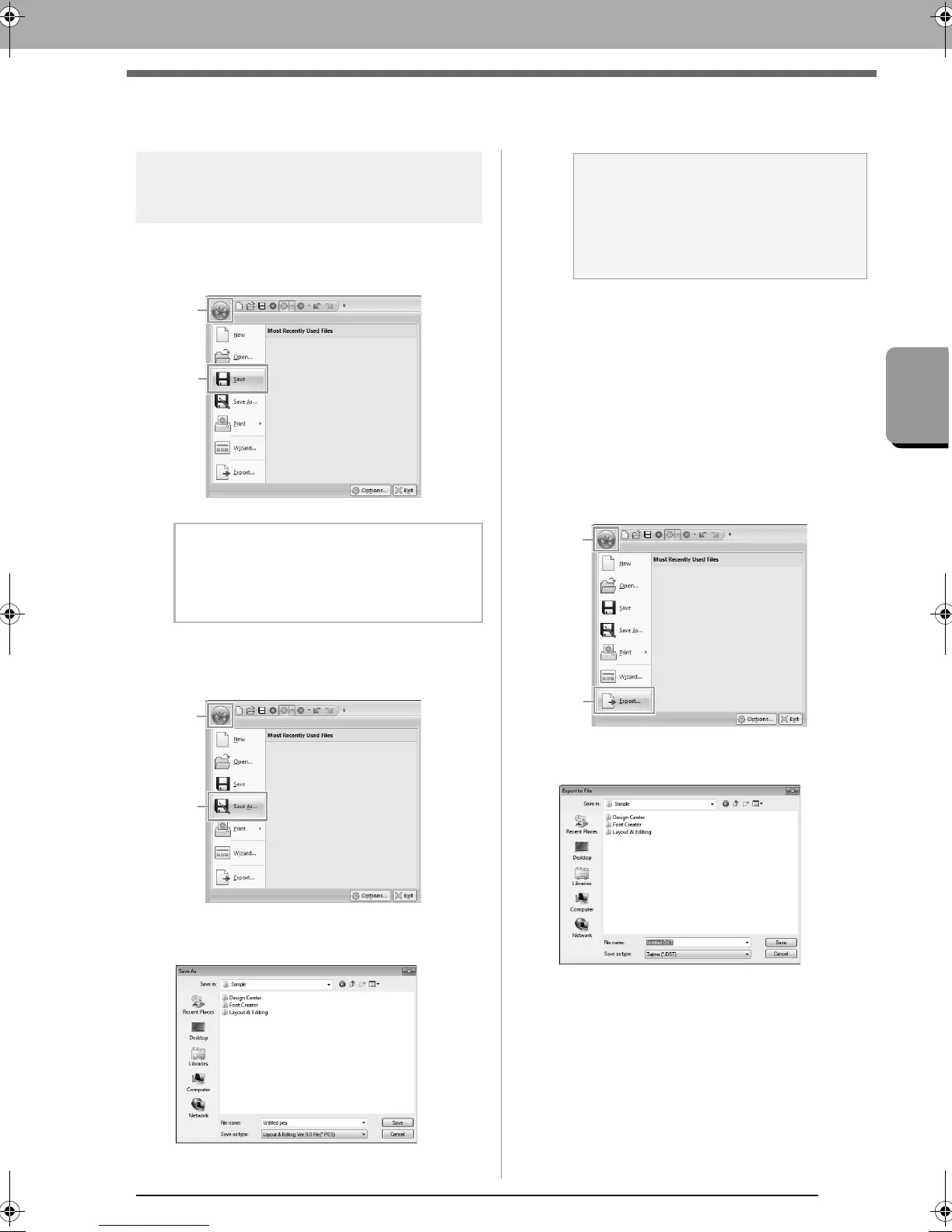
Click 1, then 2.
■ Saving with a new name
1. Click 1, then 2.
2. Select the drive and the folder, and then type
in the file name.
3. Click Save to save the data.
The new file name appears in the title bar
of the Layout & Editing window.
■ Outputting design in a different
format
The data shown in the Design Page can be exported
as a file of a different format (.dst, .hus, .exp, .pcs,
.vip, .sew, .jef, .csd, .xxx, and .shv).
1. Click 1, then 2
2. Select the drive and the folder, and then type
in the file name.
b Memo:
If no file name has been specified or if the file
cannot be found, the
Save As
dialog box
appears.
a Note:
If you select a file type of a previous software
version, saved .pes files can be opened with
that version of the software; however, all
saved designs will be converted to stitch
pattern.
XE8656-001.book Page 81 Monday, May 24, 2010 5:44 PM



 To Next Page
 Loading...


