237
Programmable Stitch Creator
Creating Motif Stitch Pattern
Creating Motif Stitch Pattern
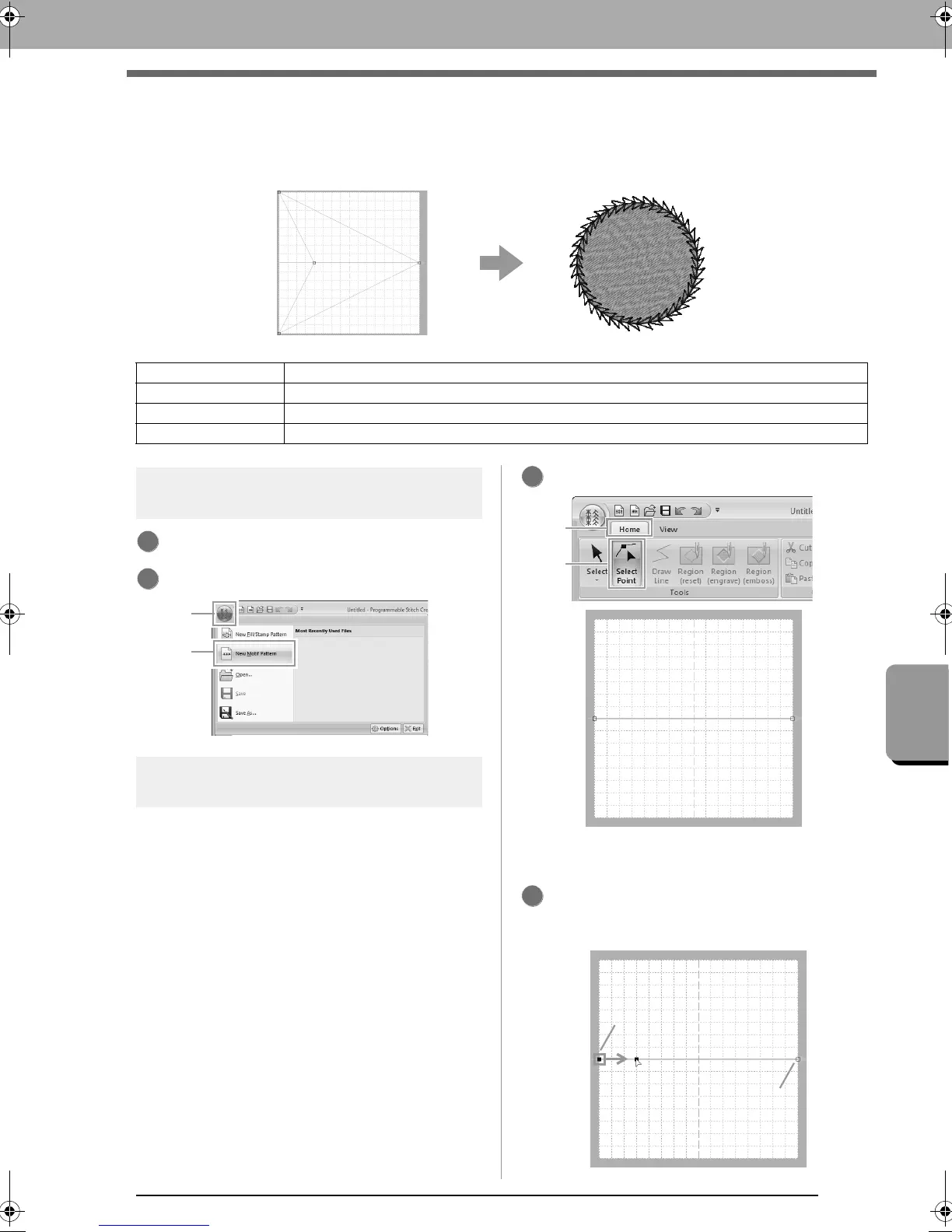
Now, we will create a new motif stitch pattern. Motif stitch patterns are created in Motif mode.
Step 1 Enter motif mode
Start up Programmable Stitch Creator.
Click 1, then 2.
Step 2 Shaping a single line to
create motif stitch pattern
In Motif mode, you can create original patterns by
changing the shape of a single line.
Click 1, then 2.
Select 0, then drag the point.
The line that moves turns green when moving
a point.
Step 1 Enter motif mode
Step 2 Shaping a single line to create motif stitch pattern
Step 3 Saving the created motif stitch pattern
Step 4 Using the edited motif stitch pattern in Layout & Editing
1
2
1
Blue square: Start point
Red square: End point
2
XE8656-001.book Page 237 Monday, May 24, 2010 5:44 PM



 To Next Page
 Loading...


