256
Selecting a Character and Preparing the Template
Selecting a Character and Preparing the
Template
Selecting the character to
be created
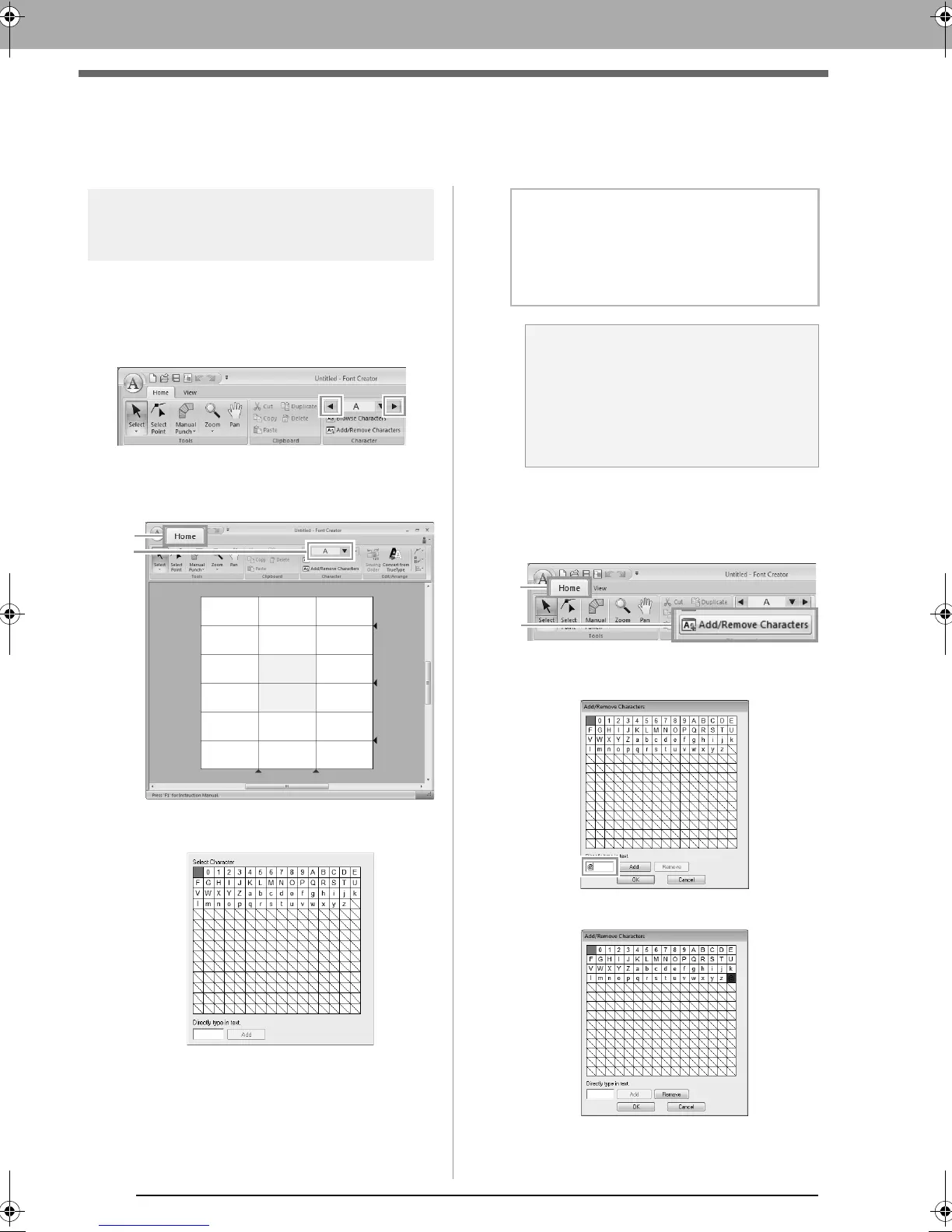
■ Selecting from the selector
Click the left or right arrow buttons of the Select
Character box to select a character before or after
the one that is currently displayed.
■ Selecting from a character list
1. Click 1, then Select Character box (2).
2. Click the character to be created.
■ Adding/deleting registered
characters
1. Click 1, then 2.
2. From the keyboard, enter the character to be
registered.
3. Click Add.
b Memo:
• Characters where pattern has already been
created appear with a blue background.
• The blank box in the upper-left corner is a
space. Click this box to select a space.
a Note:
If any part of the character pattern extends
off the Design Page when a different
character is selected, a message appears.
Before selecting a different character, edit
the character pattern so that no part extends
off the Design Page.
XE8656-001.book Page 256 Monday, May 24, 2010 5:44 PM



 To Next Page
 Loading...


