LAN settings
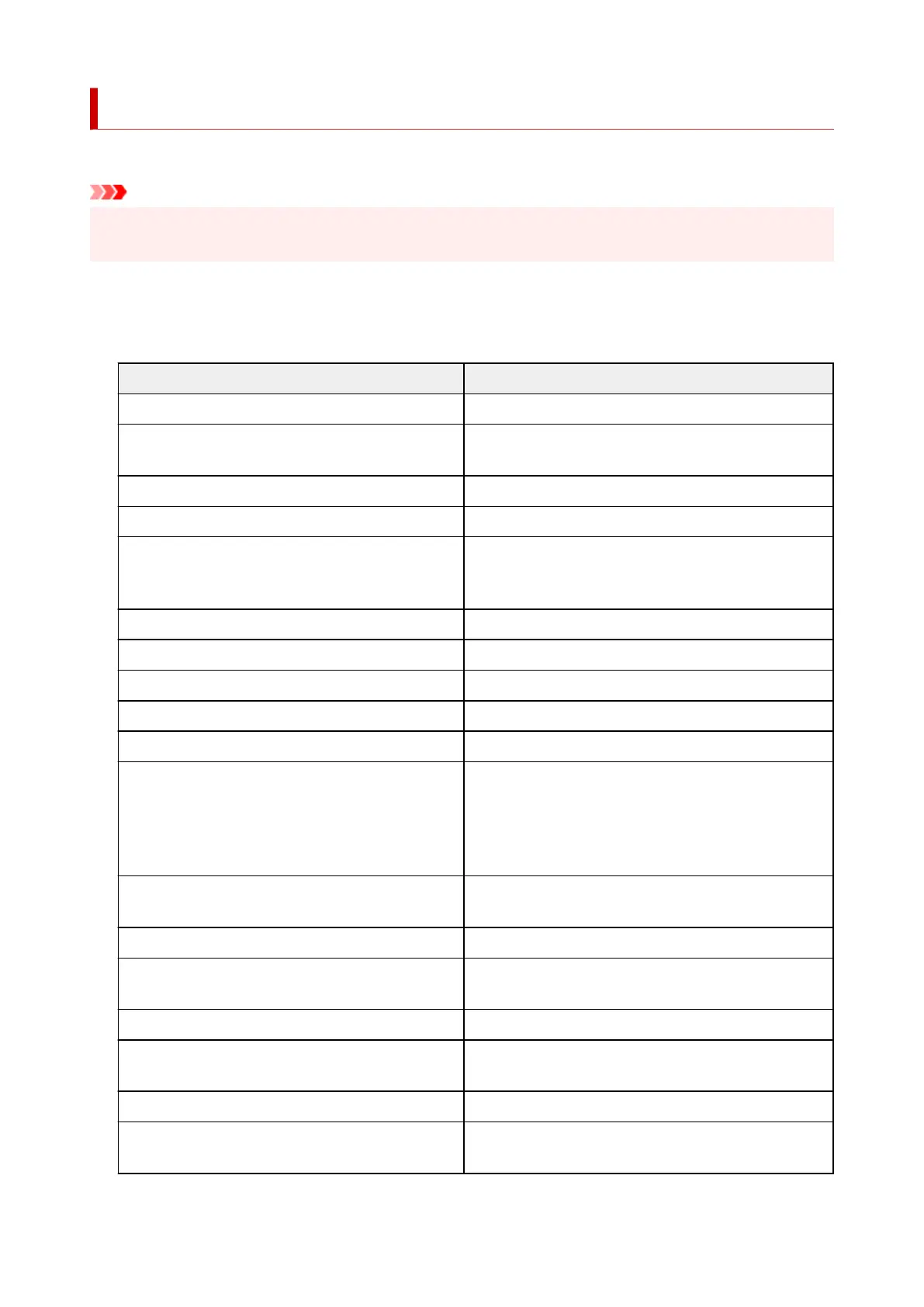
Select this setting item from HOME screen.
Important
• The administrator password is required to change settings if it is enabled for changing settings using the
operation panel.
• Wi-Fi•
The following setting information on the Wi-Fi connection is displayed. (Some items are not displayed
depending on printer settings.)
Items Setting
Connection Enable (connected) / Enabled (disconnected) / Disable
Network name (SSID) XXXXXXXXXXXXXXXX
XXXXXXXXXXXXXXXX (up to 32 characters)
Communication mode Infrastructure
Channel XX (up to 2 digits)
Wi-Fi security Disable / WEP (64 bit) / WEP (128 bit) / WPA-PSK
(TKIP) / WPA-PSK (AES) / WPA2-PSK (TKIP) / WPA2-
PSK (AES)
IPv4 address XXX. XXX. XXX. XXX (12 characters)
IPv4 subnet mask XXX. XXX. XXX. XXX (12 characters)
IPv4 default gateway XXX. XXX. XXX. XXX (12 characters)
IPv4 DNS dynamic settings Enable / Disable
IPv4 DNS host name XXXXXXXXXXXX
IPv4 DNS domain name XXXXXXXXXXXXX
XXXXXXXXXXXXX
XXXXXXXXXXXXX
XXXXXXXXXXXXX
XXXXXXXXXXXX (up to 64 characters)
IPv6 link-local address XXXX: XXXX: XXXX: XXXX:
XXXX: XXXX: XXXX: XXXX (32 characters)
IPv6 link-local prefix length XXX (up to 3 digits)
IPv6 manual address XXXX: XXXX: XXXX: XXXX:
XXXX: XXXX: XXXX: XXXX (32 characters)
IPv6 manual prefix length XXX (up to 3 digits)
IPv6 stateless address 1 XXXX: XXXX: XXXX: XXXX:
XXXX: XXXX: XXXX: XXXX (32 characters)
IPv6 stateless prefix length 1 XXX (up to 3 digits)
IPv6 stateless address 2 XXXX: XXXX: XXXX: XXXX:
XXXX: XXXX: XXXX: XXXX (32 characters)
241












 To Next Page