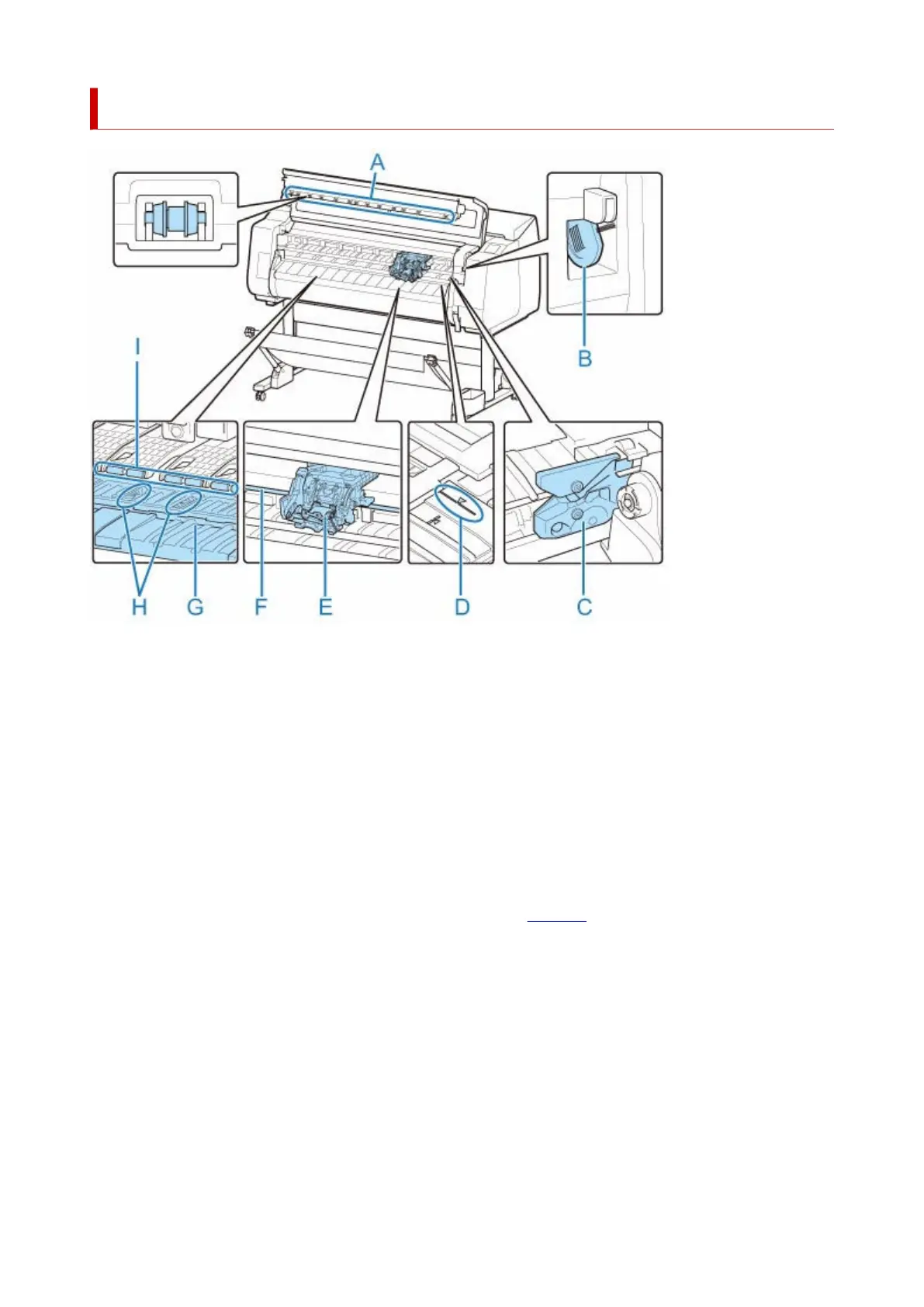
Top Cover (Inside)
(A) Top Cover Roller
Prevents paper from rising when ejected.
(B) Cleaning Brush
When cleaning inside the printer under the top cover, use this brush to sweep away paper dust on the
platen.
(C) Cutter Blade
A round-bladed cutter for automatic paper cutting.
(D) Paper Alignment Line
Align paper with this line when loading it.
(E) Carriage
Moves the print head. It serves a key role in printing. (See "Carriage.")
(F) Carriage Shaft
The Carriage slides along this shaft.
(G) Platen
The print head moves across the platen to print. Vacuum holes on the platen hold paper in place.
(H) Borderless Printing Ink Grooves
For catching ink outside the edges of paper during borderless printing.
(I) Paper Retainer
Important in supplying the paper. This retainer holds paper as it is fed.
47












 To Next Page