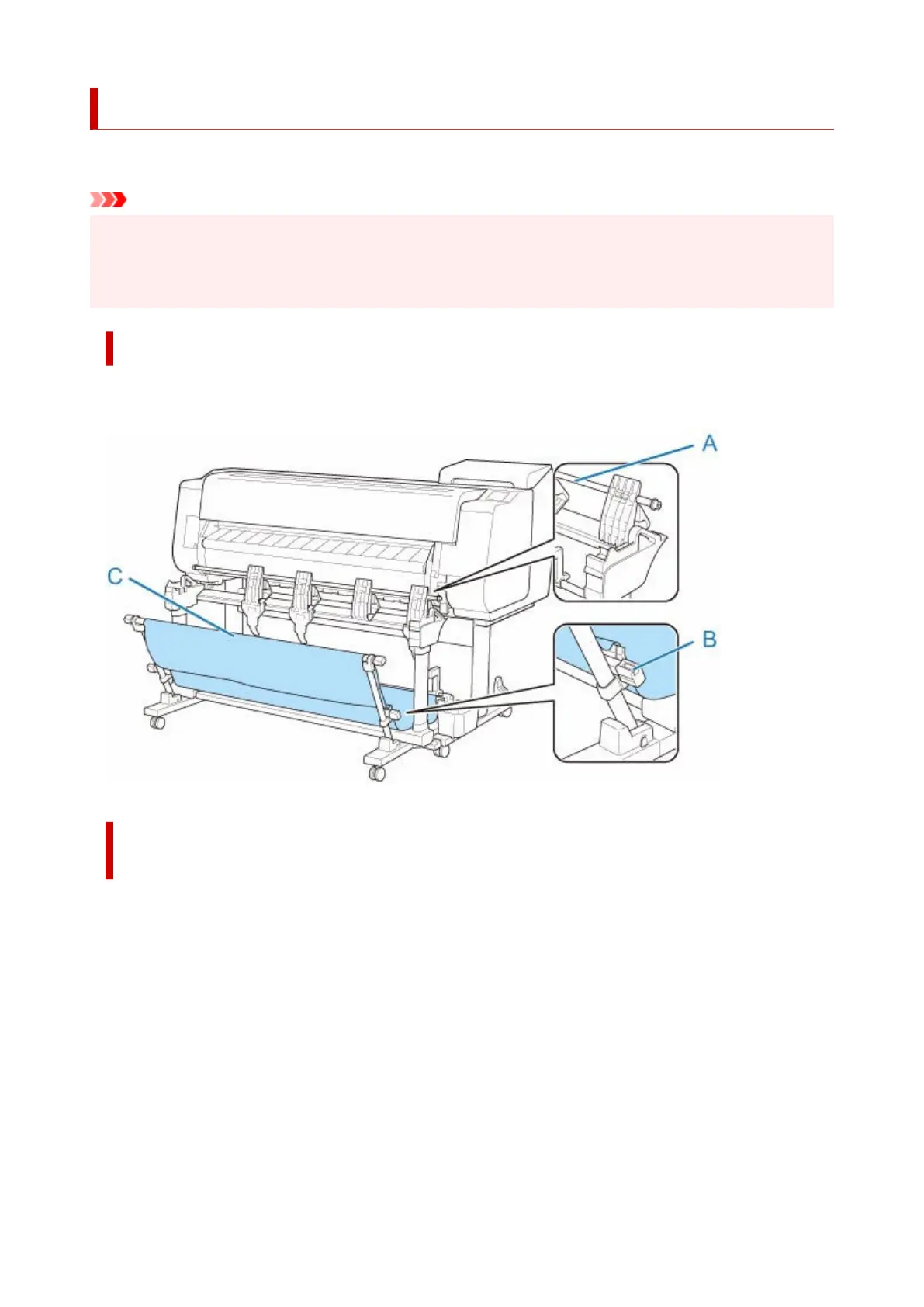
Example Stacker Configurations
The stacker is used by changing the position depending on the paper size of the printed materials.
Important
• Depending on the types of paper, it cannot be stacked in the Position 2, Position 3, or Position 4. In this•
case, use the Position 1.
• Depending on the printer model, the paper size may not be supported.•
Storing Printed Materials (Position 1)
Pull down the rod (fixed) (C) toward you. Set the rod (adjustable) in the groove (B) at the lower of the arm,
and then set the flapper (A) vertically so that the stacker configuration is the Position 1.
Stacking Printed Materials with ARCH E Portrait or A0 Portrait (Position
2)
• Supported paper size•
◦ 36"x48" (ARCH E) 36.00 x 48.00 inches (914.4 x 1219.2 mm)
◦ A0 33.11 x 46.81 inches (841.0 x 1189.0 mm)
Set the rod (adjustable) in the groove (B) at the upper of the stand, and then push down the rod (fixed) (C)
to the printer side. Then set the flapper (A) vertically so that the stacker configuration is the Position 2.
179












 To Next Page