CAPINTEC, INC. CAPRAC
®
-t
10-12 WIPE MEASUREMENT PROCEDURES April 2021
If a printer is attached to the system, the Wipe results can be printed by touching the PRINT
button.
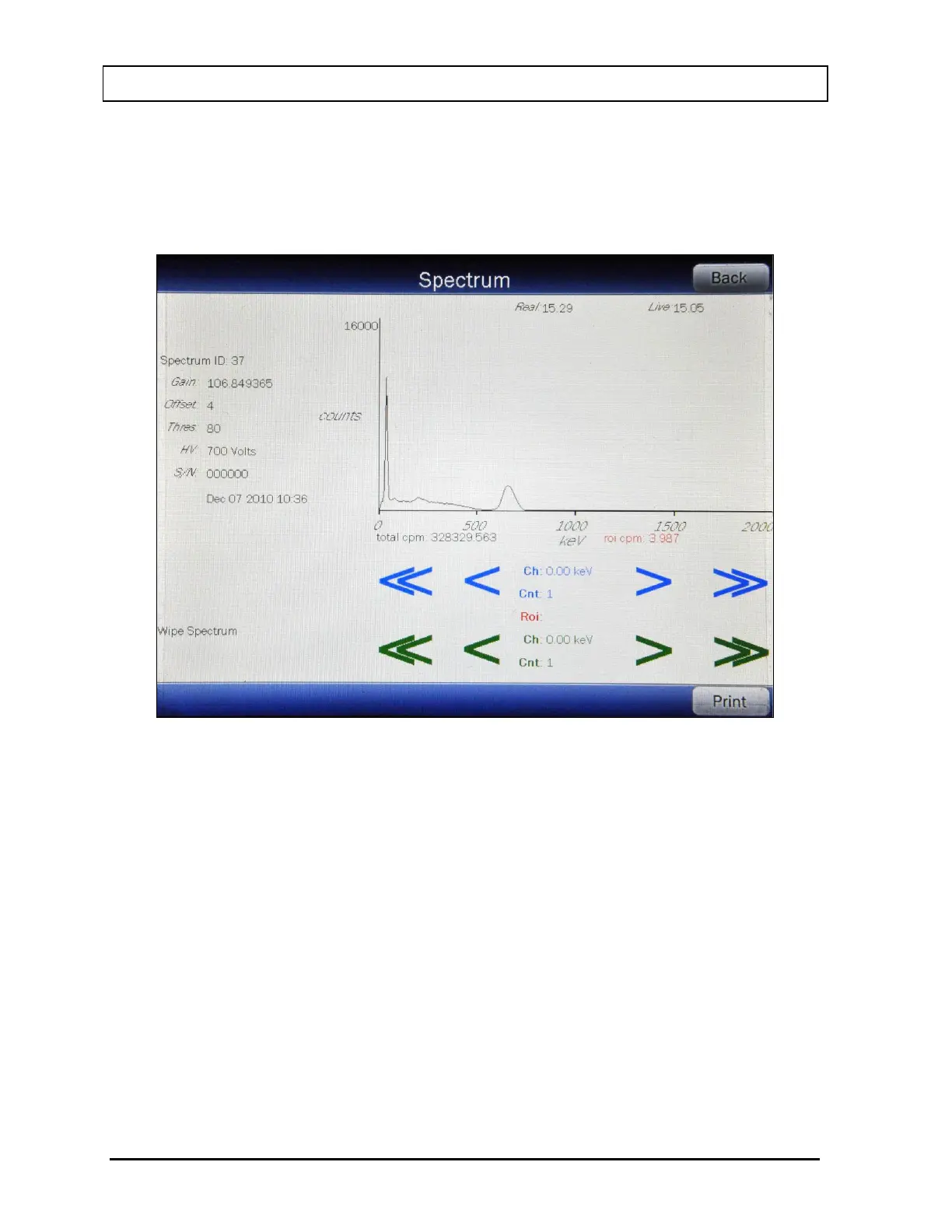
To view the spectrum of the measurement, touch the SPECTRUM button. Figure 10-10
Wipe Test Spectrum Screen will appear.
Figure 10-10 Wipe Test Spectrum Screen
A Region of Interest may be defined using the BLUE and GREEN ARROW buttons to place
vertical line cursors around the ROI. DOUBLE ARROW buttons move the cursor
approximately 75 energy channels. SINGLE ARROW buttons move the cursor approximately
7.5 energy channels.
Note: The actual energy channel keV will vary depending upon the Auto Calibration.
When the vertical cursor is moved, the channel energy (keV) and the number of counts in
that energy channel are displayed. Once the vertical cursors are set, the total counts in the
ROI are displayed.
To print the spectrum, touch the PRINT button.
To view the spectrum of the saved background, touch the highlighted Background: field
box. The screen will appear similar to that shown in Figure 10-10 Wipe Test Spectrum
Screen. The operation of the ARROW buttons is the same as described above.



 To Next Page