Appendix B VSD Parameters
B-5
The Direction Arrow indicates the commanded direction of rotation. If the Arrow is flashing,
the drive has been commanded to change direction, but is still decelerating.
Sleep Mode Indication: flashes to indicate that the drive is in sleep mode.
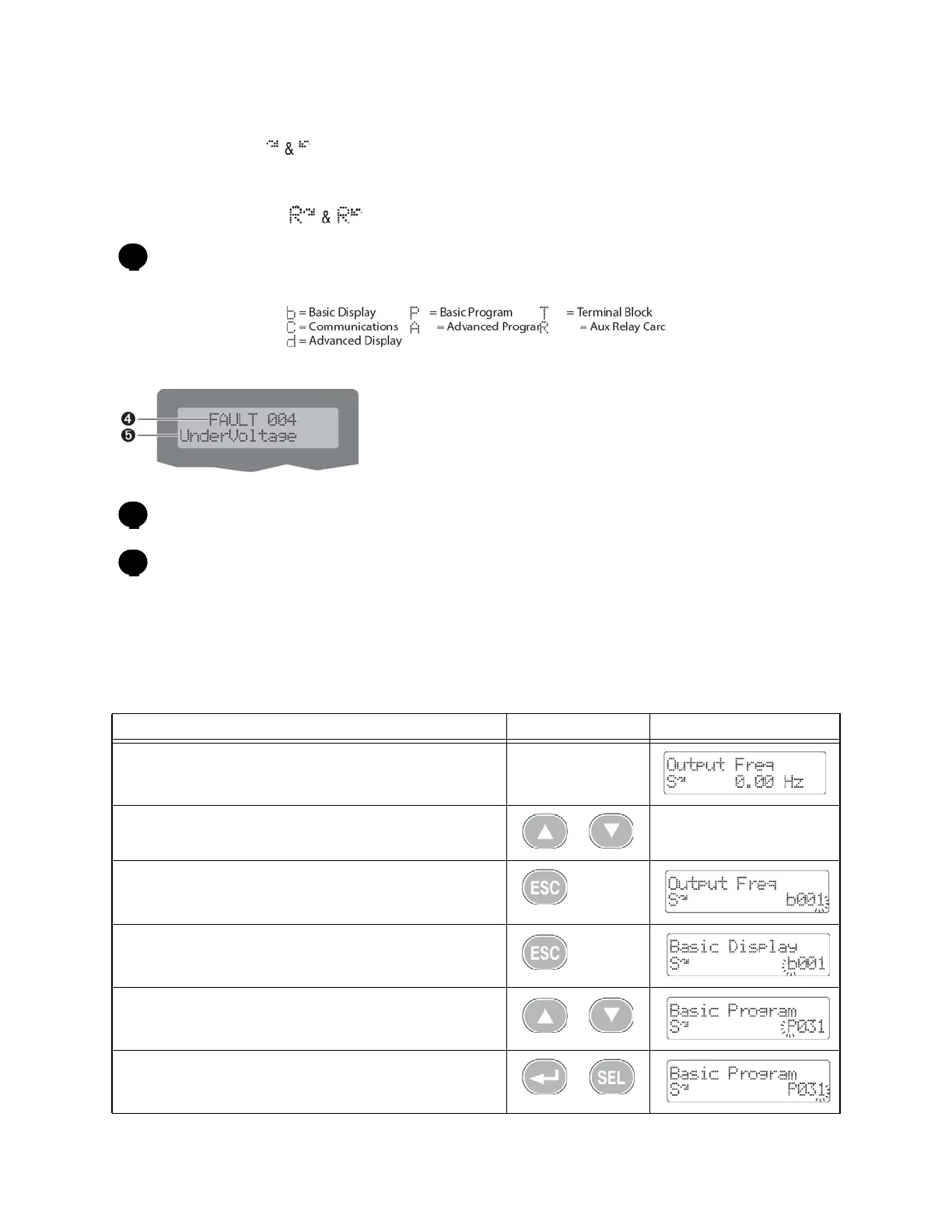
Parameter Group and Number:
Fault Indication and Fault Number
Fault Name
B.4 Viewing and Editing Drive Parameters - PF 400
Editing VSD Parameters - PF 400
Step Key(s) Example Displays
1. When power is applied, the last user-selected Basic Display Group
parameter number is displayed with flashing characters. The display
then defaults to that parameter’s current value. (Example shows the
value of b001 [Output Freq] with the drive stopped.)
2. Press the Up Arrow or Down Arrow to scroll through the Basic Dis-
play Group parameters. (Only in Display Groups)
3. Press Esc once to display the Basic Display Group parameter number
shown on power-up. The parameter number will flash.
4. Press Esc again to enter the group menu. The group menu letter will
flash.
5. Press the Up Arrow or Down Arrow to scroll through the group menu
(b, P, T, C, A and d).
6. Press Enter or Sel to enter a group. The right digit of the last viewed
parameter in that group will flash.
3
4
5



 To Next Page