Appendix B VSD Parameters
B-10
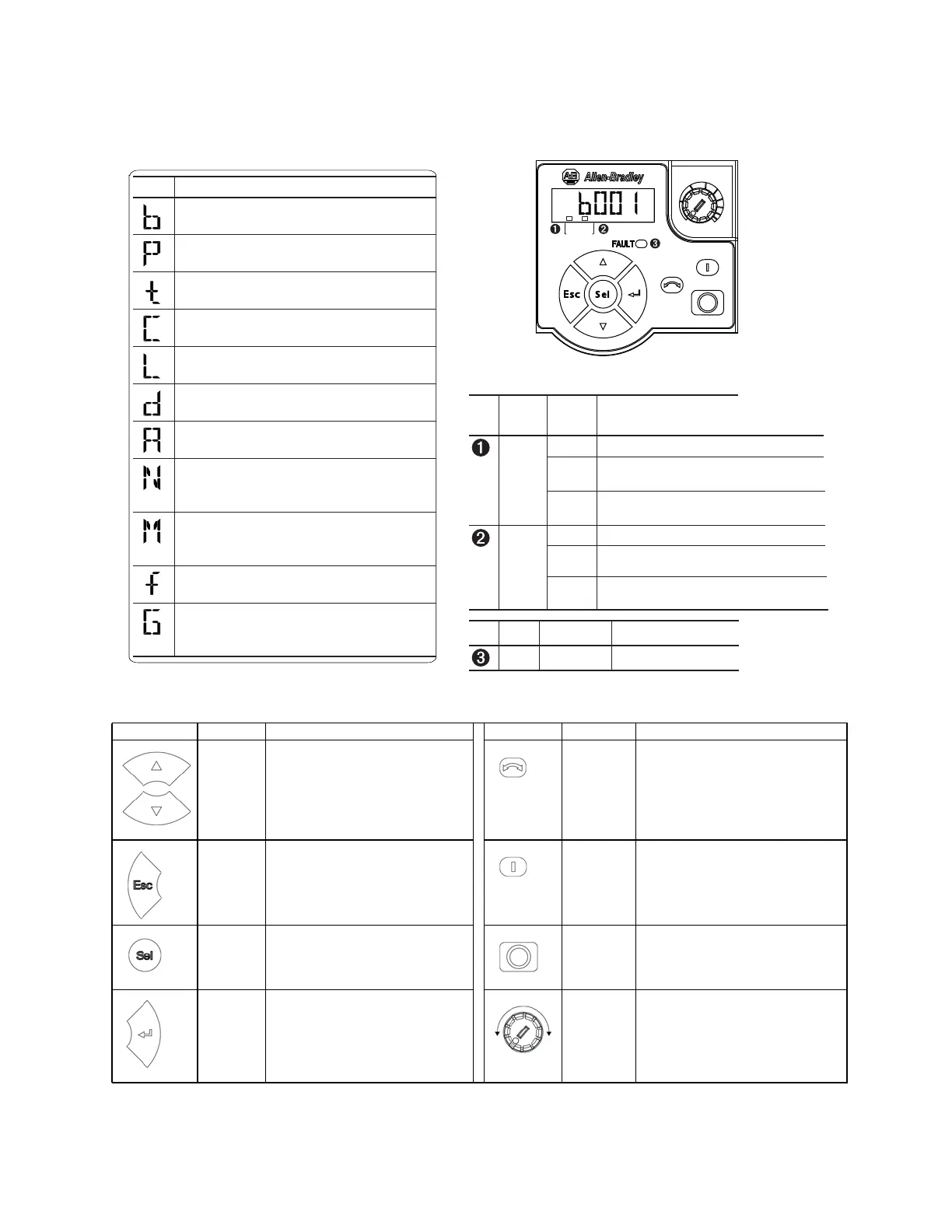
B.6 PF 525 Display, Control, and Navigation Keys
Key Name Description Key Name Description
Up Arrow
Down Arrow
Scroll through user-selectable display
parameters or groups.
Increment values.
Reverse Used to reverse direction of the drive.
Default is active.
Controlled by parameters P046, P048, and
P050 [Start Source x] and A544 [Reverse
Disable].
Escape Back one step in programming menu.
Cancel a change to a parameter value and
exit Program Mode
Start Used to start the drive. Default is active.
Controlled by parameters P046, P048, and
P050 [Start Source x].
Select Advance one step in programming menu.
Select a digit when viewing parameter
value.
Stop Used to stop the drive or clear a fault. This
key is always active.
Controlled by parameter P045 [Stop Mode].
Enter Advance one step in programming menu.
Save a change to a parameter value.
Potentiometer Used to control speed of drive. Default is
active.
Controlled by parameters P047, P049, and
P051 [Speed Reference x].
Menu Parameter Group and Description
Basic Display
Commonly viewed drive operating conditions.
Basic Program
Commonly used programmable functions.
Terminal Blocks
Programmable terminal functions.
Communications
Programmable communication functions.
Logic (PowerFlex 525 only)
Programmable logic functions.
Advanced Display
Advanced drive operating conditions.
Advanced Program
Remaining programmable functions.
Network
Network functions that are shown only
when a comm
card is used.
Modified
Functions from the other groups with values
changed
from default.
Fault and Diagnostic
Consists of
list of codes for specific faults.
AppView and CustomView
Functions from the other groups organized for
specific
applications.
F
W
D
ENET LINK
EtherNet/IP
PowerFlex 525 Embedded EtherNet/IP Indicators
No. Display
Display
State Description
ENET Off Adapter is not connected to
the network.
Steady Adapter is connected to the
network and drive is
controlled through Ethernet.
Flashing Adapter is connected to the
network but drive is not
controlled through Ethernet.
LINK Off Adapter is not connected to
the network.
Steady Adapter is connected to the
network but not transmitting
data.
Flashing Adapter is connected to the
network and transmitting
data.
No. LED LED State Description
FAULT Flashing Red Indicates drive is faulted.



 To Next Page