Appendix B VSD Parameters
B-11
B.7 Viewing and Editing Drive Parameters - PF 525
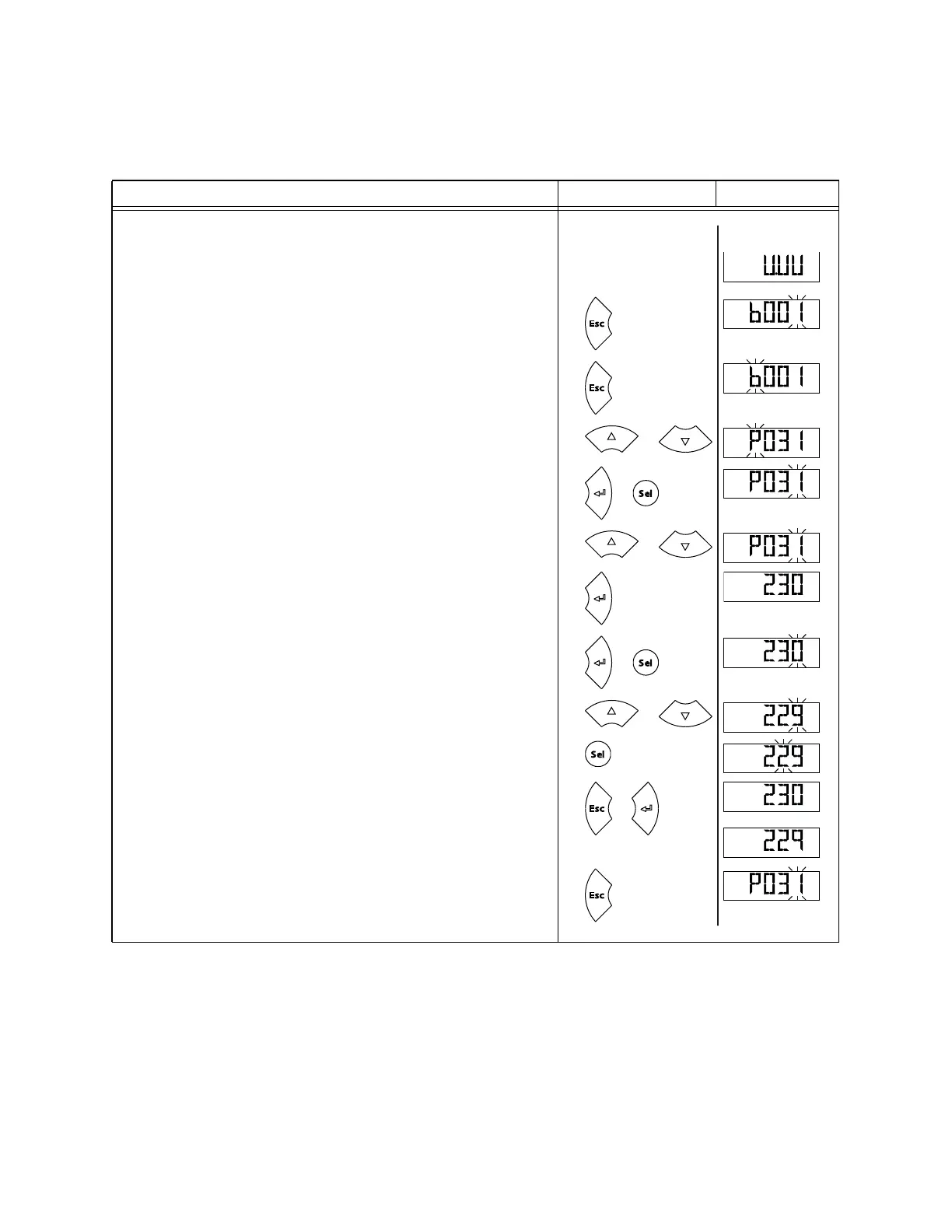
Editing VSD Parameters - PF 525
Step Key(s) Example Displays
1. When power is applied, the last user-selected Basic Display Group parameter
number is briefly displayed with flashing characters. The display then defaults
to that parameter’s current value. (Example shows the value of b001 [Output
Freq] with the drive stopped.)
2. Press Esc to display the Basic Display Group parameter number shown on
power-up. The parameter number will flash.
3. Press Esc to enter the parameter group list. The parameter group letter will
flash.
4. Press the Up Arrow or Down Arrow to scroll through the group list (b, P, t, C, L,
d, A, f and Gx).
5. Press Enter or Sel to enter a group. The right digit of the last viewed parameter
in that group will flash.
6. Press the Up Arrow or Down Arrow to scroll through the parameter list.
7. Press Enter to view the value of the parameter.
Or
Press Esc to return to the parameter list.
8. Press Enter or Sel to enter Program Mode and edit the value. The right digit
will flash and the word Program on the LCD display will light up.
9. Press the Up Arrow or Down Arrow to change the parameter value.
10. If desired, press Sel to move from digit to digit or bit to bit. The digit or bit
that you can change will flash.
11. Press Esc to cancel a change and exit Program Mode.
Or
Press Enter to save a change and exit Program Mode. The digit will stop
flashing and the word Program on the LCD display will turn off.
12. Press Esc to return to the parameter list. Continue to press Esc to back out of
the programming menu.If pressing Esc does not change the display, then
b001 [Output Freq] is displayed. Press Enter or Sel to enter the group list
again.
–
H
ER
T
Z
F
W
D
F
W
D
F
W
D
or
F
W
D
or
F
W
D
or
F
W
D
VOLT S
F
W
D
or
PROGR
A
M
VOLT S
F
W
D
or
PROGR
A
M
VOLT S
F
W
D
PROGR
A
M
VOLT S
F
W
D
or
VOLT S
F
W
D
VOLT S
F
W
D
or
F
W
D



 To Next Page