Section 4 — Commissioning
4-6 Part No. 750-363
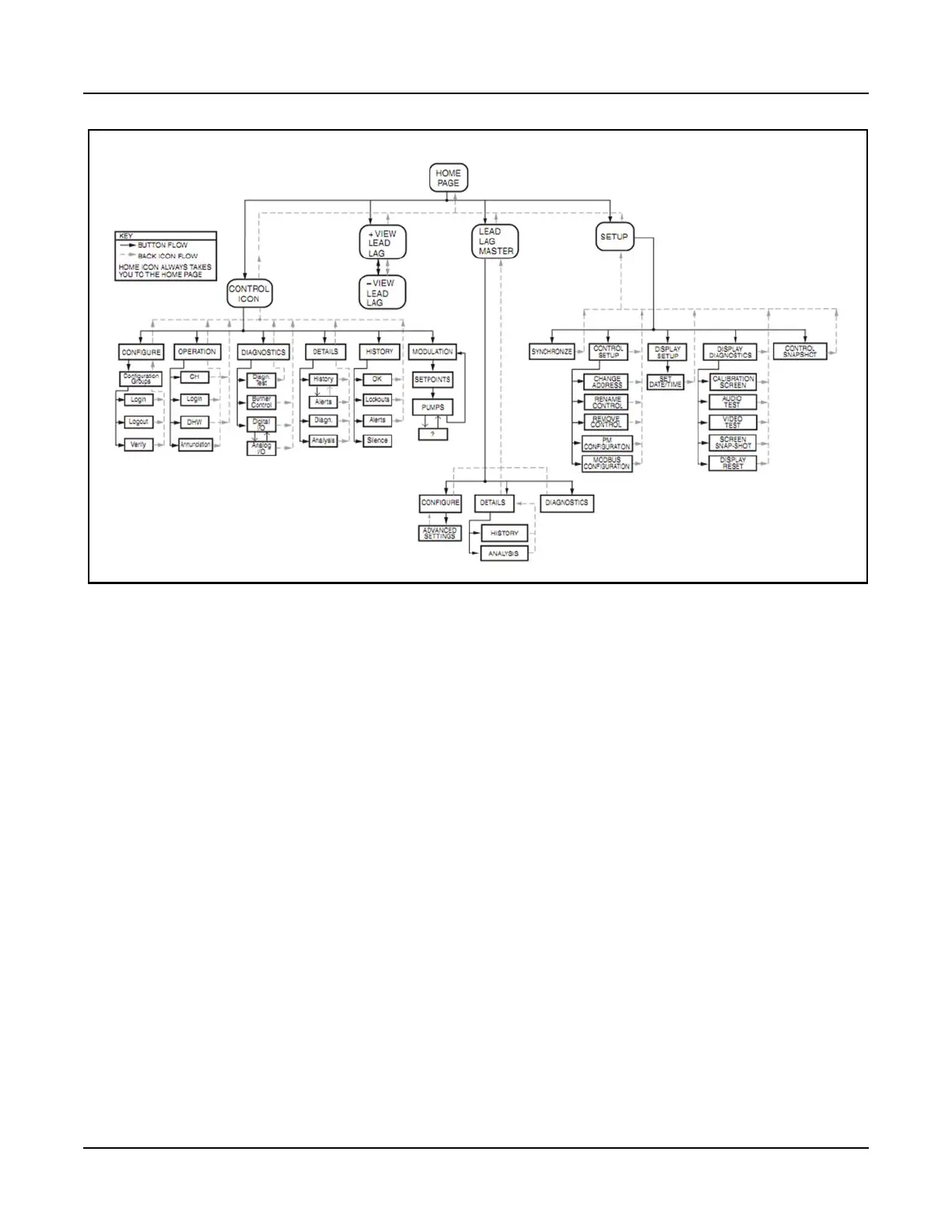
Figure 4-5 Falcon Display/Interface page flow
4.5.4 Lockouts, Holds, and Alerts
To assist in monitoring boiler operation, the Falcon control system employs messages of three types:
Lockouts, Holds, and Alerts.
• Lockouts and Holds indicate interruptions in boiler operation, whether occurring as part of the normal
operating sequence or due to an abnormal condition. Lockouts require a manual reset to continue operation,
while Holds do not. A Hold will automatically clear when the hold condition is removed or satisfied.
The 15 most recent Lockouts are stored in Falcon memory and may be accessed through the Lockout
History. Holds are not logged in memory.
Note: Before attempting to restart the boiler after a Lockout, identify and correct the Lockout condition.
• Alerts indicate conditions or events which, while not preventing boiler operation, may nevertheless be of
interest in evaluating boiler performance or operating conditions. Examples include certain operator actions,
out-of-range configuration data, controller internal status reports (e.g. timers, counters, memory read/write
activity), and recycle events. Alerts require no operator acknowledgment and are for informational purposes
only.
The most recently occurring message (Lockout, Hold, or Alert) is displayed in the alarm banner on the
Status screen (see Figure 4-6). Press this banner to access the Alert or Lockout History, where a list of the
most recently occurring Alerts/Lockouts can be viewed.


 To Next Page