Section 4 — Commissioning
Part No. 750-363 4-15
4.10.8 Setting Combustion
Note: A Combustion Analyzer is required to properly set up the Model CFLC burner. Do not attempt to fire
and adjust the burner without this equipment.
Note: Ensure boiler is filled with water prior to burner startup.
The burner does not have need of linkages for fuel/air adjustment, nor is a separate manual-auto switch
provided for burner positioning. All firing rate adjustments are accomplished via the Falcon Control. Setting
combustion will require manually modulating the burner via the Falcon from low fire to high fire two or more
times to ensure a consistent air/fuel ratio.
NOTE: Install the combustion analyzer
probe as close as possible to the boiler vent
connection. Sampling too far from the
boiler vent can produce false readings due
to air diluting the flue gas.
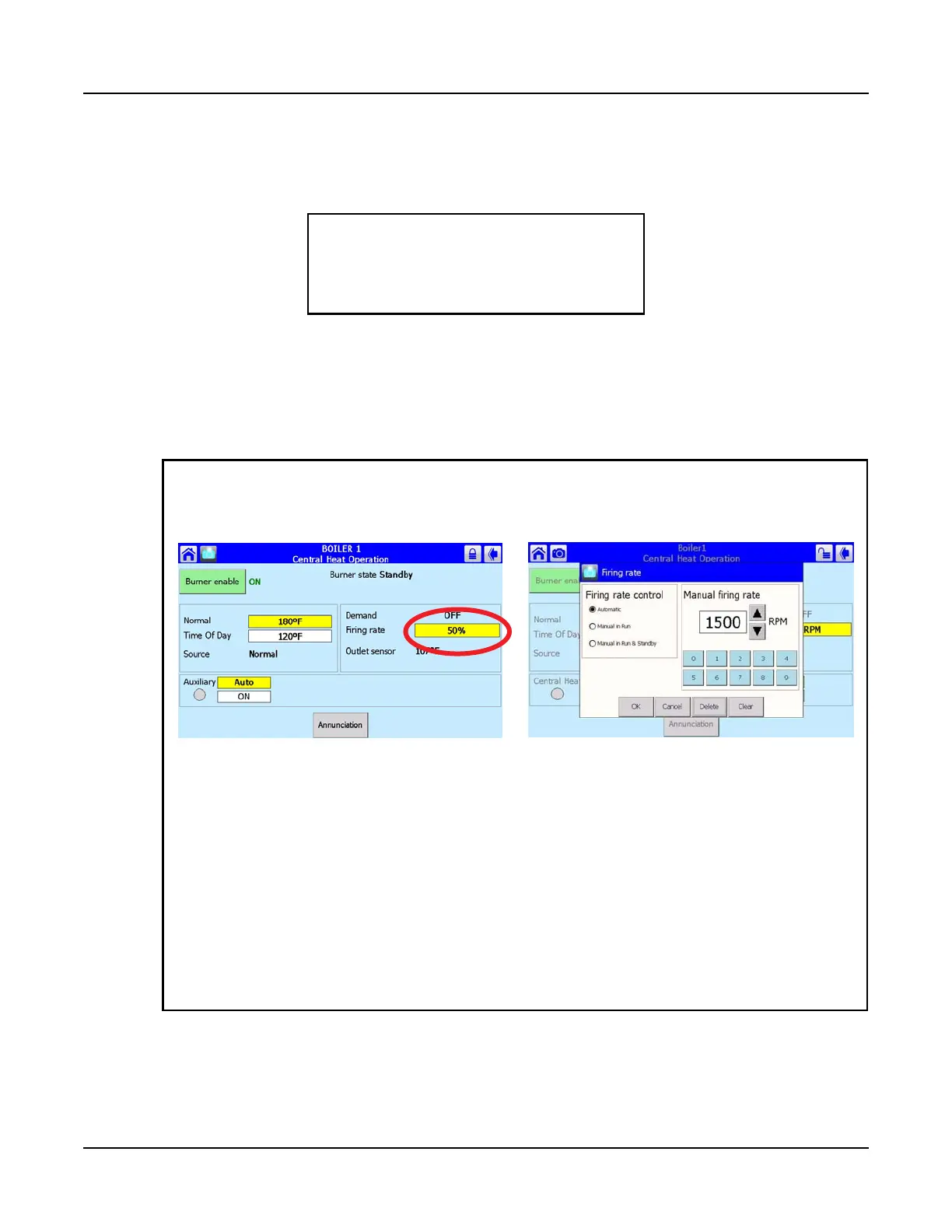
1. On the Falcon Operation screen, press the Fir-
ing rate display.
2. A numeric keypad will appear,
showing the current firing rate.
3. Press <Clear> to clear the current value.
4. Enter the desired RPM setting using the numeric
keypad.
5. Press <OK>. The display will return to the Opera-
tion screen and the burner will modulate to the cho-
sen firing rate.
Manual Modulation - use the procedure below to change the burner firing rate manually.



 To Next Page