Section 4 — Commissioning
Part No. 750-363 4-9
4.6.2 Program Module
Falcon parameter information (non-safety parameters only) can be uploaded/
downloaded using the optional Program Module (PIM). When the Program
Module is installed, its features are accessible from the Falcon Setup page.
Starting from the Home page, press <SETUP>, then <PROGRAM MODULE>.
4.7 VARIABLE SPEED DRIVE SETTINGS
The Variable Speed Drive is pre-configured at the factory. Should it become necessary to change the drive’s
configuration, VSD parameters can be viewed and changed using the drive’s integral keypad/display. See
APPENDIX B - Variable Speed Drive Parameters for parameter list; if necessary refer also to the
appropriate Allen-Bradley PowerFlex user manual.
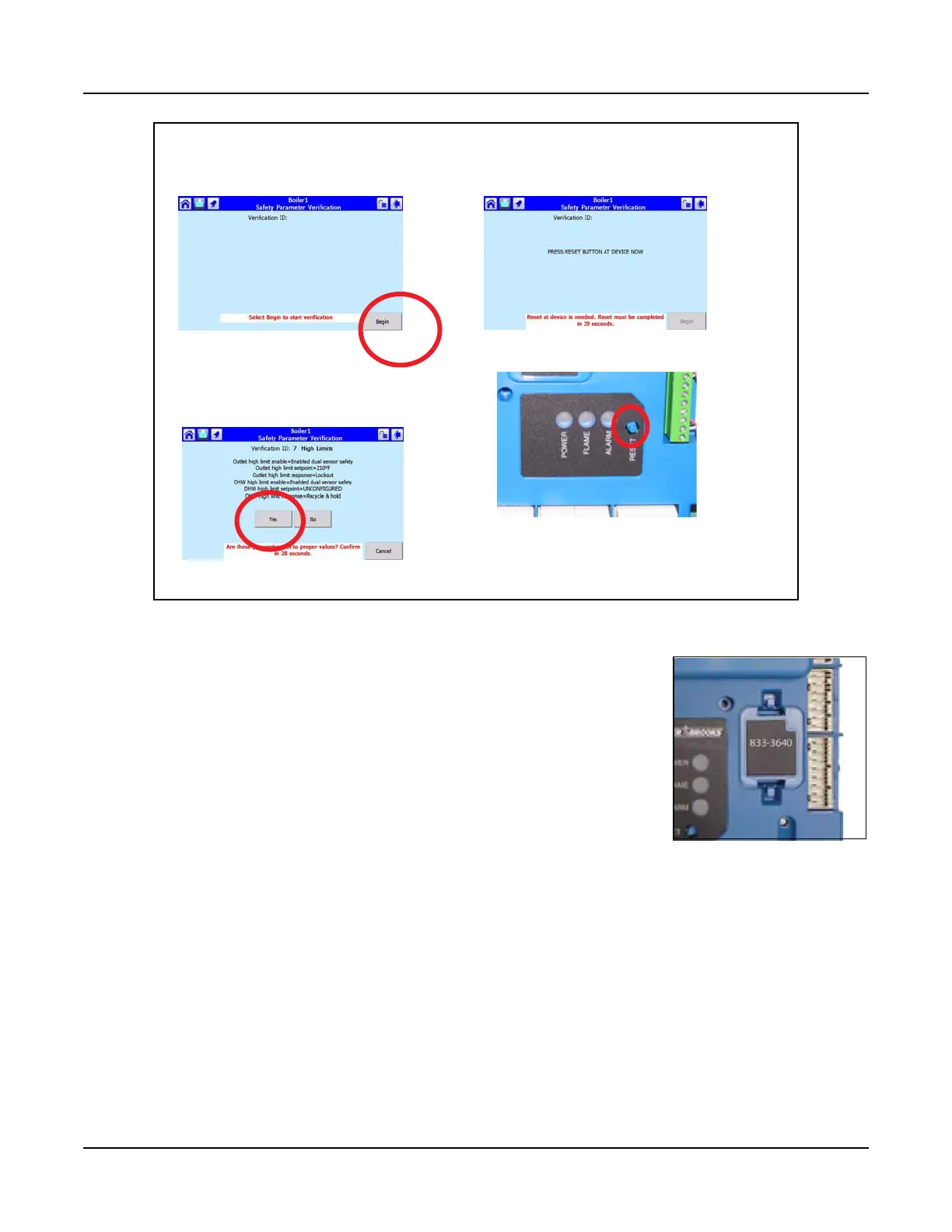
1. Press <Begin>
2. Press <Yes>
3. Reset Falcon
Confirming Safety Parameter changes
Figure 4-8 PIM



 To Next Page