ConfiguringClientQoS
D-Link UnifiedAccessPointAdministrator’sGuide
November2011 Page176
UnifiedAccessPointAdministrator’sGuide
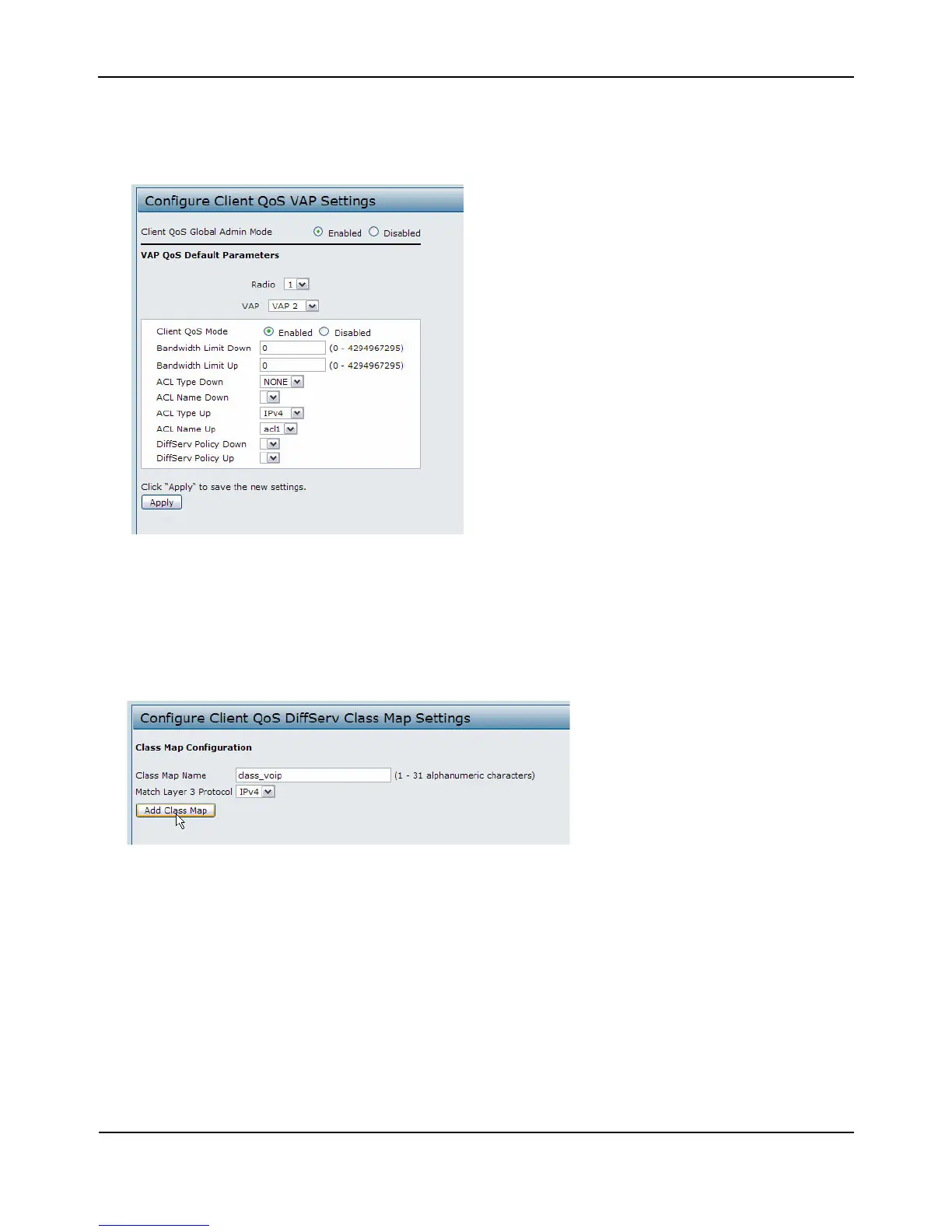
14. FromtheACLTypeUpmenu,selectIPv4.
15. FromtheACLNameUpmenu,selectacl1.
16. ClickApplytoupdatetheAPwiththeQoSsettings.
DiffServConfiguration
1. LogontotheAPandnavigatetotheClientQoS>ClassMappage.
2. Enterclass_voipintheClassMapNamefieldandclickAddClassMap.
Thepagerefreshesandadditionalfieldsappear.
3. SelecttheMatchEveryoptiontoindicatethatallmatchcriteriadefinedfortheclassmust
besatisfiedin
orderforapack ettobeconsideredamatch.
4. SelectProtocol,andthenselectUDPfromtheSelectFromListfieldtodefineUDPasamatchcriteria.
5. SelectSourceIPAddressandenterthefollowinginformation:
• Address:192.168.1.0
•SourceIPMask:255.255.255.0
6. SelecttheDestinationIP
AddressoptionandenterthefollowinginformationfortheVoIPserver:
• Address:192.168.2.200




 To Next Page