VirtualAccessPointSettings
D-Link UnifiedAccessPointAdministrator’sGuide
November2011 Page71
UnifiedAccessPointAdministrator’sGuide
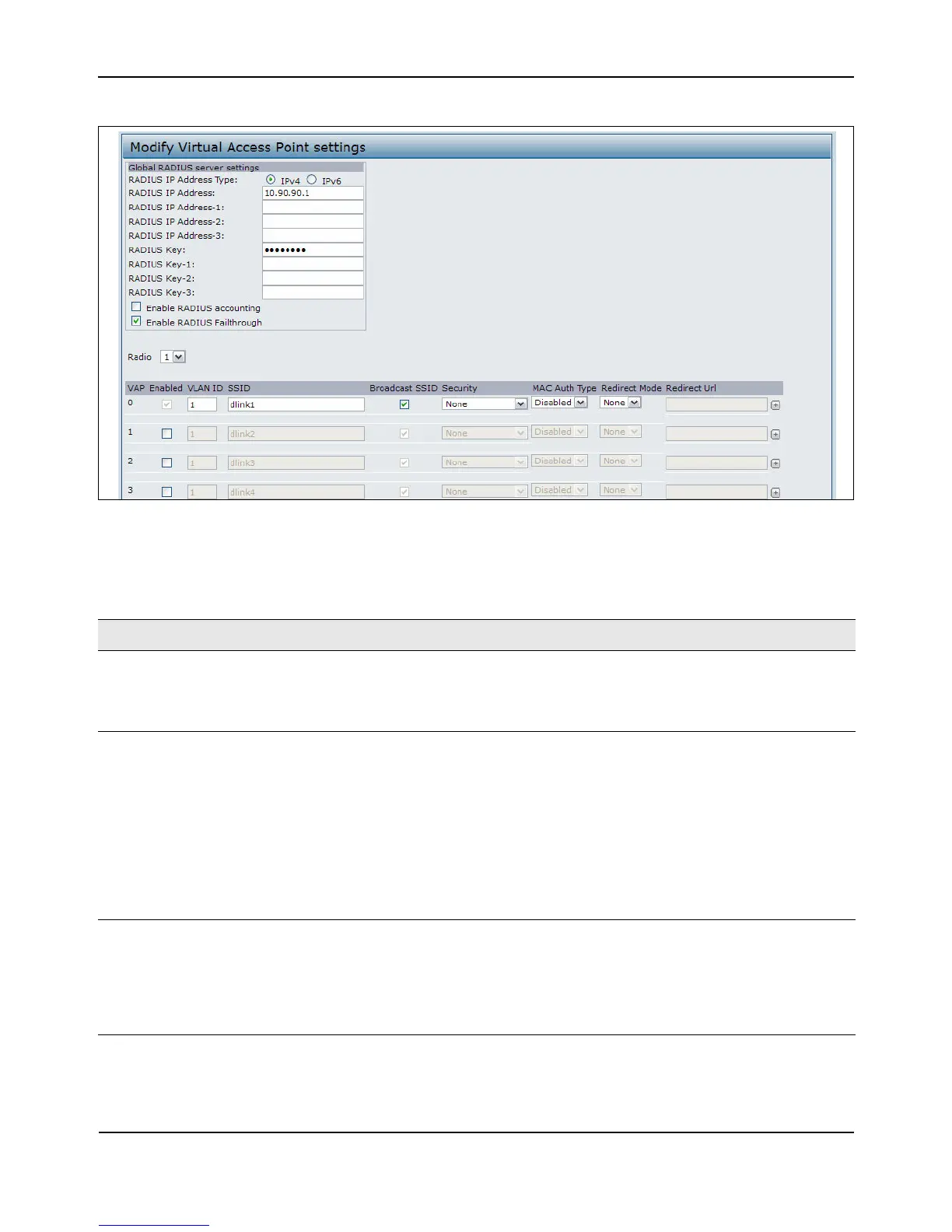
Figure20:SettingUpVirtualAccessPoints
Table22describesthefieldsandconfigurationoptionsontheVAPpage.
Table22:VirtualAccessPointSettings
Field Description
RADIUSIPAddress
Type
SpecifytheIPversionthattheRADIUSserveruses.
YoucantogglebetweentheaddresstypestoconfigureIPv4andIPv6globalRADIUS
addresssettings,buttheAPcontactsonlytheRADIUSserverorserversfortheaddress
typeyouselectinthisfield.
RADIUSIPAddress
RADIUS
IPv6
Address
EntertheIPv4orIPv6addressfortheprimaryglobalRADIUSserver.Bydefault,eachVAP
usestheglobalRADIUSsettingsthatyoudefinefortheAPatthetopoftheVAPpage.
WhenthefirstwirelessclienttriestoauthenticatewiththeAP,theAPsendsan
authenticationrequesttotheprimaryserver.Iftheprimaryserverrespondstothe
authenticationrequest,theAPcontinuestousethisRADIUSserverastheprimaryserver,
andauthenticationrequestsaresenttotheaddressyouspecify.
IftheIPv4RADIUSIPAddressTypeoptionisselectedintheprevious
field,entertheIP
addressoftheRADIUSserverthatallVAPsusebydefault,forexample192.168.10.23.If
theIPv6RADIUSIPAddressTypeoptionisselected,entertheIPv6addressoftheprimary
globalRADIUSserver,forexample2001:0db8:1234::abcd.
RADIUSIPorIPv6
Address1–3
Enterupto
threeIPv4orIPv6addressestouseasthebackupRADIUSservers.Thefield
labelisRADIUSIPAddresswhentheIPv4RADIUSIPAddressTypeoptionisselectedand
RADIUSIPv6AddresswhentheIPv6RADIUSIPAddressTypeoptionisselected.
Ifauthenticationfailswiththeprimaryserver,each
configuredbackupserveristriedin
sequence.TheIPv4orIPv6addressmustbevalidinorderfortheAPtoattemptto
contacttheserver.














 To Next Page