RPMCITF RI IC
REMOTE
TERMINAL
DATA
MODEM
SIGNALS
MODEM
8031
xr-..." SCP 1(AIDli;
FS-12757
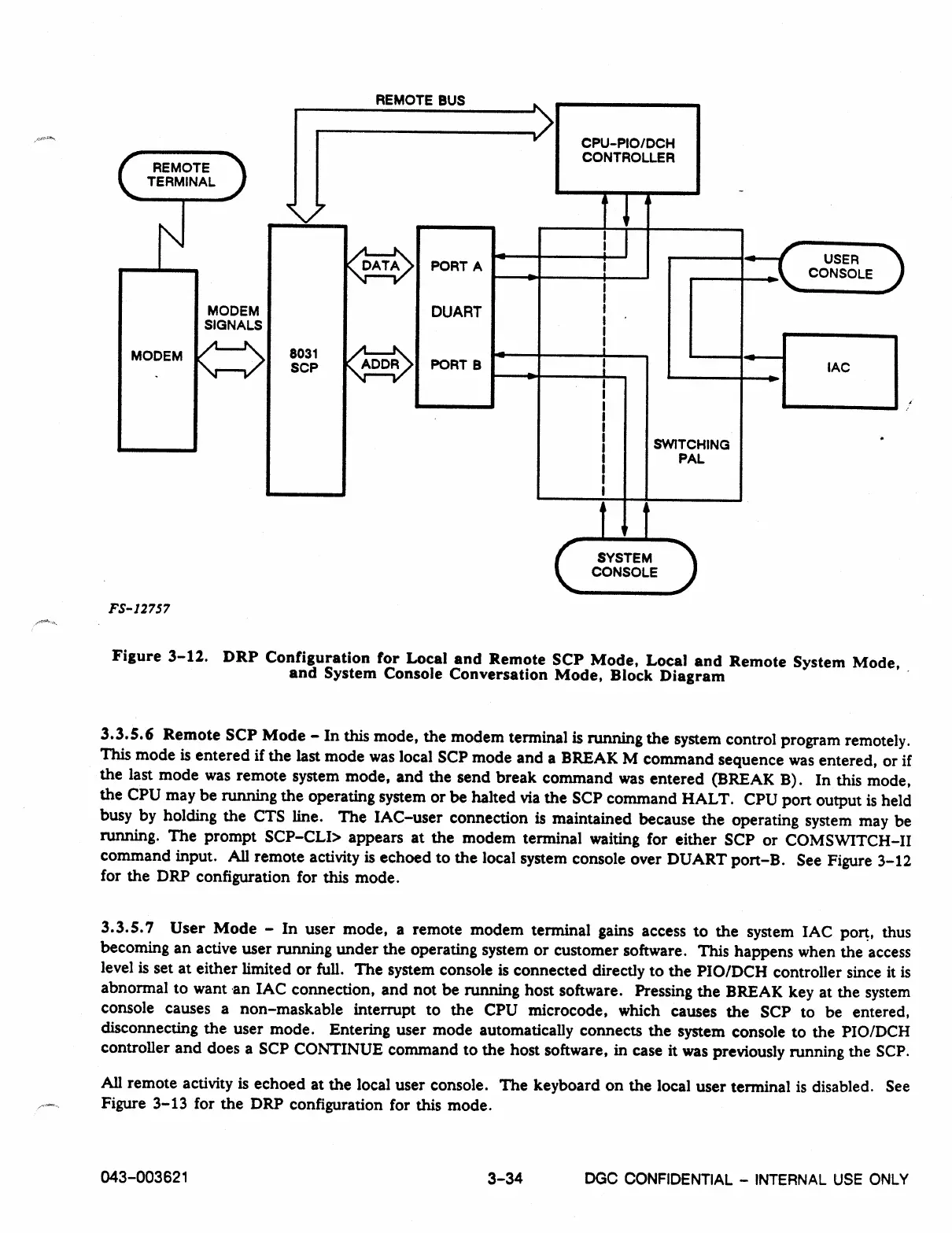
Figure 3-12. DRP Configuration for Local and Remote SCP Mode, Local and Remote System Mode,
and System Console Conversation Mode, Block Diagram
3.3.5.6 Remote SCP Mode - In this mode, the modem terminal is running the system control program remotely.
This mode is entered if the last mode was local SCP mode and a BREAK M command sequence was entered, or if
the last mode was remote system mode, and the send break command was entered (BREAK B). In this mode,
the CPU may be running the operating system or be halted via the SCP command HALT. CPU port output is held
busy by holding the CTS line. The IAC-user connection is maintained because the operating system may be
running. The prompt SCP-CLI> appears at the modem terminal waiting for either SCP or COMSWITCH-II
command input. All remote activity is echoed to the local system console over DUART port-B. See Figure 3-12
for the DRP configuration for this mode.
3.3.5.7 User Mode - In user mode, a remote modem terminal gains access to the system IAC port, thus
becoming an active user running under the operating system or customer software. This happens when the access
level is set at either limited or full. The system console is connected directly to the PIO/DCH controller since it is
abnormal to want an IAC connection, and not be running host software. Pressing the BREAK key at the system
console causes a non-maskable interrupt to the CPU microcode, which causes the SCP to be entered,
disconnecting the user mode. Entering user mode automatically connects the system console to the PIO/DCH
controller and does a SCP CONTINUE command to the host software, in case it was previously running the SCP.
All remote activity is echoed at the local user console. The keyboard on the local user terminal is disabled. See
Figure 3-13 for the DRP configuration for this mode.
043-003621
3-34
DGC CONFIDENTIAL - INTERNAL USE ONLY



 To Next Page