Set Up Your Channel Plan First
Before launching a measurement with the DS2831, it is recommended to set up the channel plan you wish
to use for testing. You can do this from the Channel Plan Editor (press CH below the screen).
For detailed instructions on channel plan creation and setup, see Chapter 4: Channel Plans.
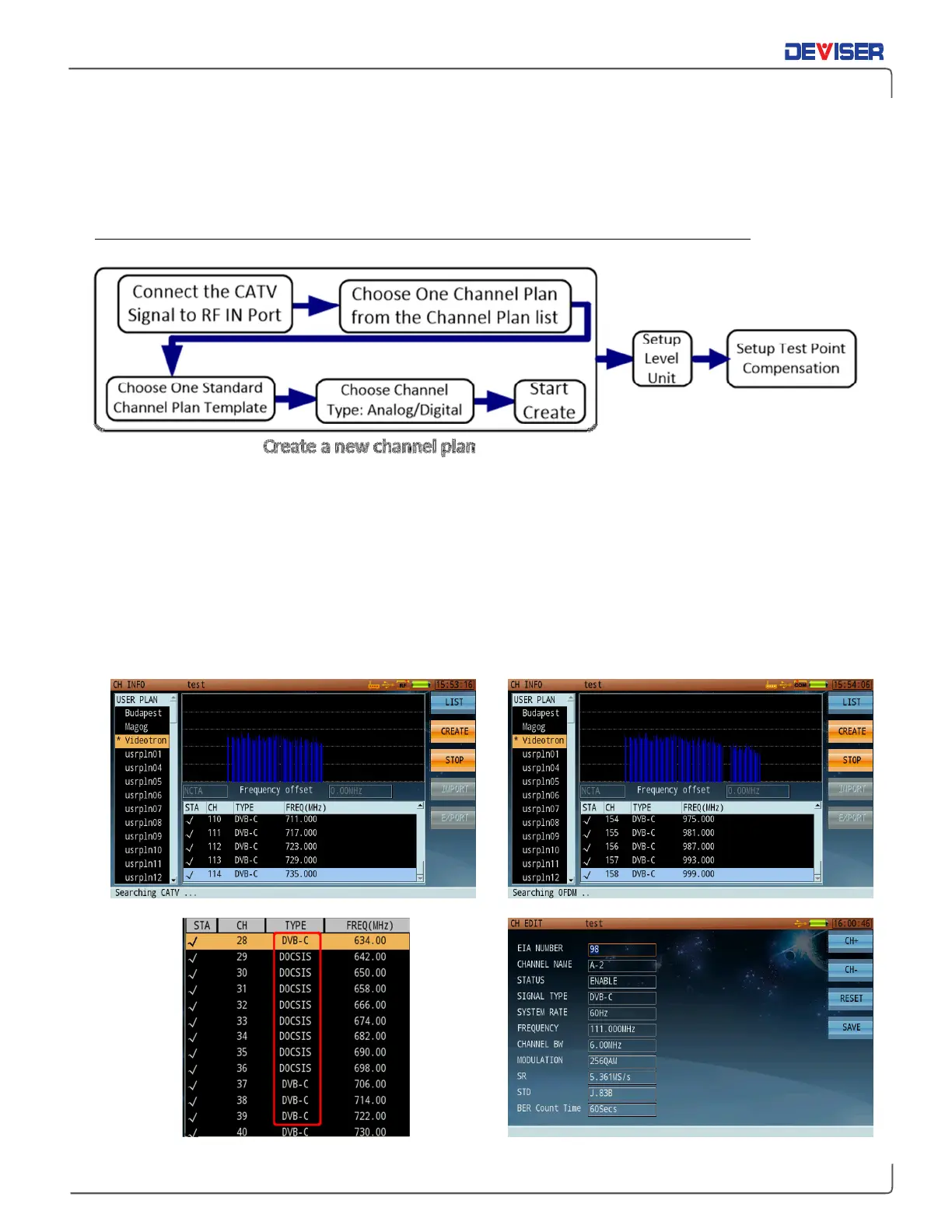
Use the plan creator (below, left) to establish and name a standard plan based on your region. Most North
American users will base their plan on the NCTA standard. Check the boxes to establish whether your plan
will include analog channels, digital channels, or both. When finished, press
Start
(F3) to auto-generate the
channel plan based on a scan of local channel availability. You can then edit the individual channels in
your plan to suit your test needs. Channel auto-detection takes ~2 minutes on a fully loaded spectrum.
The DS2831 can recognize analog, digital, and OFDM carriers. However, it cannot distinguish between a
digital DVB-C or DOCSIS carrier, so be sure to properly identify your DOCSIS SC-QAM carriers (once only) as
the DOCSIS signal type (with other parameters, such as Symbol Rate & Standard). (See below, bottom-left.)



 To Next Page