ACTIVITIES
ECO Manual
124
To Link a Page to an Activity
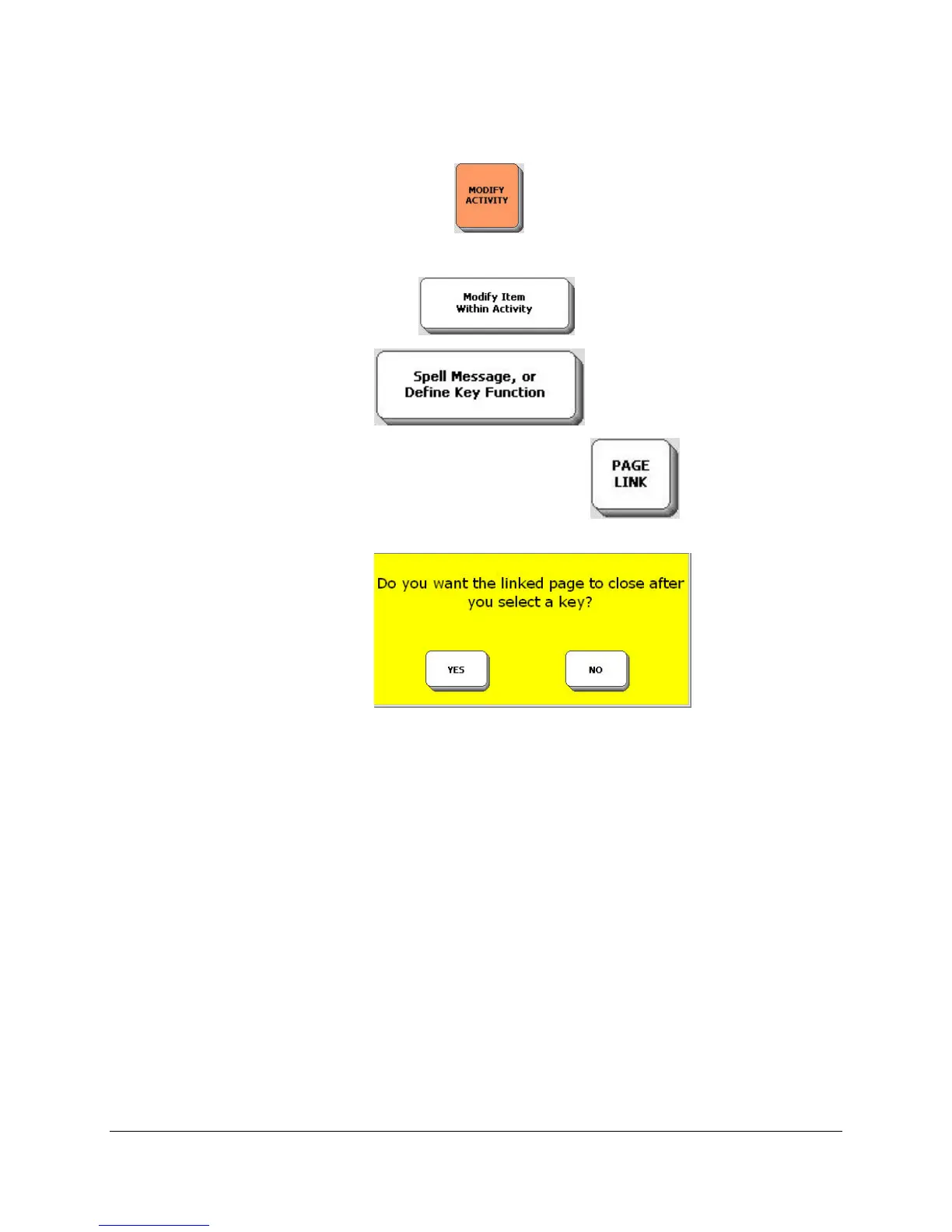
1. Open the MODIFY ACTIVITY MENU in the toolbox.
2. Select the Activity where you want to put the link to a Page.
3. Select Modify Item within Activity option.
4. Select the Spell Message…key .
5. Instead of spelling a messages, select the PAGE LINK key on the spelling
overlay.
6. You see a yellow message box .
If you select YES you will be able to go to your linked Page, make one selection from it and
return automatically to your original Activity or Page.
If you select NO, you will go to the linked page and stay there.
If you are unsure what you want, we suggest you select YES.
7. You see a list of Pages. Select the one you want to link to.
8. Select OK.
9. Now you can choose an Icon for the key, label it, etc.
10. Select OK to save your changes and exit the menu.
On the following pages are explanations of some options for Activities and Pages that can be
found in the USER AREA MENU.


 To Next Page