304 MDS Orbit MCR/ECR Technical Manual MDS 05-6632A01, Rev. F
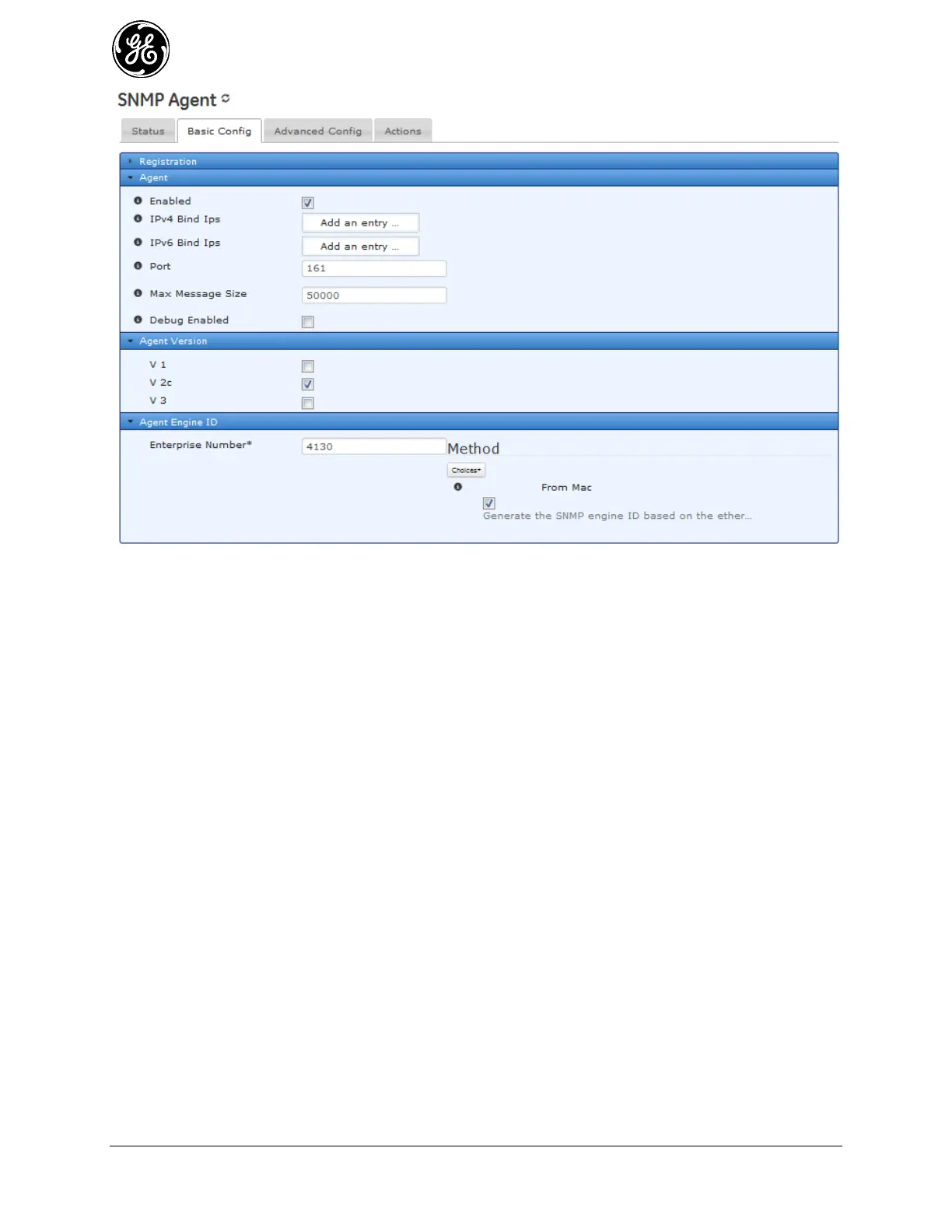
Figure 3-225. SNMP Agent Settings
Agent settings:
Enabled – If checked (true) , the SNMP support is available.
Ipv 4 Bind Ips – Restrict the server to only listen for connections on the specified IPv4
addresses. If not specified, the server will listen on all IPv4 addresses.
Ipv 6 Bind Ips – Restrict the server to only listen for connections on the specified IPv6
addresses. If not specified, the server will listen on all IPv6 addresses.
Port – UDP protocol port to be used for communication Valid values: 0—65535 Default: 161
Max Message Size – The privacy mode to use on this interface.
Debug Enabled – The privacy mode to use on this interface
Agent Version settings:
V 1 – SNMP version 1: Only requires a plain-text community, with 32 bit counters, and
minimal security.
V 2C – SNMP version 2 C (DEFAULT) : V 2c is basically equivalent to version 1, except it
adds support for 64 bit counters.
V 3 - SNMP version 3: adds both encryption and authentication, which can be used or in
combination.
Agent Engine settings:
Engine ID (submenu) - Local SNMP engine's administratively-unique identifier. Click on the
Engine ID and set/verify the parameters.



 To Next Page
 Loading...
