MDS 05-6632A01, Rev. F MDS Orbit MCR/ECR Technical Manual 71
% set interfaces interface Cell cell-config connection-profile CARRIER_B bearer-config apn
carrierB.apn
% set interfaces interface Cell cell-config connection-profile CARRIER_B sim-slot SIM-B
Enable connection profile switching on connection failure
% set interfaces interface Cell cell-config switch-to-next-on-failure true
Enable cell and commit configuration
% set interfaces interface Cell enable true
% commit
NOTE Dual SIM functionality is a selective order-entry feature. Default units are shipped with only
SIM-A enabled; SIM-B is not supported.
Monitoring
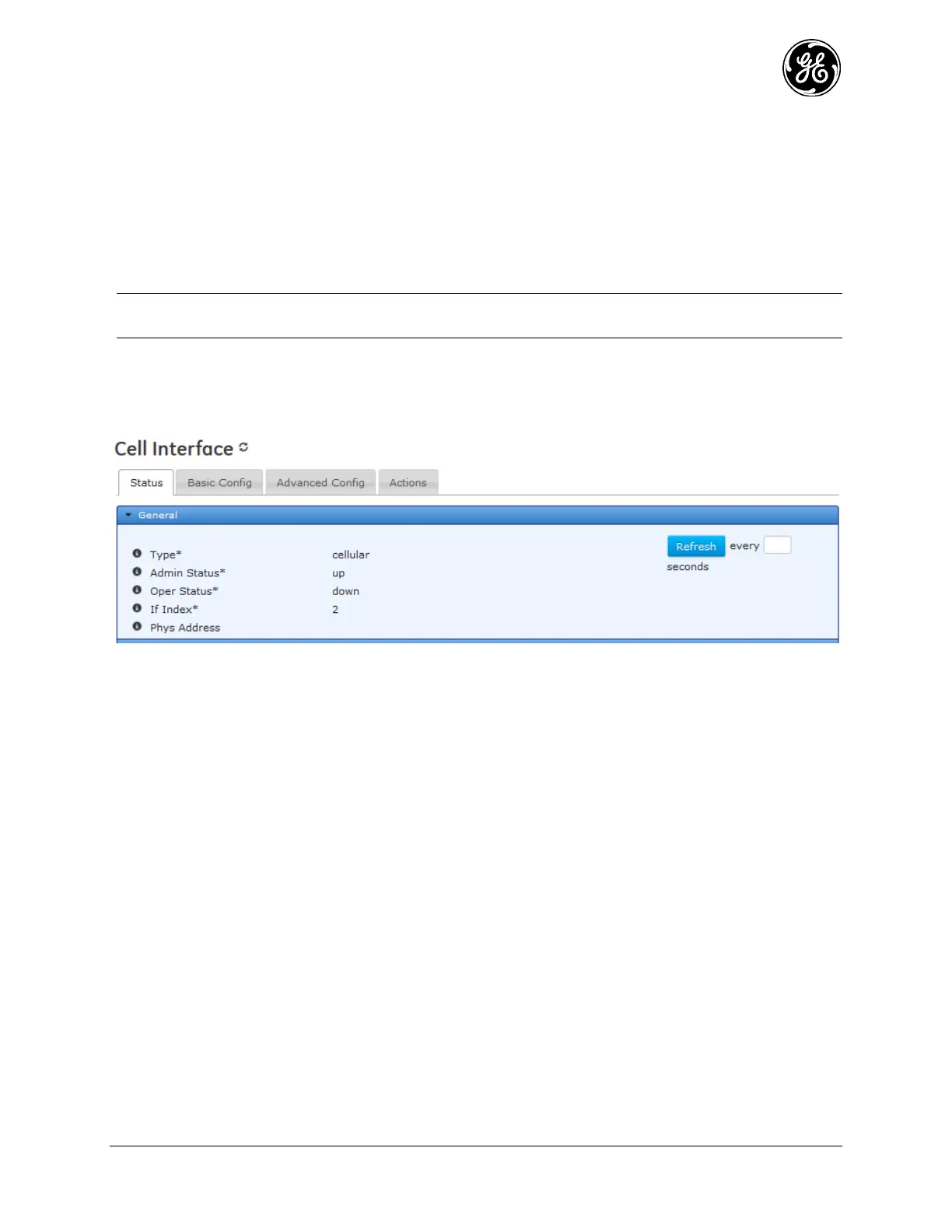
From the Web UI, status of the cell module can be reviewed on the page:
Interfaces / Cell ---> Status / General
Figure 3-26. Cell Interface Status Screen
Type - The type of the interface
Admin Status - The desired state of the interface.
Oper Status - The current operational state of the interface.
If Index - The if Index value for the if Entry represented by this interface. Valid values: 1—
2147483647
Phys Address - The interface's address at its protocol sub-layer. For example, for an 802.x
interface, this object normally contains a MAC address.



 To Next Page
 Loading...
