RDS Toolbox Maintenance
H000002007-RDS User Manual │Version 5.0.0 (2018-09-17) │175
K.3.2 UPGRADE THE FIRMWARE (ARM & PACK)
1. Copy the new firmware on C:\Users\Public\Documents\Romer\RDS\Firmwares.
2. Proceed with a Check Firmware (see previous page)
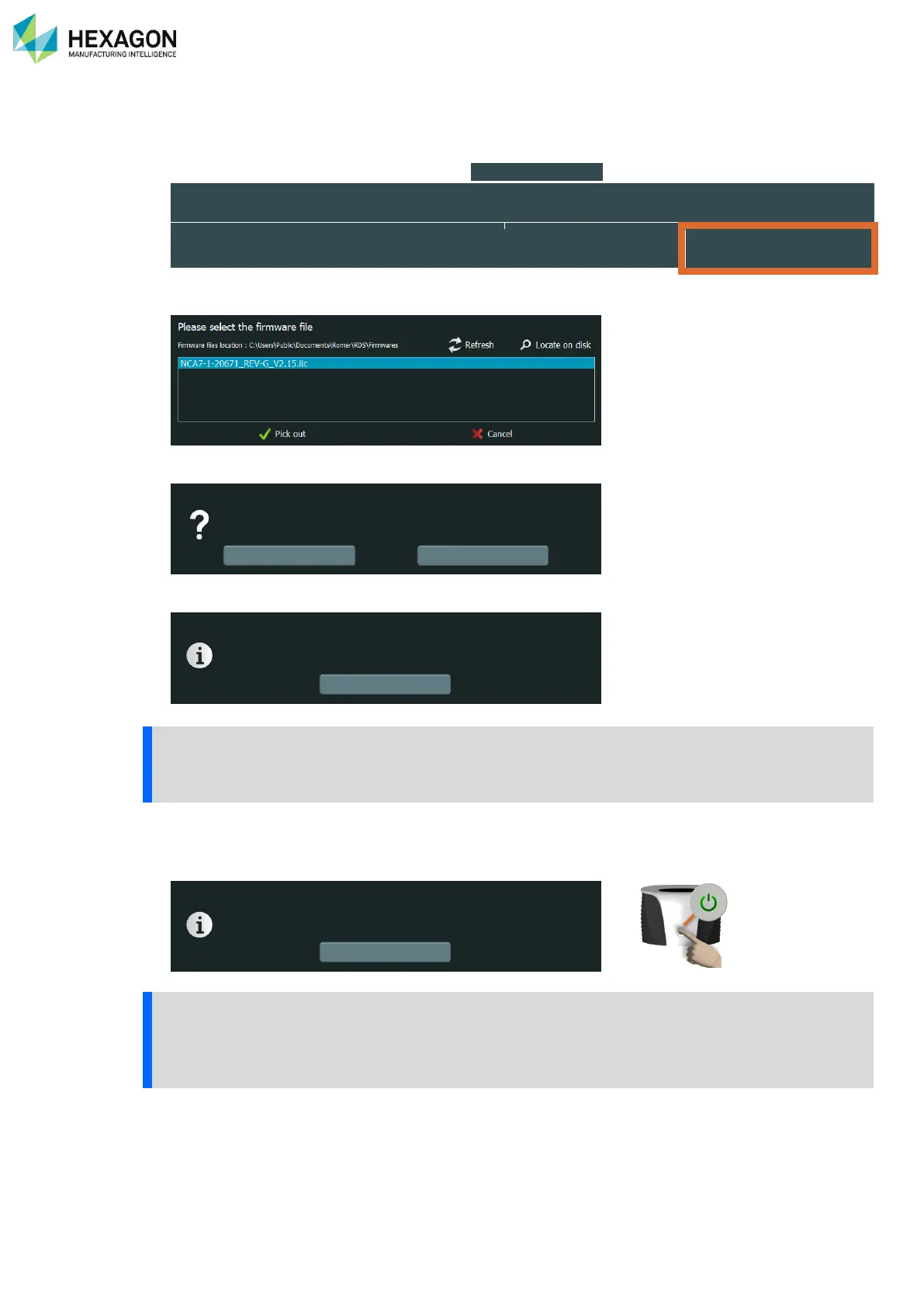
3. Ensure that the upgrade is valid and press “ Upgrade firmware ” on the appropriate line.
4. In the list select the new firmware and press “Pick out”.
5. Validate both confirmation prompts
6. Wait until the end of the upgrade, then validate the message
The upgrade may be long depending on the board. Don’t switch off the arm before the end of the
download.
7. The arm then automatically reboots (if not, switch off then on again to reboot the arm with the new
firmware).
RA8: in case of issue when programming the Mainboard firmware, a boot on Safe mode is possible:
• Press the Power button and then press again 4 times the button: the arm boots in a safe mode.
• Then proceed again with the firmware load operation.
Do you really want to upgrade the firmware?
Firmware upgrade successful
Please switch off/on the arm to apply changes



 To Next Page