EasyManua.ls Logo

Hexagon RDS - How to Do a Quick Measure; Description of the Measurement Window

Hexagon RDS
208 pages
Print Icon
To Next Page IconTo Next Page
To Previous Page IconTo Previous Page
Loading...
RDS Quick Measure (arms)
H000002007-RDS User Manual Version 5.0.0 (2018-09-17) 180
L.1 HOW TO DO A QUICK MEASURE
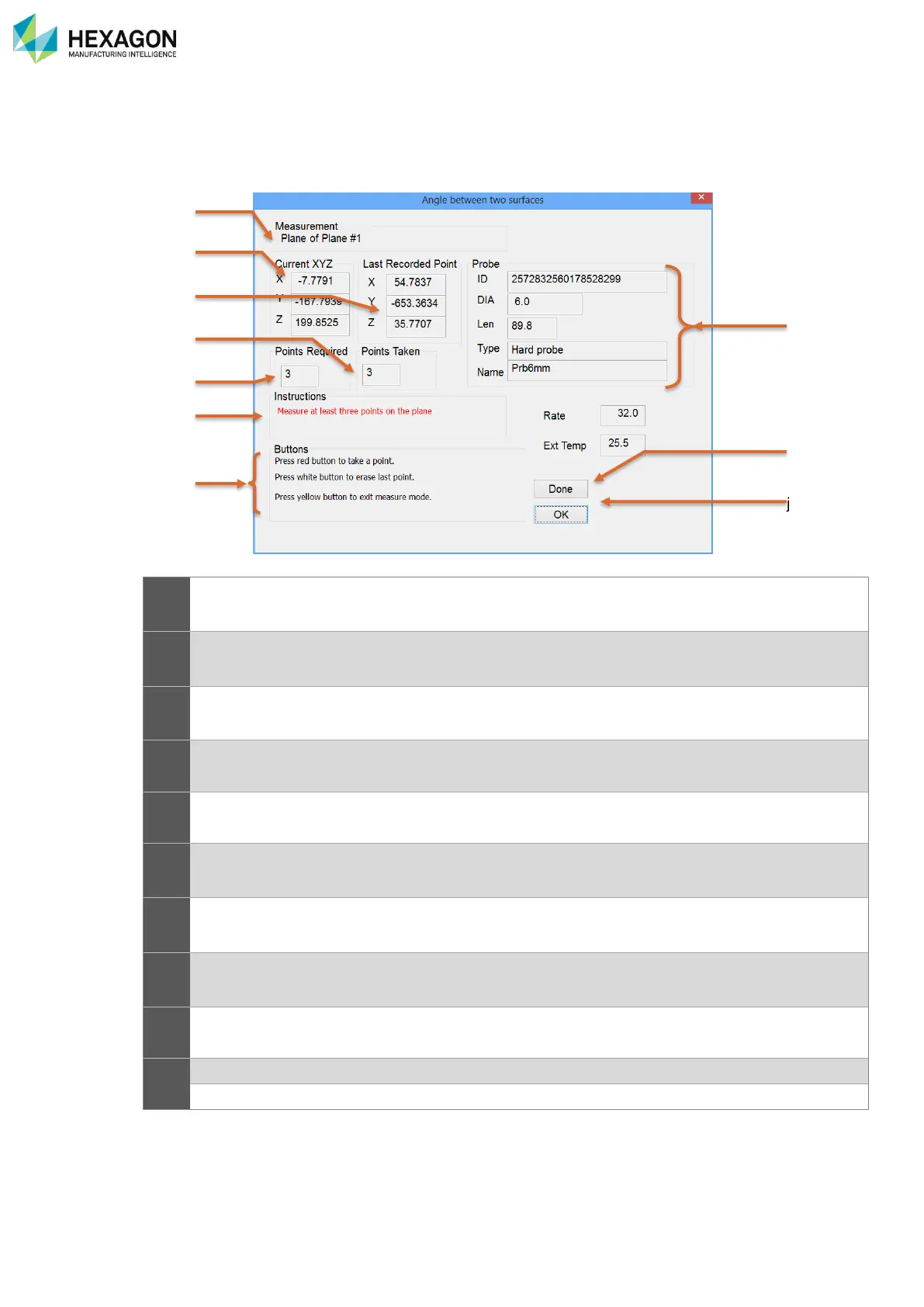
L.1.1 DESCRIPTION OF THE MEASUREMENT WINDOW
a
Type of measurement
b
Real time coordinates of the probe
c
Coordinates of the last probed point
d
Number of taken points: this must be at least equal to the minimum before validating the element.
e
Minimum number of points
f
Instructions to follow
g
Reminder of the buttons functions
h
Mounted probe specifications
i
Validate the measured element (= yellow BP2) or exit this menu
j
Cancel: delete last probed point
OK: validate the element
a
b
c
e
h
g
f
j
d
i

Table of Contents

Related product manuals