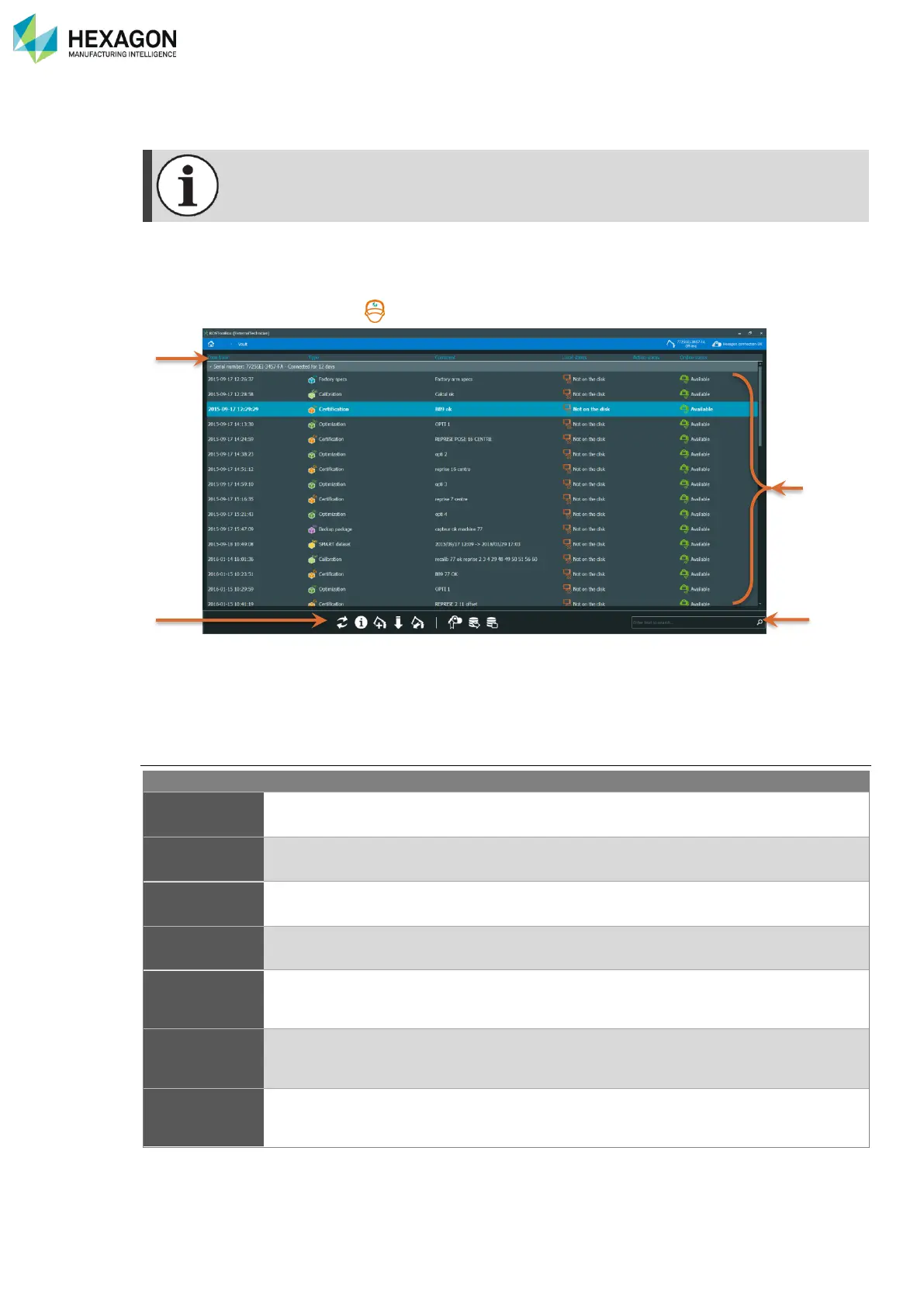
RDS Toolbox Vault – secured area
H000002007-RDS User Manual │Version 5.0.0 (2018-09-17) │119
I.1 VAULT SCREEN DESCRIPTION
Some items may be available only for Technician profile. Please refer to the Engineer manual.
When entering the vault, RDS toolbox shows the list of all the packages for the available arms. All the
packages are grouped by arm.
By default, only the local arms (connected or off-line) are displayed. And only the selected arm is deployed.
However, the technician profile ( ) gives the possibility to add any distant arm in the list of the vault.
a. Header of the list – filters by column
b. Action buttons
c. List of available packages grouped by arm
d. Search filter (Ctrl+F) for available arms
Columns description
Serial number of the arm in the package
Date and time of creation of the package
Type of package (Armspecs / Certification / Profile / Diagnosis …see after)
Comment entered at the creation of the package
Shows if the package is present or not locally on the computer: if not on the disk, RDS
Toolbox simply notifies that the package is available on HEXAGON SERVER and can
be downloaded. The package is downloaded only is necessary.
Notification about the packages locally present on the computer (Downloaded /
Created / Synchronized…)
Only displayed when RDS Toolbox is online.
Shows if the package is available or not on HEXAGON SERVER database



 To Next Page