EasyManua.ls Logo

Hexagon RDS - Page 50

Hexagon RDS
208 pages
Print Icon
To Next Page IconTo Next Page
To Previous Page IconTo Previous Page
Loading...
RDS Control Panel
H000002007-RDS User Manual Version 5.0.0 (2018-09-17) 49
RDS setup
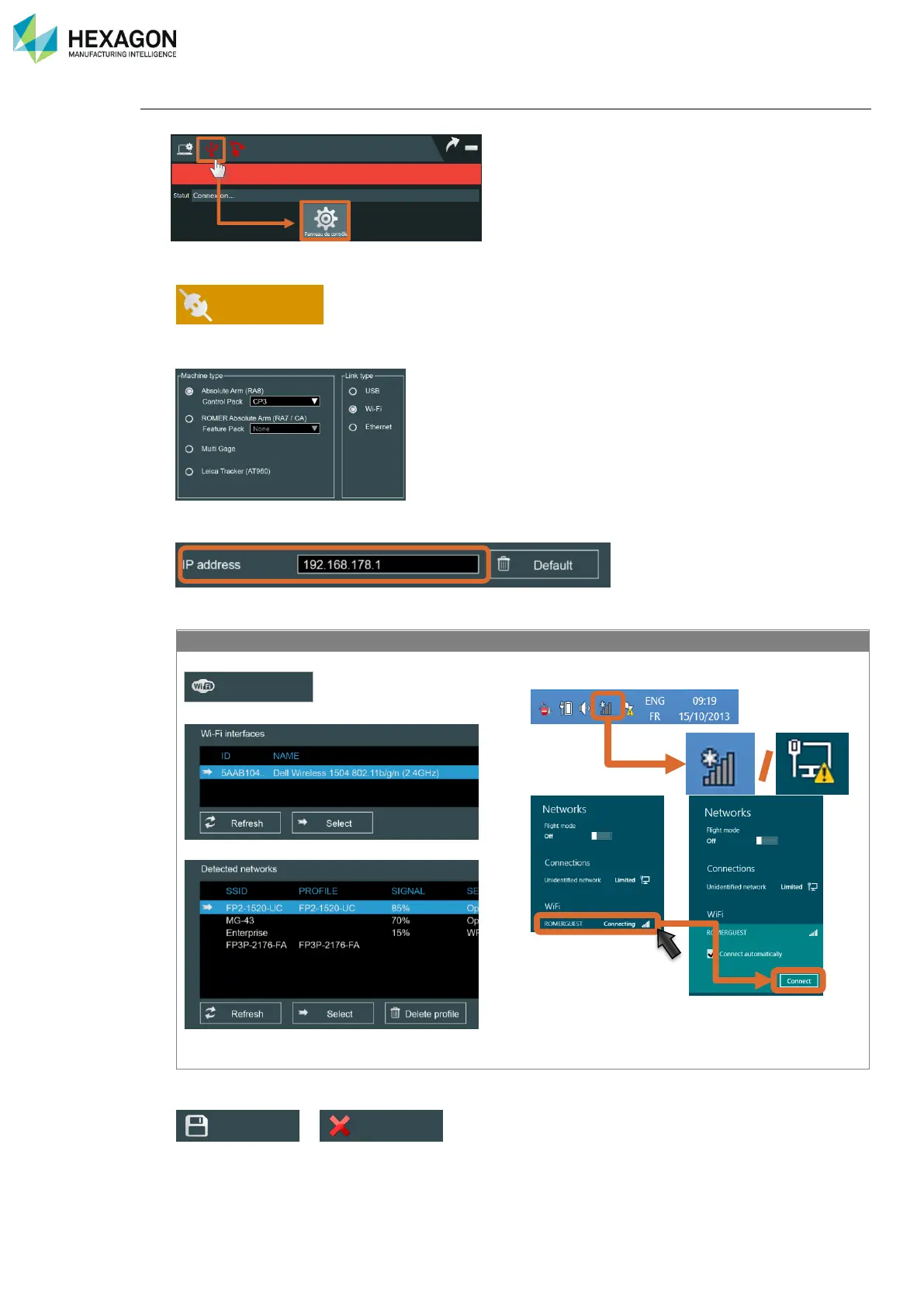
5. Enter RDS Control Panel
6. Select Connection tab
7. Select the type of Instrument, type of Pack (Control / Feature, for the Absolute Arm) and “Wi-Fi”
8. If the Pack address has been modified, enter the TCP/IP address.
9. Connect the network
FP2 / FP3
CP2 / CP3 / FP2+ / FP3+
Click on “Modify”
Choose the Wi-Fi interface and “Select”
Choose the Feature Pack SSID and “Select”
Close the Wi-Fi window and
Display the available wireless networks and
connect the Feature Pack
10. Save the modifications.
>
11. Now RDS automatically connects to the arm.
Modify
Connection
Save
Quit

Table of Contents

Related product manuals