SECTION 5 - JLG CONTROL SYSTEM
3121642 – JLG Lift – 5-1
SECTION 5. JLG CONTROL SYSTEM
5.1 HAND HELD ANALYZER
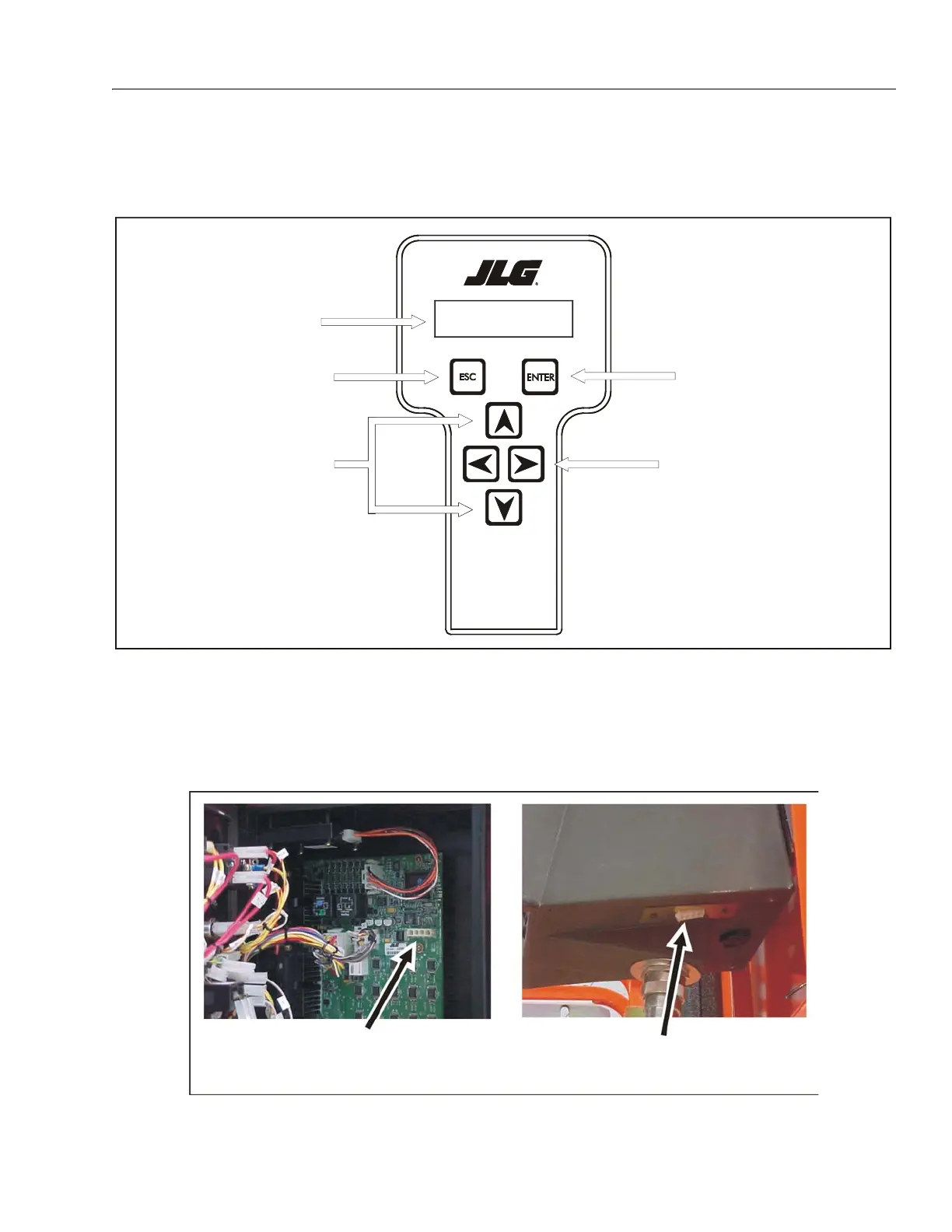
To Connect the Hand Held Analyzer:
1. Connect the four pin end of the cable supplied with the
analyzer, to the four position connector on the PCB in
the ground control station or at the platform control sta-
tion as shown in. Connect the remaining end of the
cable to the analyzer.
me n u :
PRESS ENTERHEL P:
Analyzer Dis-
Escape Key
To re tu rn ho me or
access previous menu
Enter Key
Stores and selects Top Level,
Sub Level, and item menus
Left & Right Arrow Keys
Used to move between Top
Level, Sub Level, and item
Up & Down Arrow
Keys
Value Selector
Figure 5-1. Hand Held Analyzer
Figure 5-2. Analyzer Connection
Ground Control
Analyzer Connection
Platform Controll
Analyzer Connection


 To Next Page