SECTION 5 - JLG CONTROL SYSTEM
5-8 – JLG Lift– 3121642
b. Disconnect the sensor and clean any corrosion off of
the tilt sensor and control board connections.
c. Reassemble and test. If fault persists, replace tilt sen-
sor.
2. If the Analyzer displays angles other than +20.0°,
attempt to calibrate. If machine will not calibrate, note
the reason displayed on Analyzer:
a. SENSOR FAILURE – tilt sensor internal frequency is
out of range (replace sensor).
b. NOT LEVEL - tilt sensor has either developed an off-
set or it is too unlevel as mounted on the machine.
Tilt Sensor
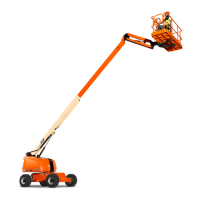
NOTE: Refer to Figure 5-5., Tilt Sensor Removal for numbers in
parenthesis.
1. Disconnect the batteries.
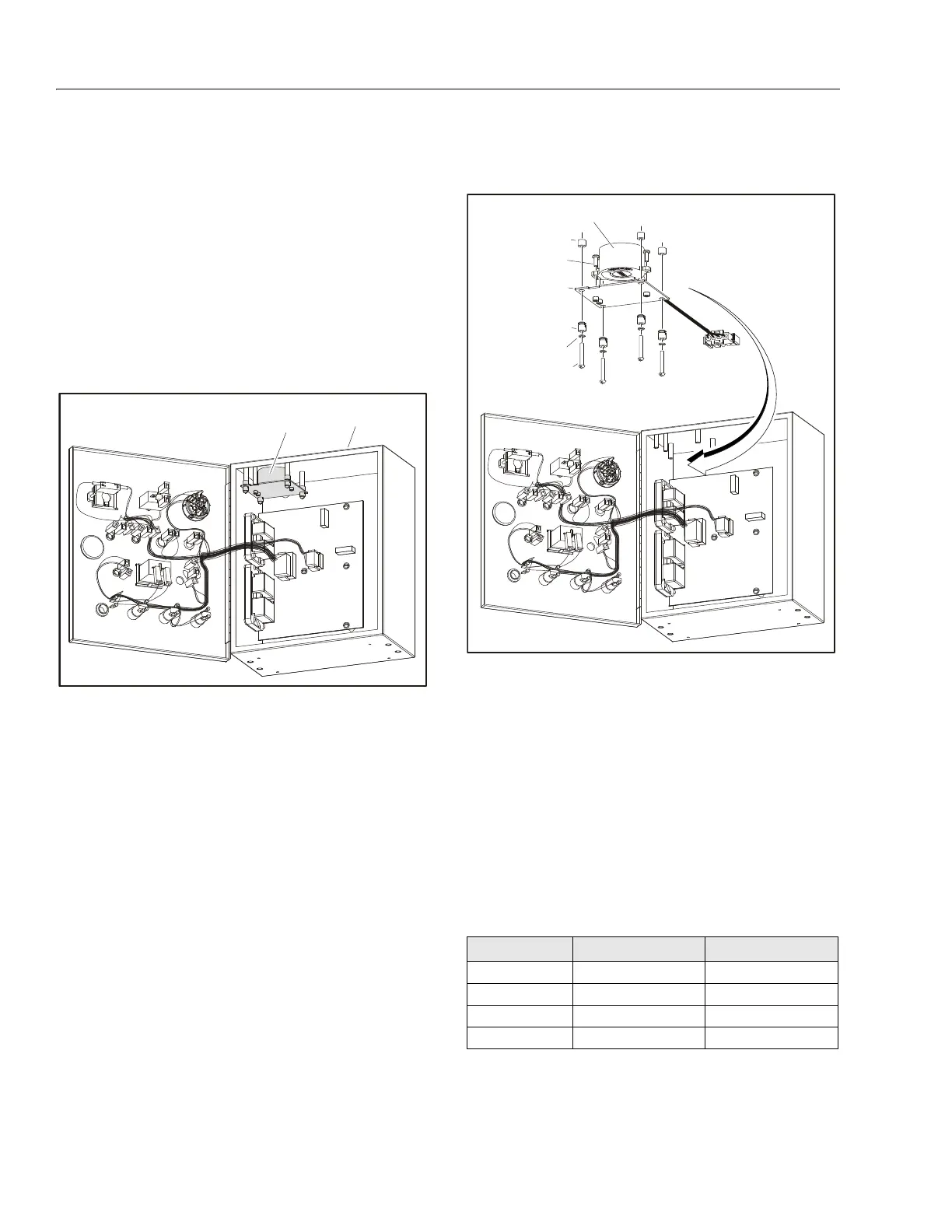
2. Open the Ground Control Box to gain access to the Tilt
Sensor Assembly.
3. Remove the four Screws (3), Lockwashers (4), Standoff
Insulators (5), and Washers (6) to remove the Tilt Sensor
(1) and Sensor Mount (2) from the Ground Control Box.
4. The Tilt Sensor (1) can be removed from the Sensor
Mount (2) by removing the three Screws (7).
NOTE: Follow the above procedures in reverse order when install-
ing the tilt sensor assembly. After installing, be sure to cali-
brate the tilt sensor (refer to Section 5.2, Calibrations).
1. Ground Control Box
2. Tilt Sensor Assembly (JLG P/N 1810140)
Figure 5-4. Tilt Sensor Location
Table 5-1. Tilt Sensor Harness
Wire Color Function Connector Pin
Red VCC 1
Green PWMX 2
White PWMY 3
Black Ground 4
1. Tilt Sensor (JLG P/N 4000021)
2. Sensor Mount
3. Screw, 6-32 x 1
4. Lockwasher
5. Standoff Insulator
6. Washer, 0.313 x 0.250 Nylon
7. Screw, M3.5 x 0.6 x 10
Figure 5-5. Tilt Sensor Removal


 To Next Page