SECTION 3 - CHASSIS, PLATFORM & SCISSOR ARMS
3-44 – JLG Lift – 3121642
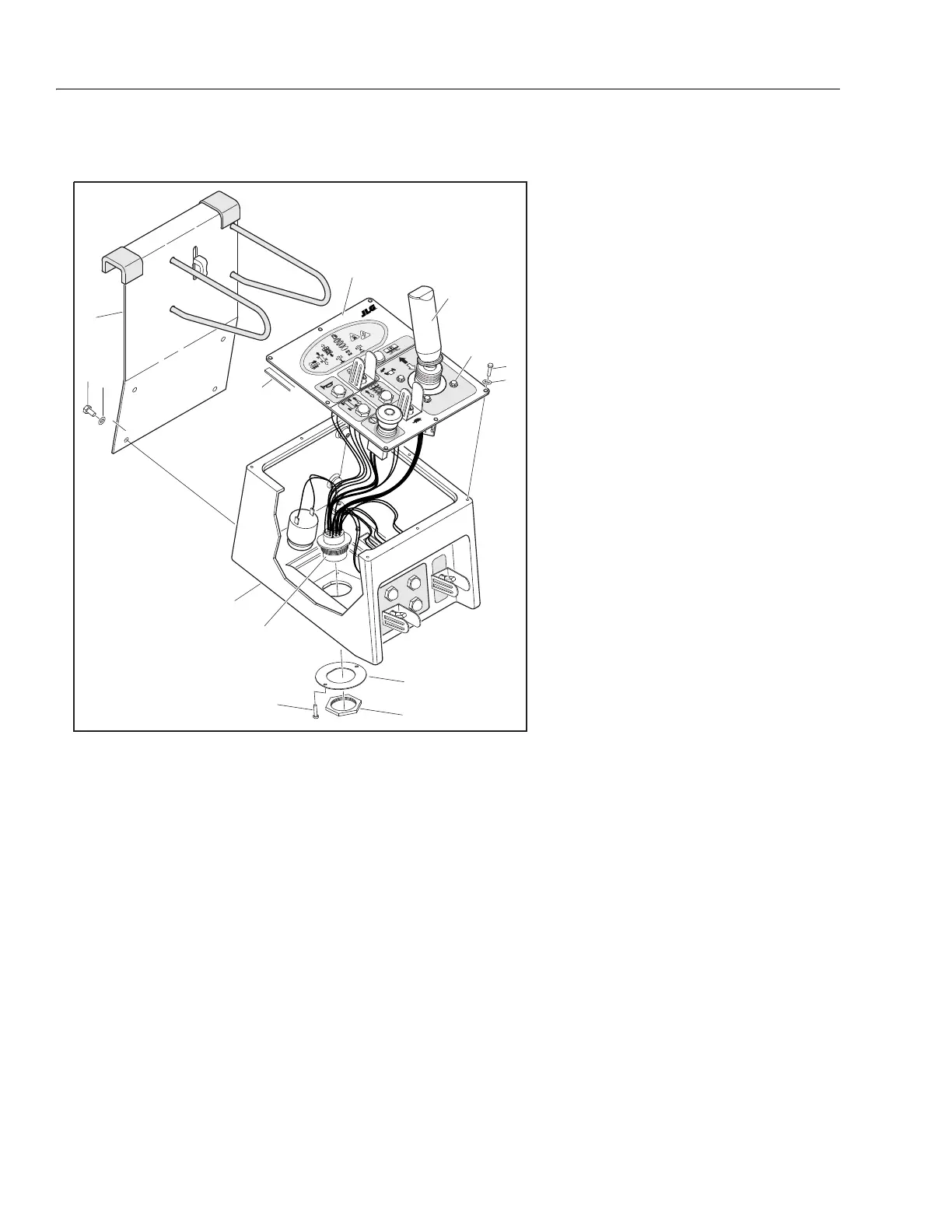
Platform Control Station
DISASSEMBLY:
1. Disconnect the cable from the harness on the underside
of the platform control station.
2. Remove the control station from the mounting bracket
(1) by removing the four bolts (2) and starwashers (3).
3. Remove the seven screws (6) and washers (7) to remove
the console lid (5) from the console box (4).
4. Once lid is removed, switches, buttons and bulbs can be
removed for replacement.
5. Remove the the four screws (7) and washers (9) to
remove the joystick controller (14).
6. The harness (13) can be removed from the box by
removing the terminal nut (11), two screws (10) and d-
ring bracket.
ASSEMBLY
1. Follow Disassembly Procedures in reverse.
2. Ensure electrical wires are properly and securely
attached to switches, buttons and bulbs.
3. Apply a new layer of insulation tape (8) between lid and
box if needed.
NOTE: Ensure wires are not pinched when placing lid onto box.
4. Reattach cable to harness on underside of platform con-
trol station.
5. Operate functions with platfrom control console to
ensure proper operation.
1. Mounting Bracket
2. Bolt, 1/4"-20NC x 1/2"
3. Starwasher
4. Console Box
5. Console Lid
6. Self Tapping Screw, #8-18 x 3/4"
7. Washer
8. Insulation Tape
9. Plastite Screw, #10-32NC x 1/2"
10. Self Tapping Screw, #8-18 x 3/4"
11. Terminal Nut
12. D-Ring Bracket
13. Harness
14. Joystick Controller
Figure 3-39. Platform Control Station


 To Next Page