KDC User Manual SYNCHRONIZATION
125
4.4 KDC BLE and Samsung Tizen
Free SDK for KDC provides a sample demo application for Tizen, especially Samsung Gear
S3. This document explains how to install and use the demo application on Samsung Gear
S3.
Connect the phone to Gear S3 and Install the demo application
➢ Download the Samsung Gear application by referring to the link below. (Please make
sure your phone supports Galaxy Gear S3.)
http://www.samsung.com/ca/support/skp/faq/1119975
➢ Connect the Samsung Gear to your smartphone. On the Gear press the home button
and scroll to settings. Scroll down and select Connect to a New Phone. On the phone,
open the Samsung Gear application and search for nearby Gear devices. Select your
Gear from the list and confirm the passcode on both devices.
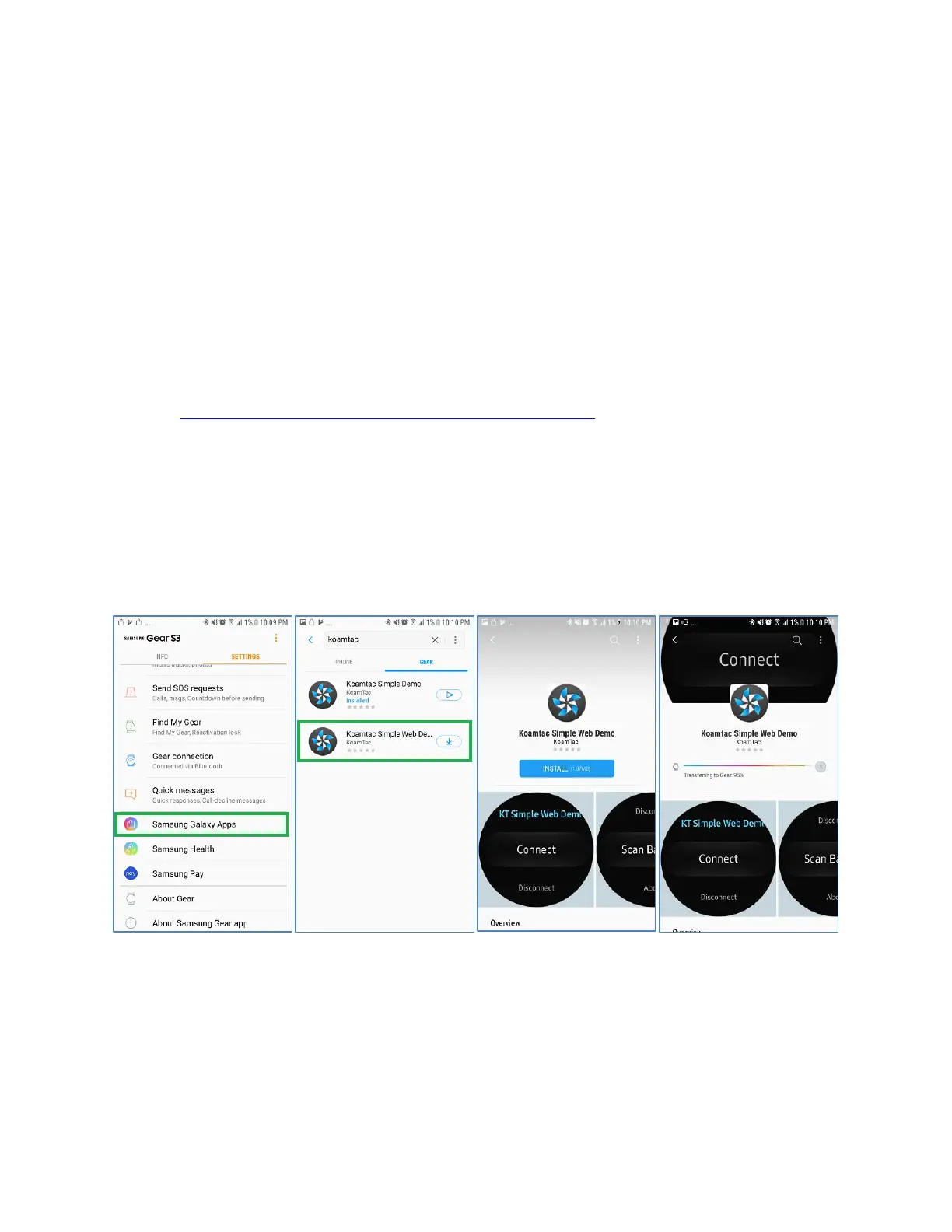
➢ From Galaxy Apps, search Koamtac apps, which is “Koamtac Simple Web Demo” App
and install it on Gear S3.


 To Next Page