KDC User Manual SYNCHRONIZATION
146
NFC/RFID Tag Read
KDC default mode is Read mode when NFC/RFID power is enabled.
In this mode, KDC reads NFC/RFID data when an NFC/RFID tag is positioned near the back
of the KDC; users receive the following audible and visible (KDC350) indications of a
successful tag read:
l- Single Beep
l- Display UID on KDC screen (KDC350)
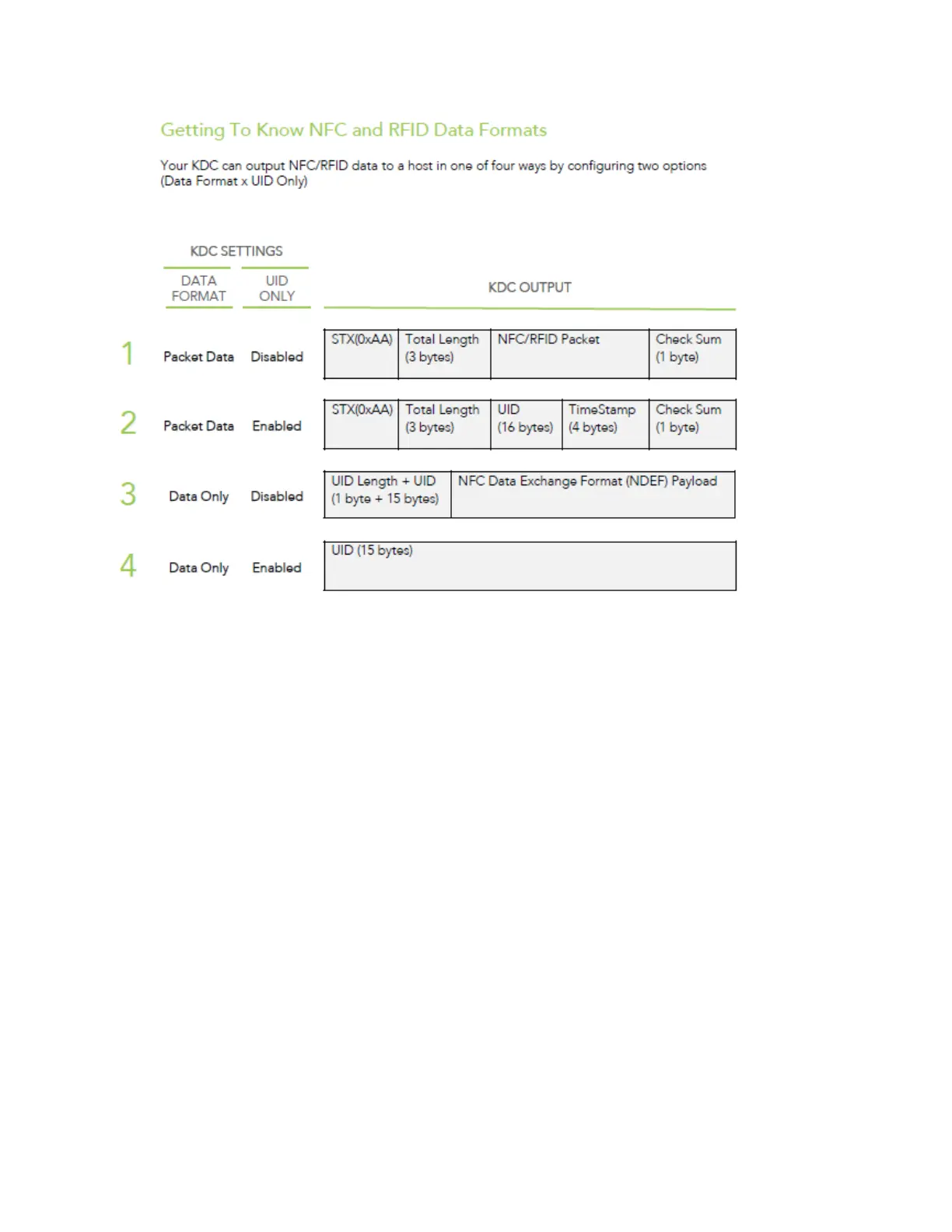
Tag data is transmitted to the host via Bluetooth or USB according to the selected NFC data
format (as taught in this guide).
When reading NFC tags, the 3
rd
party host software application must parse the NDEF
payload to get the corresponding message.
NFC/RFID Tag Write
NFC tag Write function works with Mifare Ultralight and Ultralight C tags
KDC will change to Write mode only when it receives the write command from the host.



 To Next Page