160
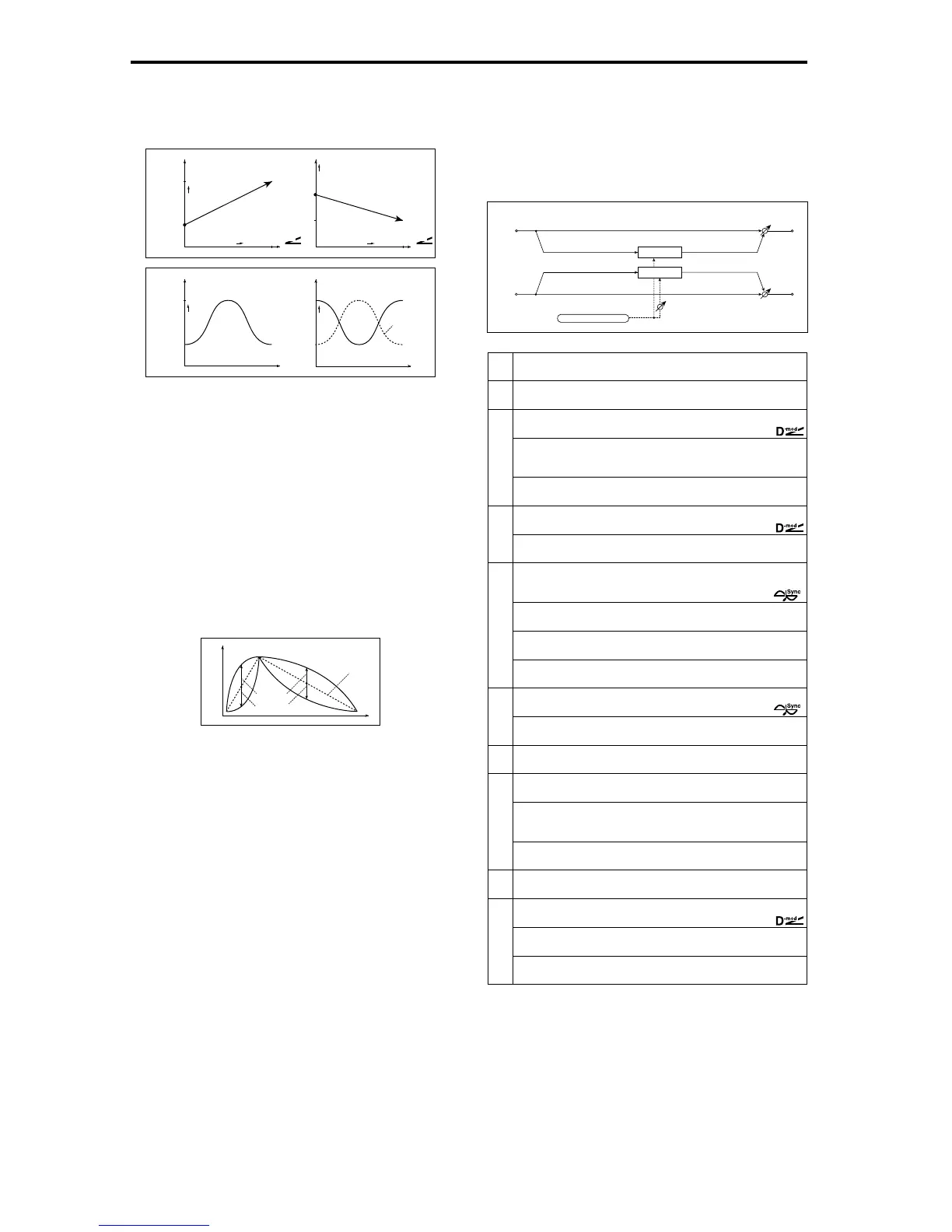
a: Frequency Bottom, a: Frequency Top
The sweep width and direction of the wah filter are determined
by the “Frequency Top” and “Frequency Bottom” settings.
b: Sweep Mode
This parameter changes the wah control mode. Setting “Sweep
Mode” to Auto will select an auto-wah that sweeps according to
envelope changes in the input signal level. Auto-wah is frequently
used for funk guitar parts and clav sounds.
When “Sweep Mode” is set to D-mod, you can control the filter
directly via the modulation source in the same way as a wah
pedal.
When “Sweep Mode” is set to LFO, the effect uses LFO to sweep
in cycle.
c: Envelope Sens (Envelope Sensitivity)
This parameter sets the sensitivity of auto-wah. Increase the value
if the input signal is too low to sweep. Reduce the value if the
input signal is so high that the filter is stopped temporarily.
c: Envelope Shape
This parameter determines the sweep curve for auto-wah.
d: LFO Frequency [Hz], e: BPM/MIDI Sync
When “BPM/MIDI Sync”=Off, the LFO speed uses the LFO Fre-
quency parameter setting. When “BPM/MIDI Sync”=On, the
LFO speed follows the “BPM”, “Base Note”, and “Times” settings.
e: BPM, e: Base Note, e: Times
One cycle of LFO sweep is obtained by multiplying the length of a
note (…) (selected for “Base Note”, in relation to the tempo
specified in (“BPM”, or the MIDI Clock tempo if “BPM” is set to
MIDI) by the number specified in the Times parameter.
010: St. Random Filter
(Stereo Random Filter)
This stereo band pass filter uses a step-shape waveform and
random LFO for modulation
.
You can create a special effect
from filter oscillation.
a: LFO Waveform, c: LFO Frequency [Hz],
d: LFO Step Freq (Frequency) [Hz]
When “LFO Waveform” is set to
Step-Tri
, LFO is a step-shape, tri-
angle waveform. The “LFO Frequency” parameter sets the origi-
nal triangle waveform speed. Changing the “LFO Step Freq”
parameter enables you to adjust the width of the steps.
Frequency
Bottom=25
Top=75
Higher
Max
Zero
Higher
D
-mod
Frequency
Bottom=60
Top=30
Higher
Max
Zero
Higher
D
-mod
Sweep Mode=D-mod
Frequency
Bottom=25
Top=75
Higher
Frequency
Bottom=75
Top=25
Higher
Sweep Mode=Auto
Envelope
Envelope
Time
Wah
Woo
Woo
Woo
Envelope
Wah Wah
Time
Woo
Woo
Wah
Wah
Time
Level
Envelope
value = 0...–100
value = 0...+100
Envelope Shape
a
LFO Waveform
Selects LFO Waveform
Step-Tri, Random
☞
b
LFO Phase [degree] –180...+180
Sets the LFO phase difference between the left and right
☞
c
LFO Frequency [Hz]
Sets the LFO speed
0.02...20.00Hz
☞
,
Src Off...Tempo
Selects the modulation source used for both LFO speed and step
speed
Amt –20.00...+20.00Hz
Sets the modulation amount of LFO speed
d
LFO Step Freq (Frequency) [Hz] 0.05...50.00Hz
Sets the LFO step speed (speed that changes in steps)
☞
,
Amt –50.00...+50.00Hz
Sets the modulation amount of LFO step speed
e
BPM/MIDI Sync Off, On
Switches between using the frequency of the LFO speed and using
the tempo and notes
☞
Fx:009,
BPM
Selects MIDI Clock and assigns tempo
MIDI, 40...240
☞
Fx:009,
☞
Base Note
Selects the type of notes that specify the LFO speed
☞
Fx:009
Times x1...x16
Sets the number of notes that specify the LFO speed
☞
Fx:009
f
Step Base Note
Selects the type of notes to specify the LFO step speed
☞
,
Times x1...x32
Sets the number of notes to specify the LFO step speed
☞
g
Manual
Sets the filter center frequency
0...100
h
Depth 0...100
Sets the modulation depth of filter center frequency
Src
Selects the modulation source of filter modula-
tion
Off...Tempo
Amt
Sets the modulation amount of filter modulation
–100...+100
i
Resonance
Sets the resonance amount
0...100
j
Wet/Dry –Wet...–1:99, Dry, 1:99...Wet
Sets the balance between the effect and dry sounds
☞
,
Src Off...Tempo
Selects the modulation source of the effect balance
Amt
Sets the modulation amount of the effect balance
–100...+100
Filter
Left
Right
Wet / Dry
Wet / Dry
Stereo In - Stereo Out
Filter
LFO Phase
LFO: Step-Tri/Random







 To Next Page